
Game illustrations that belong to the current scene
Watch the case videoBring text adventures and interactive stories to life with images that follow the player’s view. Generate game illustrations through SeedRouter APIs, connect each result to its scene and reuse approved artwork when the visual state stays the same.
For interactive-fiction teams and game developers.
Make game illustrations serve the player’s story
Game illustrations are images that show a location, character or event inside the experience you build. SeedRouter supplies image model calls; your game decides what the player knows, when a scene changes and which asset belongs on screen.
Game illustrations for visible locations
Build game illustrations from the current location, time and visible objects. A forest at night and the same path at dawn may need different art, while another line of dialogue may leave the scene unchanged.
Explore this use caseGame illustrations with a recognizable cast
Use approved appearance references for recurring people in game illustrations. Separate permanent identity details from temporary state, such as a wet coat, an equipped lantern or an injury established by the story.
Explore this use caseGame illustrations without accidental spoilers
Limit game illustrations to information the player can see. Keep hidden rooms, unrevealed identities and secret items out of the visual brief even when your game system already knows about them.
Explore this use caseGame illustrations from the player’s point of view
The player stands inside a dry underwater observatory facing a closed coral door. These game illustrations use only the visible room, dome, fish outside and marker lamps; the undiscovered space behind the opaque door is deliberately absent.
- Build game illustrations from visible facts, excluding the secret behind the door.
- Count the three marker lamps and check which ones are lit.
- Reject game illustrations that reveal a room the player has not entered.
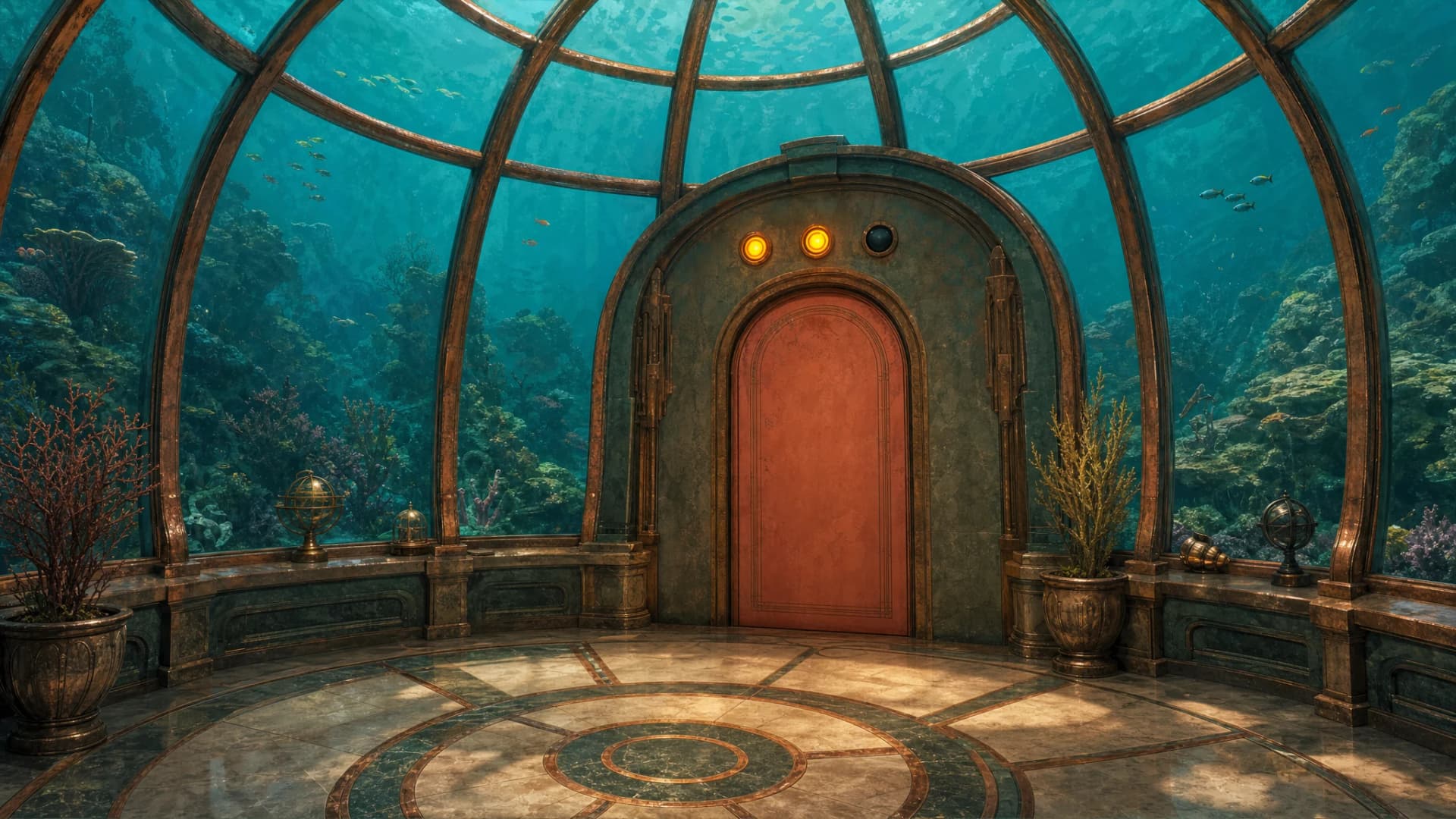
Change one visible fact and compare the result
The second request changes only the rightmost lamp from dark to amber. Compare game illustrations for unintended changes to the door, dome ribs and tile pattern; a correct lamp does not excuse a different room.
- Keep the original game illustrations reference attached to the state change.
- Compare both game illustrations at the same size and camera position.
- Hold the candidate if a closed door opens or new scenery appears.
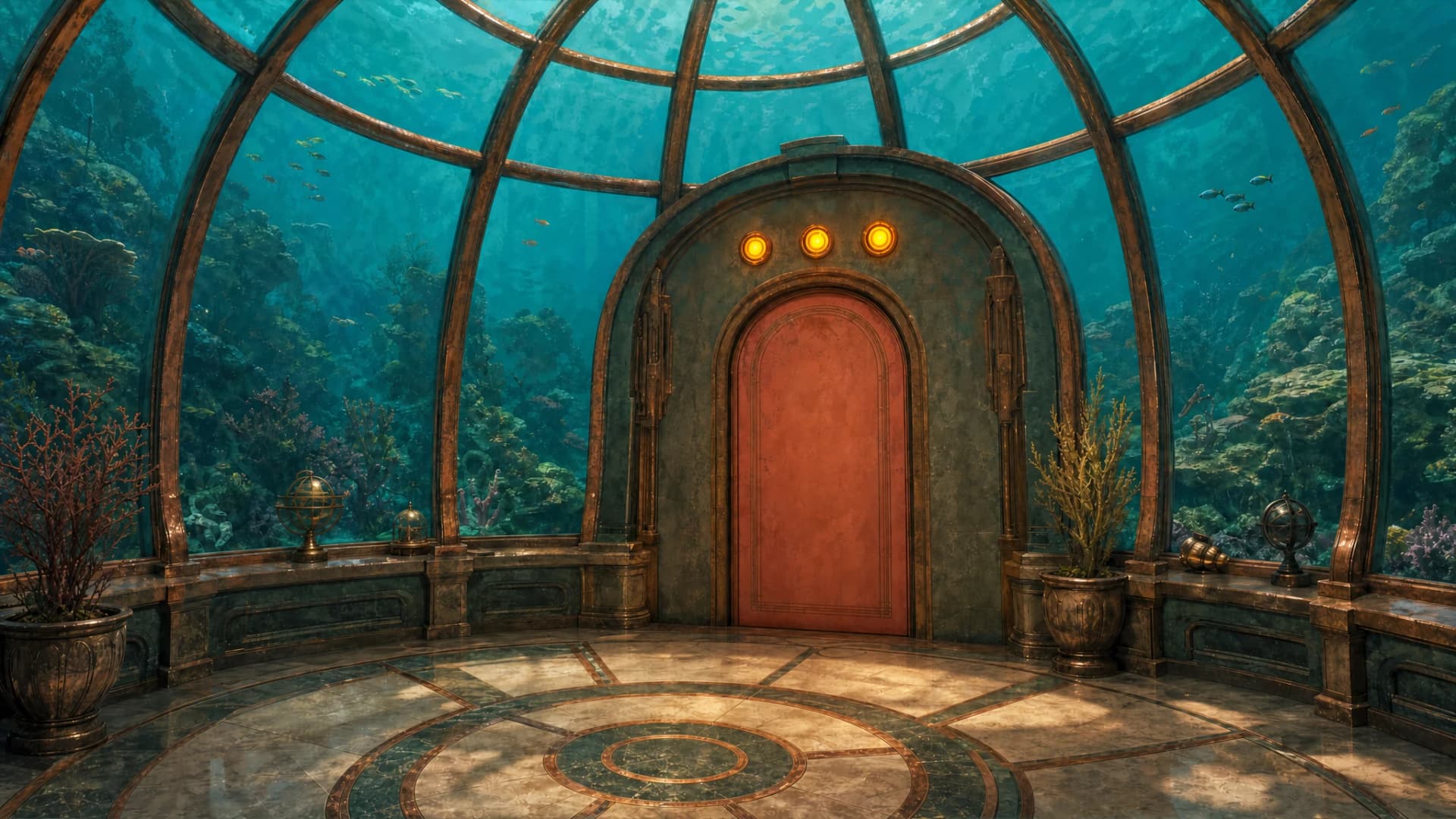
Reuse a scene when the picture has not changed
Tie game illustrations to the observatory’s visual state. Another line of dialogue may reuse the same room, while a lamp changing state needs a matching asset; the application decides which accepted image belongs on screen.
- Save game illustrations against the scene version that requested them.
- Show game illustrations only when they still match the player’s current location.
- Plan a waiting state for new art while keeping the story interface usable.
Game illustrations: result handoff
- Scene
- DEMO-OBSERVATORY-01
- State A
- Left and middle lamps on; right lamp off
- State B
- All three lamps on; door still closed
- Do not reveal
- Anything behind the opaque coral door
- Application check
- Display only the asset matching the current visible state
Your application owns these game illustrations decisions. The API returns a generation result; it does not know the player’s current game state.
Choose a game illustrations approach
Compare game illustrations on prompt accuracy, waiting time and the art your players can use. The highest-resolution output is not automatically the best fit for a small scene window or a frequently changing story.
| Game need | Prepare | Test in context |
|---|---|---|
| Game illustrations for fixed scenes | Approved scene descriptions and art direction | Readable locations at in-game display size |
| Game illustrations for live story states | Visible-state brief and recurring references | Correct scene with no hidden information |
| A reusable character library | Identity and expression references | Recognition across poses and backgrounds |
Connect scene art to your game loop
Keep game illustrations attached to the story state that created them. Start with a short playable path and include a fast location change, a repeated view and a scene with more than one character.
- 1
Prepare the visible scene
Build game illustrations prompts from your game’s approved state. Include the current location and visible action, then add recurring style and character references supported by the model.
- 2
Save the result
Associate game illustrations with the requesting scene and version. Keep the generated asset in your application’s library so returning to a view does not automatically request another image.
- 3
Review the player experience
Check game illustrations in the actual interface, including loading and fast scene changes. Count requests, reused images and accepted assets before extending generation to every session.
Game illustrations questions, answered
Can SeedRouter create a complete game from game illustrations?
SeedRouter provides model APIs, including image generation, rather than a game engine. Your application manages game illustrations alongside story state, inventory, player actions and presentation; the examples here focus on the visual part of that experience.
Should game illustrations be generated on every player turn?
Only when the visible scene needs a new image. Reuse accepted game illustrations when dialogue changes but the location, characters and important objects remain the same; your application decides whether a change actually affects what should appear on screen.
How do I stop game illustrations revealing spoilers?
Build the request from a player-visible scene description rather than the full internal story state. For game illustrations, exclude undiscovered objects and secret identities, then review the output for contradictions or additions before treating it as an authoritative view of the world.
Can game illustrations keep characters consistent?
Pass approved references where the model supports them and record the identity details that matter. Review game illustrations across the actual scenes for face, wardrobe and proportions; references communicate the intended character but do not guarantee perfect continuity in every generation.
How do I estimate costs for game illustrations?
Measure how many image requests a representative session makes, including revisions, and how often accepted assets are reused. Apply current model rates to game illustrations that are actually generated, then compare session cost and player waiting time alongside visual quality.
What happens when game illustrations arrive after the player moves?
Your application should check the scene identity before showing the result. Save game illustrations for the scene that requested them and keep the current view intact if the player has already moved elsewhere; completed-result lookup is covered in the task documentation.
Explore the implementation references
SeedRouter created these game illustrations case images on October 12, 2026 with GPT Image 2 at high quality: 2 requests, one image per request, no retries. Later images use the documented earlier references. The downloadable file records inputs and observed limitations; no customer outcome or completed video is claimed.
- Game illustrations with Python
- Completed image task results
- Character reference guide
- Current image pricing
Related solutions
- Product and advertising visuals
Turn product references into reviewable campaign variants, with checks for product fidelity and revision costs.
- Fashion catalog photography
Plan consistent catalog images around garment details, model references and scene requirements.
- Video production
Build a shot-based workflow with clear acceptance criteria, selective revisions and a delivery budget.
- AI comic and series production
Connect scripts, character references and reusable shots for serialized visual storytelling.
- Storyboards and animation keyframes
Translate a shot list and character references into keyframes that can guide animation.
- Editable brand assets
Combine generated imagery with editable text, original logos and a reusable design layout.
Try one scene from your playable story
Choose a location, one visible action and the characters the player can see. Test game illustrations on that brief, review the result in your interface and decide when the same art can be reused.