
Kling Image 4.0 Long Image — Product Pages & Tall Web Designs
Build a scrolling product detail page or webpage design in one PNG. Give Kling Image 4.0 Long Image a brief and your product, style or subject photos.
- Ecommerce detail pages
- Webpage visual design
- 1K and 2K tall PNG output
Try Kling Image 4.0 Long Image before you write any code
Test a webpage design from a prompt, or switch Kling Image 4.0 Long Image to ecommerce mode with 1 to 3 product photos. Check the live estimate before running.
kling-image-4-0-long-imageFrom $0.2269 / image
Generate from a prompt or edit reference images. Submit once; results appear when the task completes.
Pick ecommerce for product detail pages or webpage for full-page visual layouts in Kling Image 4.0 Long Image.
List each section from top to bottom. Kling Image 4.0 Long Image accepts up to 166,000 English or 71,000 non-English characters.
Kling Image 4.0 Long Image outputs 1K at 1024 px wide and 2K at 2048 px wide; height adapts to content.
Each reference adds one input-image charge to the Kling Image 4.0 Long Image request.
Optional JPEG or PNG visual reference for color, type and grid in Kling Image 4.0 Long Image webpage mode.
Optional ID such as layout to mention @layout in the Kling Image 4.0 Long Image prompt.
Each reference adds one input-image charge to the Kling Image 4.0 Long Image request.
Optional JPEG or PNG focal photo to preserve a product inside a Kling Image 4.0 Long Image webpage design.
Optional ID such as product to mention @product in the Kling Image 4.0 Long Image prompt.
One tall PNG at the selected mode, length and width, plus each reference photo.
Try one of these prompts


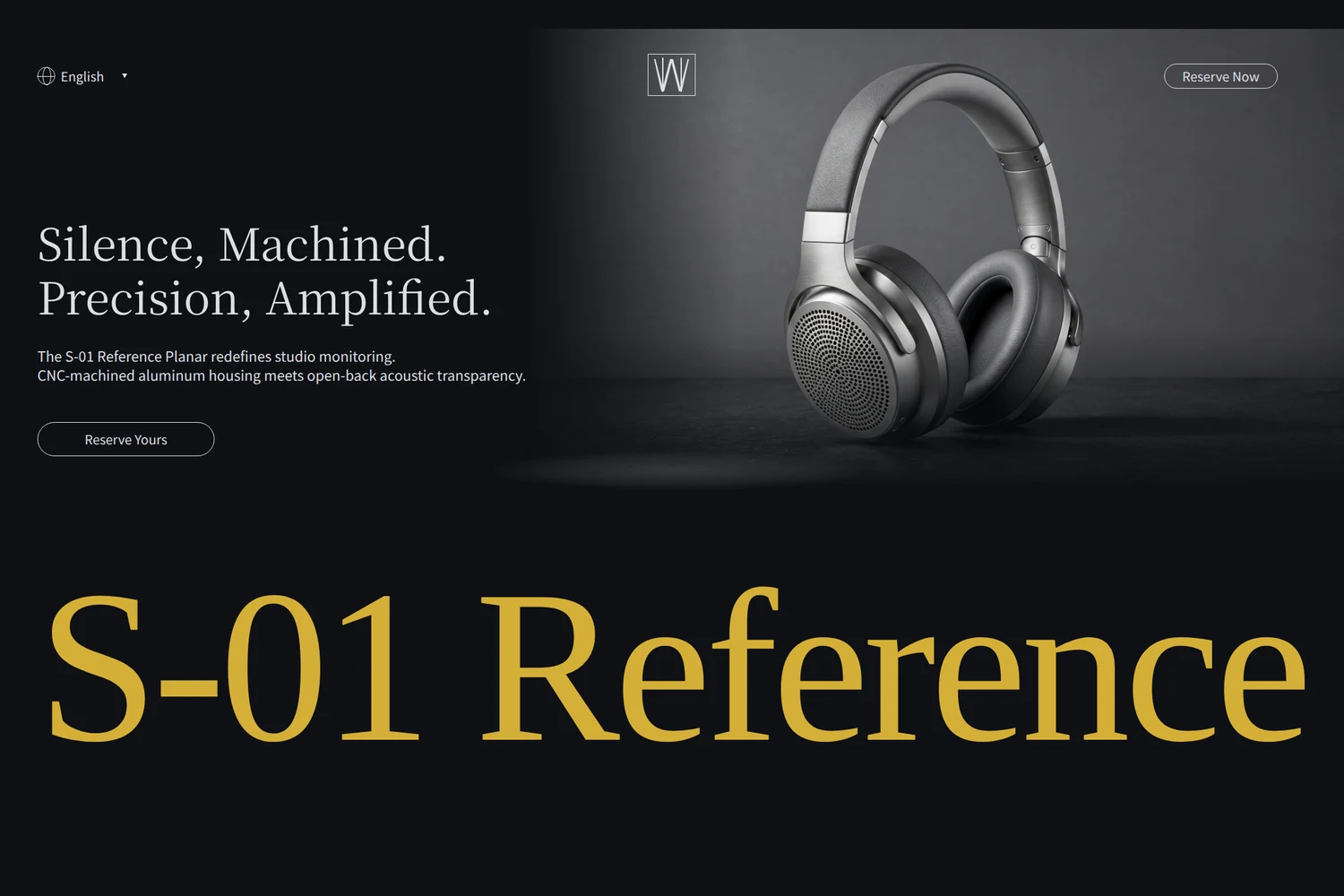
Generated with Kling Image 4.0 Long Image at 2K via this API (2048×16385 webpage and 2048×19533 ecommerce detail page). Click any preview to open the full vertical scroll.
What Kling Image 4.0 Long Image costs
Kling Image 4.0 Long Image bills one output tier per tall PNG plus one charge for every reference photo. All figures below come from live rates.
- Kling Image 4.0 Long Image
- $0.229925/ request
- Kling Image 4.0 Long Image
- $0.5294/ request
- Kling Image 4.0 Long Image
- 37images
A failed request carries no charge.
Kling Image 4.0 Long Image rates by mode, length and width
Pick the output tier first, then add the reference rate for each product, style or subject photo.
- Ecommerce · 1K · short
- $0.2269Price · 1 image
- Ecommerce · 2K · short
- $0.2723Price · 1 image
- Ecommerce · 1K · medium
- $0.4538Price · 1 image
- Ecommerce · 2K · medium
- $0.5294Price · 1 image
- Ecommerce · 1K · long
- $0.7563Price · 1 image
- Ecommerce · 2K · long
- $0.8319Price · 1 image
- Webpage · 1K
- $0.5294Price · 1 image
- Webpage · 2K
- $0.5748Price · 1 image
- Reference image
- $0.003025Price · 1 image
Price your own long-image request
Select a Kling Image 4.0 Long Image tier and reference count to price the request before running.
Each Kling Image 4.0 Long Image request outputs one tall PNG. References are billed from the first photo.
Working with Kling Image 4.0 Long Image
Standard still models force teams to stitch disconnected banners by hand. Kling Image 4.0 Long Image renders a continuous vertical page in one pass, keeping typography, palette, product scale and dividers coherent top to bottom.
Use Kling Image 4.0 Long Image in ecommerce mode with 1 to 3 product photos for short, medium or long detail pages. Switch Kling Image 4.0 Long Image to webpage mode for full landing-page direction, with optional style and subject references.
Kling Image 4.0 Long Image outputs 1K at 1024 px wide and 2K at 2048 px wide; vertical height follows the sections in your brief.
Two ways to use Kling Image 4.0 Long Image
Call Kling Image 4.0 Long Image from your backend or brief a coding agent. Both return the finished tall PNG URL.
Call Kling Image 4.0 Long Image from your app
Pass your section outline in contents and bind each image URL to a unique ID so prompt mentions stay stable.
- 1Create a SeedRouter API key for Kling Image 4.0 Long Image.
- 2POST prompt, mode settings and reference URLs to /v1/images/generations.
- 3Poll the task ID until completed and save output.data[0].url.
Brief a coding agent on Kling Image 4.0 Long Image
The prompt includes the Kling Image 4.0 Long Image request shape, live cost approval and polling loop.
- 1Copy the instructions into your coding agent.
- 2Provide your section outline and reference URLs.
- 3Approve the live estimate, then inspect the saved PNG.
What Kling Image 4.0 Long Image gives you
One vertical canvas instead of stitched tiles. Kling Image 4.0 Long Image keeps branding, lighting and typography consistent top to bottom.
Structured ecommerce storytelling
Turn 1 to 3 product shots into a vertical listing with Kling Image 4.0 Long Image across short, medium or long section counts.
Full-page web art direction
Generate hero, feature grids and footer sections together in Kling Image 4.0 Long Image webpage mode with optional style and subject references.
1K drafts and 2K crisp masters
Iterate layout pacing at 1K (1024 px) before rendering high-detail 2K (2048 px) masters with Kling Image 4.0 Long Image.
Where Kling Image 4.0 Long Image fits best
Marketplace product detail pages
Supply up to three angles of an item and ask Kling Image 4.0 Long Image for a short, medium or long layout covering hero, features, specs and care notes.
Landing-page visual exploration
Draft complete brand pages in Kling Image 4.0 Long Image webpage mode before writing front-end code. Review hierarchy and section pacing in one PNG.
Style-matched product showcases
In Kling Image 4.0 Long Image webpage mode, pair one style reference for grid and type with one subject photo so your product anchors the page.
How to brief Kling Image 4.0 Long Image
- 01
Set up your API key
Store your SeedRouter key on the server and use the bare model ID kling-image-4-0-long-image.
- 02
Pick mode, length and width
Select ecommerce with short, medium or long, or webpage for general layouts. Draft at 1K and render final assets at 2K in Kling Image 4.0 Long Image.
- 03
Name every reference image
Upload crisp JPEG or PNG photos at least 300 px per side. Give each Kling Image 4.0 Long Image photo an ID and mention @id in the sections where it belongs.
- 04
Poll and inspect full height
Tall 2K pages can take several minutes and exceed 50 MB. Poll the saved task ID, download the PNG and check copy and product geometry top to bottom.
Kling Image 4.0 Long Image ecommerce versus webpage mode
Match the Kling Image 4.0 Long Image mode to your reference assets and page structure.
| Requirement | Ecommerce mode | Webpage mode |
|---|---|---|
| Reference inputs | 1–3 required refer_image product photos | Optional style_refer_image (max 1) and subject_refer_image (max 1) |
| Length setting | short (2–5), medium (6–10) or long (11–18) | Omitted; section count follows the brief |
| Resolution tiers | 1K (1024 px) or 2K (2048 px) | 1K (1024 px) or 2K (2048 px) |
Kling Image 4.0 Long Image input and output limits
Strict mode-specific references
Kling Image 4.0 Long Image requires 1 to 3 refer_image items in ecommerce mode. In webpage mode, Kling Image 4.0 Long Image rejects refer_image and accepts at most one style_refer_image and one subject_refer_image.
Large 2K PNG downloads and wait time
Each Kling Image 4.0 Long Image call returns one PNG with no batch or ratio fields. Tall 2K outputs can take several minutes and exceed 50 MB, so allow generous download timeouts.
Using Kling Image 4.0 Long Image on SeedRouter
Live estimates across all eight tiers
Check exact Kling Image 4.0 Long Image rates for every ecommerce length, webpage width and reference image before running a paid task.
Unified endpoint and zero charge on failure
Run Kling Image 4.0 Long Image on /v1/images/generations and inspect the exact request JSON in the playground. A failed Kling Image 4.0 Long Image request carries no charge.
Other image models on SeedRouter
Compare Kling Image 4.0 Long Image with other image models available with the same API key.
Create and edit images with GPT Image 2 on SeedRouter. Use text prompts, reference images and transparent backgrounds, with a live playground and usage-based pricing.
View pricingGenerate and edit images with GPT Image 2.5 Flare or Sunburst on SeedRouter. Six quality steps up to max, transparent backgrounds, a live playground and pay-as-you-go pricing.
View pricingCreate and edit images with Nano Banana 2 (Gemini 3.1 Flash Image): 512px to 4K, 14 aspect ratios, up to 14 references. Pay per image or per token.
View pricingNano Banana 2.1, Google's update to Nano Banana 2: create and edit images with sharper text, 1K to 4K, 14 aspect ratios and 14 references, one price per image.
View pricingCreate and edit images with Nano Banana Pro (Gemini 3 Pro Image): 1K to 4K output, built-in thinking, up to 14 references. Pay per image or per token.
View pricingCreate and edit images with Nano Banana 2 Lite (Gemini 3.1 Flash Lite Image), Google's fastest and cheapest image model: 1K output, 14 aspect ratios.
View pricingKling Image 4.0 Long Image guides
Request examples, reference rules and response fields for Kling Image 4.0 Long Image.
Build 2K webpage layouts and ecommerce detail pages with Kling Image 4.0 Long Image. See two real tall PNG runs, curl payloads, polling steps and live rates.
See cURL, Python, Node.js and Go examples for ecommerce and webpage modes, from submission to PNG retrieval.
Kling Image 4.0 Long Image questions
Can I use Kling Image 4.0 Long Image without uploading photos?
Yes, in webpage mode. Set settings.skill to webpage and write your brief. Ecommerce mode in Kling Image 4.0 Long Image requires 1 to 3 refer_image product photos.
How does Kling Image 4.0 Long Image differ from Kling Image 4.0?
Kling Image 4.0 generates 2K or 4K stills and multi-frame series. Kling Image 4.0 Long Image specializes in single continuous tall layouts (1K or 2K wide) for ecommerce detail pages and webpage designs.
How do I mention references in Kling Image 4.0 Long Image?
Assign each image a unique id and write @id in the prompt. In Kling Image 4.0 Long Image ecommerce mode name up to three product angles; in webpage mode name optional style and subject references.
Does settings.length apply in Kling Image 4.0 Long Image webpage mode?
No. Page length (short, medium, long) applies only to ecommerce mode. In webpage mode omit settings.length and list the sections in your Kling Image 4.0 Long Image prompt.
How large can a Kling Image 4.0 Long Image PNG be?
Width is 1024 px at 1K or 2048 px at 2K, while height scales with sections. A long 2K Kling Image 4.0 Long Image file can exceed 50 MB.
How are references billed on Kling Image 4.0 Long Image?
Each completed Kling Image 4.0 Long Image request bills one output tier fee plus one reference fee per input image, including the first. Failed tasks are not charged.
Generate your first tall page with Kling Image 4.0 Long Image
Try a webpage layout or upload 1 to 3 product photos in the playground to preview live pricing with Kling Image 4.0 Long Image.