
Seedream 5.0 Pro — Create, Edit, Split into Layers
Seedream 5.0 Pro is ByteDance's image model for generation and editing. Write a prompt, add up to 10 references, or split a finished design into editable layers.
- Text to image
- Editing with 10 references
- Layer decomposition
- Transparent background
Try Seedream 5.0 Pro
Run Seedream 5.0 Pro with the same request your code will send. Turn on layer decomposition to split one image instead of making a new one.
seedream-5-0-proEach reference image after the first adds {reference}. Layer decomposition charges the base image and every layer at one tier for the whole request. Failed requests are not charged.
Generate from a prompt or edit reference images. Submit once; results appear when the task completes.
Describe the image and its shape. Optional with layer decomposition: list the elements to split out.
Add references for an edit, or one image to split into layers. Files are uploaded and sent as URLs.
Optional. Up to 10 references for an edit; exactly one for layer decomposition or a transparent background.
Seedream 5.0 Pro splits one image into a base image and up to 16 transparent layers.
1K and 1.5K cost the same. Custom: WIDTHxHEIGHT, 921,600 to 4,624,220 pixels.
Standard gives higher quality; fast returns sooner.
With layers, sets the base image only; layers are always PNG.
Transparent needs one PNG with transparency and PNG output.
On adds an AI generated mark in the lower-right corner.
Always on in the playground.
Greyed-out options relax content filtering. They are available through the API only, not in the playground.
Layer decomposition shows the most it can cost (17 images); you pay for the images it returns.
Try one of these prompts
Seedream 5.0 Pro examples
Three of our own runs on SeedRouter: text to image, lettering and a layer split. The text prompts are in the playground above.

Golden hour on the gallery
A lighthouse keeper mid-stroke, low sun and sea spray, from one text prompt at 2816x1584.

A poster that spells it right
The headline and the small event line came out exactly as written, at 1.5K in 2:3.
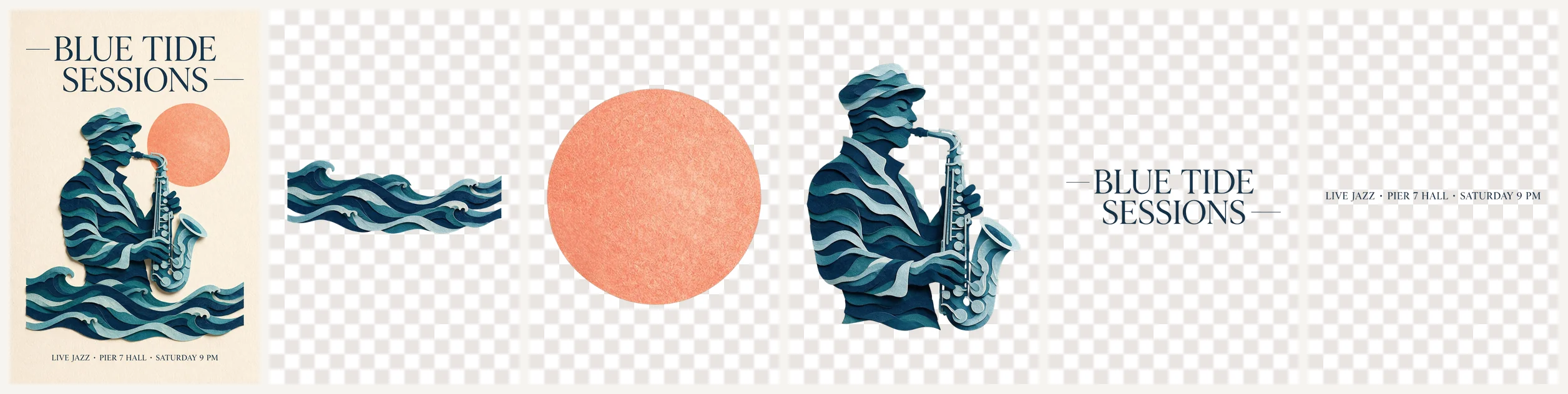
One poster, five layers
The jazz poster split by Seedream 5.0 Pro: waves, moon, player, headline and event line, each a transparent PNG with its position.
Seedream 5.0 Pro pricing
Seedream 5.0 Pro is priced per image. Size sets the tier: 1K and 1.5K share the lower price, 2K and anything above 2.61 million pixels cost more.
| Category | Up to 2.61 MP (1K, 1.5K)Price · 1 image | Above 2.61 MP (2K)Price · 1 image |
|---|---|---|
| Image generation, per image | $0.03375 | $0.0675 |
| Layer decomposition, per returned image | $0.016875 | $0.03375 |
Each reference image after the first adds $0.00225. Layer decomposition charges the base image and every layer at one tier for the whole request. Failed requests are not charged.
What is Seedream 5.0 Pro?
Seedream 5.0 Pro
Seedream 5.0 Pro is ByteDance's flagship image model. It makes one image from a prompt, edits a photo, or combines up to 10 reference images into a new picture, at 1K, 1.5K, 2K or an exact pixel size.
Seedream 5.0 Pro can also take a finished image apart. Layer decomposition returns a base image plus up to 16 transparent PNG layers, each with a name, a description and its position, ready for a design tool.
Use this exact identifier in the model field for generation, editing and layer decomposition.
Two ways to use Seedream 5.0 Pro
Call Seedream 5.0 Pro from your application. Send the prompt and references, keep the task ID, and fetch the finished images. The API guide has copyable examples.
Share the Seedream 5.0 Pro OpenAPI file with your coding agent. It covers every field, the layer output and the task polling flow.
What you can make with Seedream 5.0 Pro
Describe the subject, light and framing, and name the shape. Seedream 5.0 Pro picks a matching frame at the size you choose.
Give Seedream 5.0 Pro a product, a model and a location, then say what each one contributes. Refer to them by order.
Turn a flat poster into layers: background, product, headline, badges. Each layer comes back as its own transparent PNG with its position.
Send one PNG with transparency and get a cutout back, ready to drop onto any page or slide.
Where Seedream 5.0 Pro fits
Split last season's poster with Seedream 5.0 Pro, swap the headline layer, and keep the product shot untouched.
Place one product photo in new settings with Seedream 5.0 Pro. Check labels and shape against the real item before publishing.
Banners and covers need fixed sizes. Ask Seedream 5.0 Pro for exact pixels such as 2048x1024 instead of cropping afterwards.
Your first Seedream 5.0 Pro image
- 01
Write the prompt
Say what the picture shows and its shape, for example a 16:9 landscape. For layers, list the elements to separate.
- 02
Add images if needed
Upload references for an edit, or one image to split. Seedream 5.0 Pro takes up to 10.
- 03
Pick size and format
Choose 1K, 1.5K, 2K or exact pixels, and JPEG or PNG. The estimate updates as you change settings.
- 04
Review and download
Open each Seedream 5.0 Pro result at full size and download what you keep. Hosted links are not permanent.
Choose your Seedream 5.0 Pro workflow
| Workflow | Text to image | Reference editing | Layer decomposition |
|---|---|---|---|
| When to use it | No references. Use Seedream 5.0 Pro this way to explore a new scene or a first concept. | One to 10 images. Seedream 5.0 Pro carries a product, face or layout over into the result. | Exactly one image. Use Seedream 5.0 Pro layers when you need to edit parts of a finished design separately. |
Seedream 5.0 Pro limits
Seedream 5.0 Pro returns one image per request, except layer decomposition. Send separate requests for variations.
Seedream 5.0 Pro adds a small AI generated mark unless you set watermark to off.
Seedream 5.0 Pro results are not reproducible by seed, and images arrive when the task completes.
Use Seedream 5.0 Pro on SeedRouter
The Seedream 5.0 Pro estimate uses the current rate for your size and mode before you submit.
Failed Seedream 5.0 Pro requests are not charged, and layer decomposition bills only the images it returns.
Top up any amount and use it for Seedream 5.0 Pro and every other model. Credits do not expire.
Compare image models
Other image models on SeedRouter, for different editing styles and price points.
Seedream 5.0 Pro guides
Prompting, pricing and workflow notes for Seedream 5.0 Pro.
Seedream 5.0 Pro questions
What is Seedream 5.0 Pro used for?+
Seedream 5.0 Pro makes images from text, edits photos with up to 10 references, and splits finished designs into editable layers. Teams use it for ad visuals, product scenes, posters and covers that need exact sizes.
How much does Seedream 5.0 Pro cost?+
On SeedRouter, Seedream 5.0 Pro costs $0.03375 per image at 1K or 1.5K and $0.0675 at 2K or above 2.61 million pixels. Each extra reference image adds $0.00225. Failed requests are not charged.
Which company made Seedream 5.0 Pro?+
ByteDance made Seedream 5.0 Pro, the top model of its Seedream image family. On SeedRouter you call Seedream 5.0 Pro with the model ID seedream-5-0-pro.
What does Seedream 5.0 Pro layer decomposition return?+
A base image followed by up to 16 transparent PNG layers. Each layer has a stacking order, a name, a description and a bounding box, so you can rebuild or rearrange the design. Each image costs $0.016875 when all stay within 2.61 million pixels, otherwise $0.03375.
Can Seedream 5.0 Pro edit my own photo?+
Yes. Pass one image URL, or up to 10, and say in the prompt what to keep and what to change. Seedream 5.0 Pro uses them as references for the new image.
What sizes does Seedream 5.0 Pro support?+
Choose 1K, 1.5K or 2K and name the shape in the prompt, or send exact pixels from 921,600 to 4,624,220 in total, between 1:16 and 16:1. A 16:9 image at 2K is 2816x1584.
How long does Seedream 5.0 Pro take?+
In our tests a 1K Seedream 5.0 Pro image took about 35 to 55 seconds. A 1K layer decomposition with 13 layers took about 140 seconds.
Is Seedream 5.0 Pro free?+
No. Seedream 5.0 Pro is paid per image, and new SeedRouter accounts get a small credit to try it. There is no subscription and credits never expire.
Make your next image with Seedream 5.0 Pro
Start at 1.5K, add references when they help, and split the result into layers when you need to edit it. Seedream 5.0 Pro shows the price first.