
AI Character Reference Sheet Generator
Turn an idea or an approved image into a character reference sheet for your next comic, storyboard or video. Start with four views, compare the details, and keep the version you want.
- Draft a turnaround
- Explore facial expressions
- Correct one difficult view
Start your character reference sheet from a description or image. Request four full-body views on one board, then review the settings and price before generating.
gpt-image-2.5-flare$0.0225 · Per output image
Start with the face, outfit and details you want to keep.
required · up to 32,000 characters
Reference images for image-to-image and editing. Files are uploaded and sent as URLs; on Official IDs each one adds image input tokens.
Start your character reference sheet with an approved image, uploaded before generation. Or describe the character in the prompt.
Let the model choose the image dimensions.
auto or WIDTHxHEIGHT · custom sizes supported
Reference images for image-to-image and editing. Files are uploaded and sent as URLs; on Official IDs each one adds image input tokens.
For a local repair, add a PNG mask under 4 MB matching the first reference image. Transparent areas are edited; include that reference.
default auto · xhigh and max are new
1 to 10 · default 1
auto, opaque or transparent · transparency requires PNG
default png
Choose JPEG to set compression.
default auto
Greyed-out options relax content filtering. They are available through the API only, not in the playground.
Standard charges per output image. Official uses token billing; the sample-based estimate can change with your canvas, prompt and references.
Choose your starting prompt
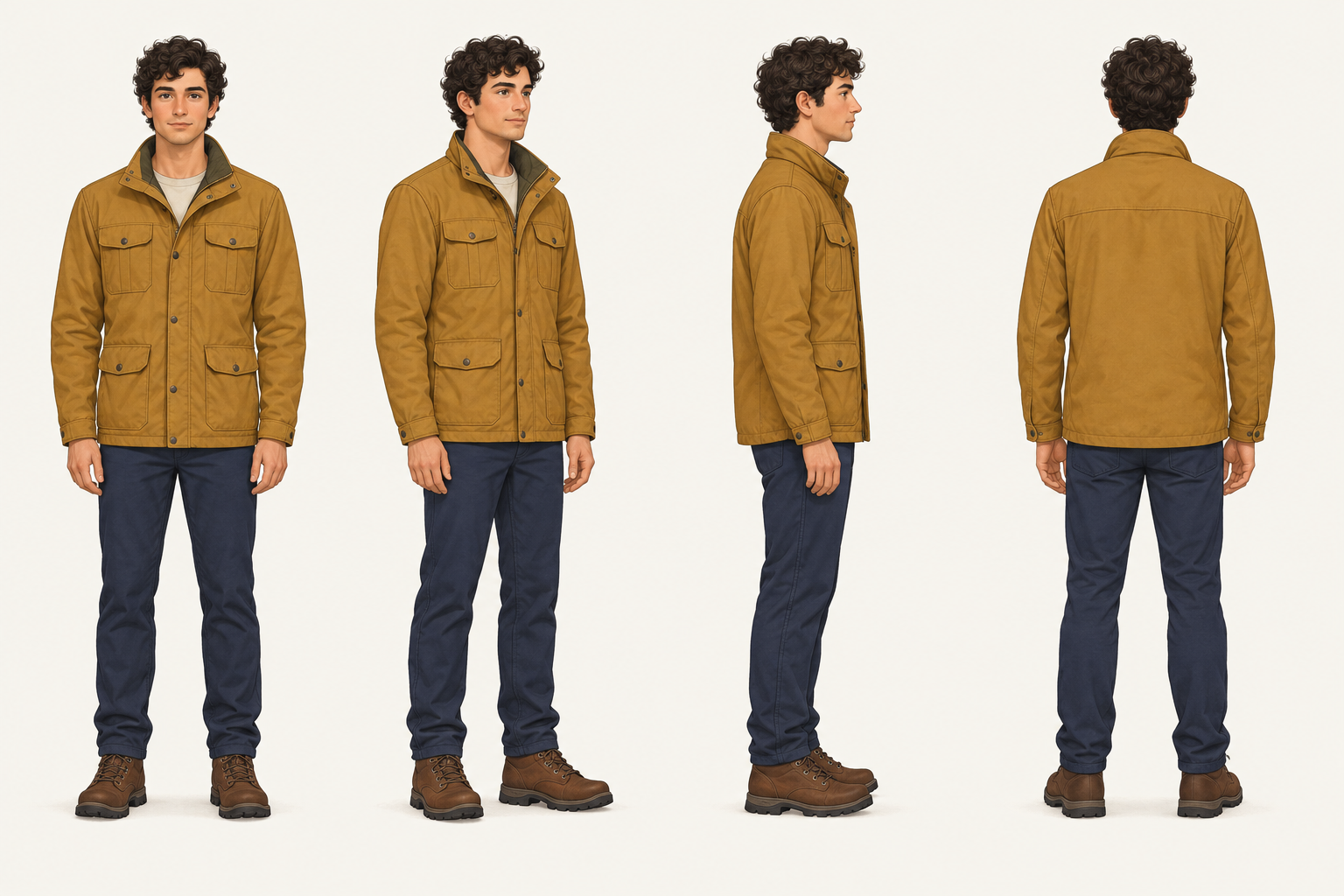
A generated character reference sheet
This character reference sheet was generated from the four-view preset, with no input image. It shows front, three-quarter, profile and back views on one board. Inspect clothing and facial details before reusing any result.
Four views of one original character
Generated with GPT Image 2.5 Flare Standard: 1536 × 1024, high quality, PNG, one output. The prompt is available in the four-view preset above. This is one generated result; future results may differ.
Reuse the same character reference sheet
Both examples below used the four-view sheet above as their only reference image. They were generated separately with the expression and single-profile presets.
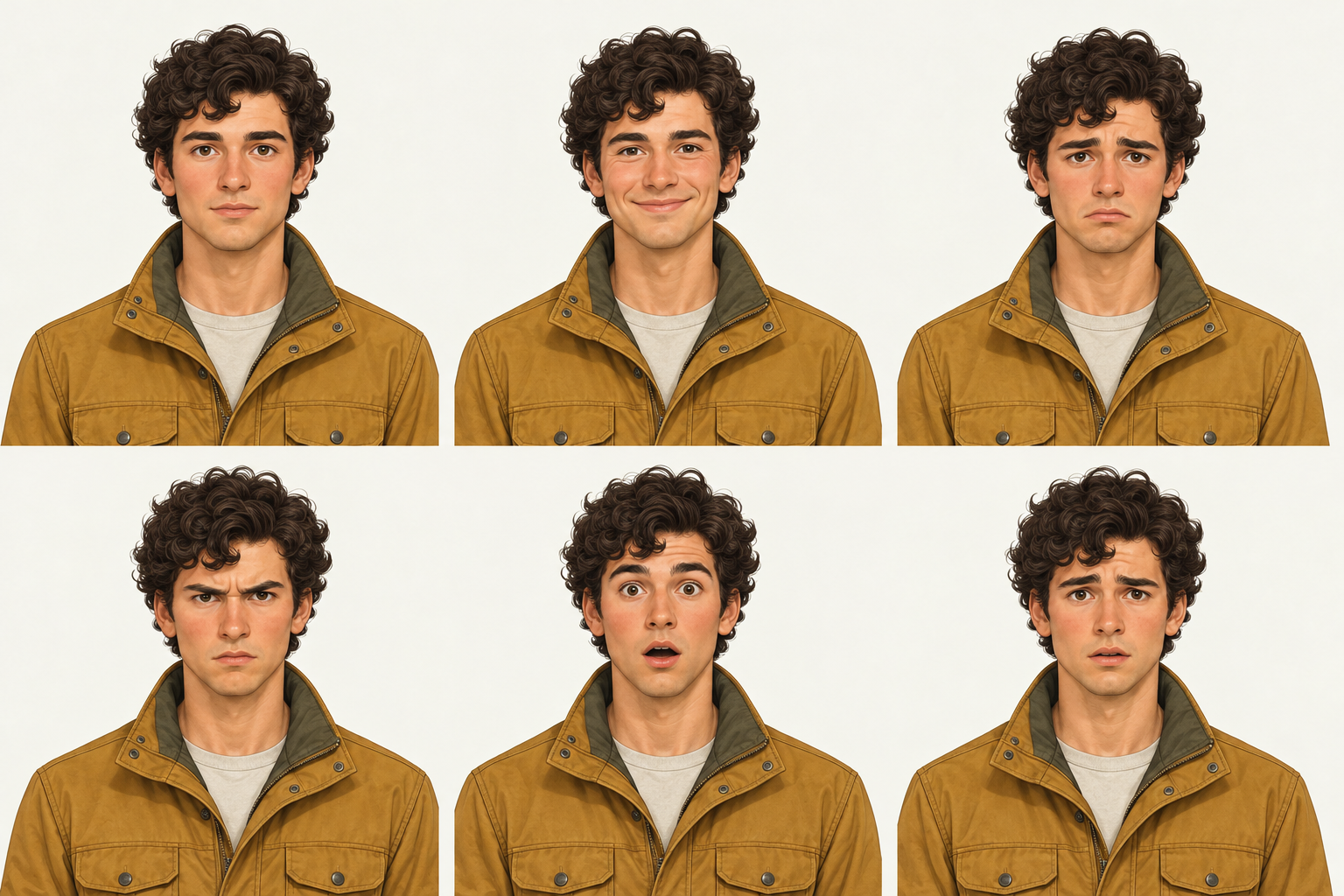
Six expressions from the same reference
GPT Image 2.5 Flare Standard · 1536 × 1024 · high · PNG · one output. Six head-and-shoulders portraits keep the curly hair and ochre jacket while changing the expression.
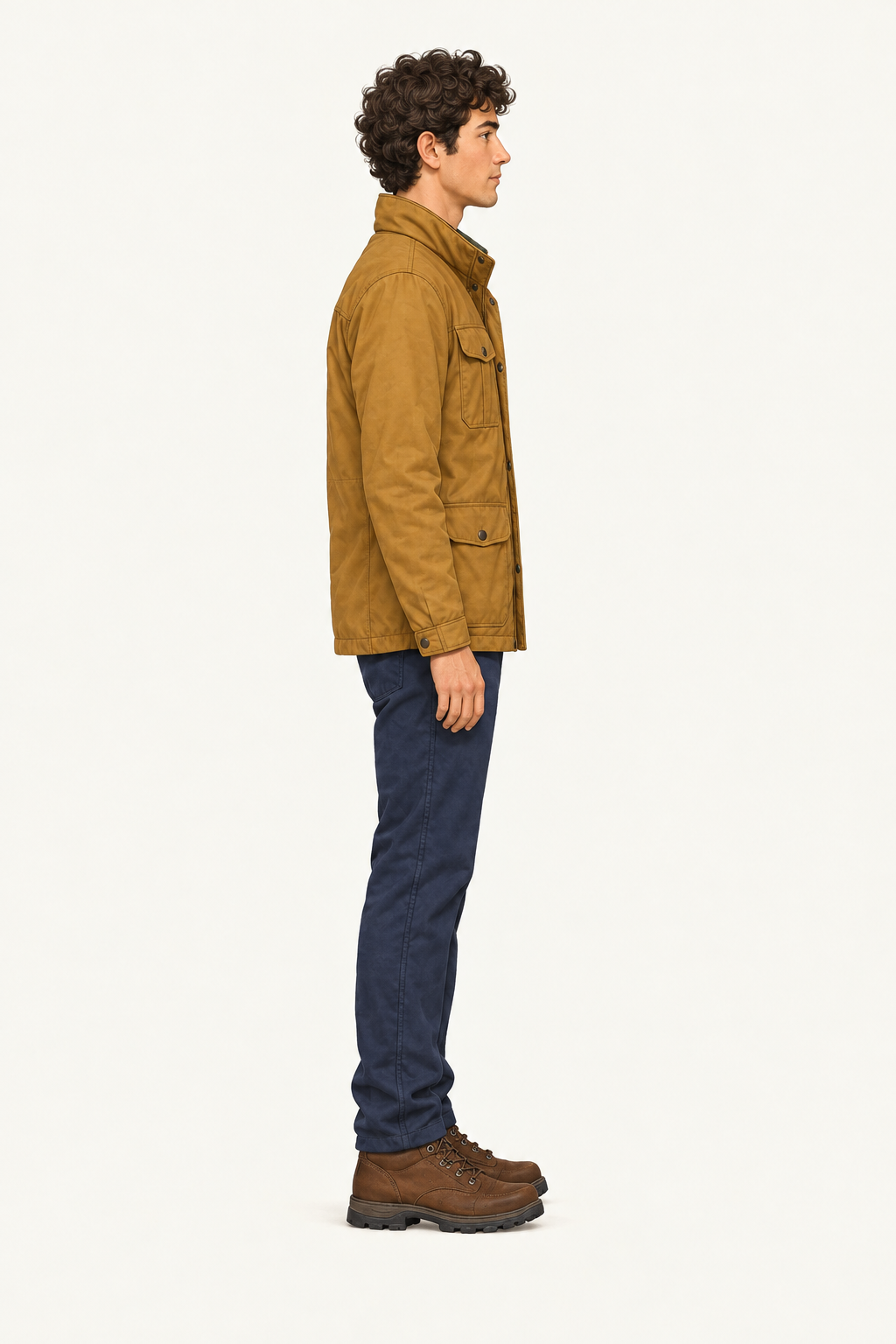
Regenerate one profile view
GPT Image 2.5 Flare Standard · 1024 × 1536 · high · PNG · one output. This creates a separate side-view image; it does not replace a panel inside the original sheet.
Current character reference sheet pricing
Choose Standard for per-image billing or Official for token billing. The rates below come from the generator’s live catalogue; a fresh character reference sheet or correction is a new paid request.
| Model | Billing | Current rate |
|---|---|---|
| GPT Image 2.5 Flare · Standard | Per output image | $0.0225 |
| GPT Image 2.5 Sunburst · Standard | Per output image | $0.0225 |
| GPT Image 2.5 Flare · Official | Per 1M tokens | Input $3.75 · Output $22.50 |
| GPT Image 2.5 Sunburst · Official | Per 1M tokens | Input $3.75 · Output $22.50 |
Top up once and use your balance as needed. Failed requests are not charged; a finished character reference sheet is a completed generation, even when its creative details need another pass.
View balance optionsWhat is a character reference sheet?
An AI character reference sheet generator creates a visual board from your description or reference image. Compare views of one design—its face, clothing and proportions—before reusing it in another scene.
A character reference sheet can focus on body angles or facial expressions. Start with one output for one complete board: the image count requests additional outputs, not additional views.
Put your character reference sheet to work
Comics and storyboards
Use a character reference sheet to carry the approved face and outfit into your next panel. Keep a profile or back view nearby when the framing moves beyond the original portrait.
Video preparation
Choose the view closest to your next shot from the character reference sheet. Crop a useful reference, check the video model’s requirements, and inspect a short result before planning a longer sequence.
Character design
Compare the silhouette, clothing and accessories on your character reference sheet before settling on a design. Keep the angles that agree and give a weak view its own correction.
Why create your character reference sheet here?
Start with your own character
Build a character reference sheet from an original description or an image you want to develop. Name the features that matter, from the hairline and face shape to a jacket’s collar and fastenings.
Make the next step smaller
Draft a character reference sheet first, then work on expressions or a difficult angle. A preset changes the prompt without sending a request, so you can prepare before spending your balance.
Pay for what you create
Use your SeedRouter balance for each character reference sheet you generate. Check the selected model’s live rate before submission; there is no separate subscription for this tool.
Create a character reference sheet in three steps
- 01
Define the character
Upload a clear reference or replace the example description. Set the face, hair, clothing and important accessories, and keep the background simple so the character reference sheet is easy to inspect.
- 02
Choose the views and generate
Choose a character reference sheet preset. Review the canvas, quality and output count, then check the price before generating; one output is the starting point for one complete board.
- 03
Review, download and reuse
Compare each view in your character reference sheet for identity and outfit changes. Download the result you want to keep; request a faulty angle separately using the approved reference.
Create a character reference sheet through the API
Add character reference sheet generation to your application with GPT Image 2.5. Its documentation covers reference images, accepted settings and downloading completed outputs.
Choose a character reference sheet for the next shot
| Format | Use it for | Check before reuse |
|---|---|---|
| Full-body turnaround | Body shape, outfit and changing camera angles | Matching height, clothes and accessories across views |
| Expression sheet | Close-ups and changes of emotion | The same face beneath each expression |
| Single-view reference | One difficult angle or a specific shot | Enough detail for that shot without competing views |
Give the character reference sheet a useful review
Compare the small details
Check the face, colors, proportions and accessories in every view of your character reference sheet. Angles can be missing or repeated, so approve the panels that fit your brief before using them again.
Define what the camera cannot see
A front portrait leaves unseen details on your character reference sheet open to interpretation. Add a reference or describe the back of a hairstyle or jacket when those details matter.
Leave room for a readable face
Every panel shares the character reference sheet’s canvas. For fine facial detail, create a separate portrait or single-view image; downloaded boards remain complete images rather than automatically cropped files.
Choose the next model’s input
A video model may see your character reference sheet as several people. Pick one view when its reference guidance calls for it; movement and audio need separate instructions or media.
Use references you can upload
Reference images for a character reference sheet upload to SeedRouter storage. Removing a file from the form excludes it from the next request; it stays in storage. Use permitted images and read the privacy policy.
Take the character reference sheet into your next task
Find character reference sheet prompts to repair a view or outfit. Compare video workflows before choosing how to animate your design.
Copy character sheet prompts for front, side and back views, expressions, and targeted repairs. Check identity and clothing before reusing the results.
Compare Genjutsu alternatives for music video character replacement, motion references, face swaps and local edits, with audio and cost boundaries.
Check image settings, supported options and model documentation.
Character reference sheet questions
Is the AI character reference sheet generator free?+
Read the prompts, choose a preset and inspect the settings before generating. Creating a character reference sheet uses your SeedRouter balance; check the displayed price before submission. Changing a preset costs nothing, while a new render or correction is another paid request.
Can I make a character reference sheet from one image?+
Yes: add a clear image and explain what to keep. It can guide the visible face and outfit in your character reference sheet, while unseen details remain an interpretation. Add another angle or describe the back of the clothing when those details matter.
Do four views mean four paid images?+
The four-view preset asks for four panels inside one image. Start with an image count of one for a single character reference sheet; a higher count requests more complete outputs and increases the estimate. Inspect the returned views before approving the board.
What size should a character reference sheet be?+
Choose a landscape canvas for body views or a layout suited to your expression grid. The form starts at auto; even a large character reference sheet can contain small faces. Request a separate close-up when facial detail matters more than seeing every angle together.
Can I download each view separately?+
Download the complete image or images returned by the model. Crop a view from your character reference sheet in an image editor, or request it separately with the approved reference. Keep the original board for comparison while preparing your next shot.
Will the character stay identical in a video?+
A checked character reference sheet communicates the face and outfit you want, but identity can change between generated frames or shots. Use the next model’s supported reference format and inspect a short result first. Keep the approved master and repeat its defining traits in later scenes.
Start your character reference sheet with one clear idea
Compare your character reference sheet views, approve the details, then carry the design into your next scene. Give each correction a specific target.