Gemini 4 Argon 3D code: reproduce the official Python scene
Run the official Gemini 4 Argon 3D code on a Mac with Python and NumPy. Reproduce a sunlit library, inspect the result and change rendering parameters.
Read as MarkdownYou can run Gemini 4 Argon 3D code locally by reproducing the Python scene published in Google Gemini's demo repository. Google attributes the code to Argon; Python, NumPy and Pillow turn that code into a PNG of a sunlit library. This walkthrough uses the published source, so it needs no model API key or new generation request.[1]
We reproduced the scene at two resolutions on October 14, 2026. Start with the smaller image, verify its dimensions and composition, then render the larger one. The downloadable package includes the unchanged renderer, pinned dependencies, attribution and both reference results.
What the Gemini 4 Argon 3D code produced locally
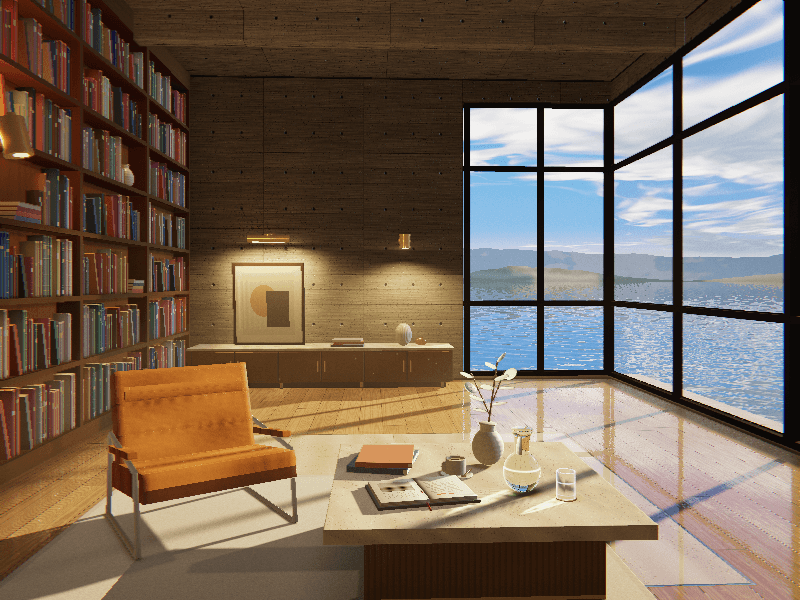
Local reproduction of Google's open-source Argon demo, commit 15515edc, under Apache-2.0. This image was rendered from published code; it is not a new SeedRouter API generation.
Both runs exited successfully and produced RGB PNGs with the requested dimensions. We checked that each decoded correctly and inspected the scene: shelves on the left, a chair and table in front, and corner windows overlooking the sea. The larger image makes the open book, cup and glass vessels easier to inspect.
| Local run | Seed | Wall time | Peak resident memory |
|---|---|---|---|
| 320 × 240 | 20301 | 6.837 seconds | 230.5 MiB |
| 800 × 600 | 20301 | 4.731 seconds | About 1.24 GiB |
These are two individual runs, not a speed benchmark. Library startup, caching and host load affect timing; the shorter larger-image run does not establish a performance rule. We did not test the default 1600 × 1200 render.
1. Download the scene and prepare Python
Use an Apple Silicon Mac with native arm64 CPython 3.14 and macOS 14 or later. Our tested environment was macOS 26.2, Python 3.14.3, NumPy 2.5.3 and Pillow 12.3.0. The dependency hashes select wheels for that architecture and Python version; this package is not a verified installation recipe for Intel Macs or other Python versions.
Save the reproduction package in Downloads. Extract it into a fresh folder, then create a virtual environment:
cd ~/Downloads
unzip gemini-4-argon-3d.zip
cd gemini-4-argon-3d
python3.14 -m venv .venv
.venv/bin/python -m pip install --only-binary=:all: \
  --require-hashes -r requirements-verified.txt
Installation downloads the dependencies. Rendering then runs locally. If installation reports no matching wheel or a hash mismatch, check the Python version and architecture before continuing. Keep the package's LICENSE and ATTRIBUTION.md with the source.[3]
2. Render and inspect a small preview
Run this from the extracted package directory:
PAINT_WIDTH=320 PAINT_HEIGHT=240 PAINT_SEED=20301 \
  .venv/bin/python source/python/sunlit_library.py \
  output/library-320x240.png
The final argument sets the output filename. The renderer creates its parent directory and prints a Saved message when writing finishes.[2] New images go into output/; the bundled reference images remain separate. Check the file itself:
.venv/bin/python - <<'PY'
from PIL import Image
with Image.open("output/library-320x240.png") as image:
    image.load()
    assert image.format == "PNG"
    assert image.mode == "RGB"
    assert image.size == (320, 240)
    print(image.format, image.mode, image.size)
PY
open output/library-320x240.png
Expect PNG RGB (320, 240). Then inspect the picture in Preview: a valid file can still contain an incomplete or unwanted scene. Check the room layout, window frames and shadow direction before increasing the resolution.
3. Produce the larger reference size
Once the preview passes, run:
PAINT_WIDTH=800 PAINT_HEIGHT=600 PAINT_SEED=20301 \
  .venv/bin/python source/python/sunlit_library.py \
  output/library-800x600.png
open output/library-800x600.png
Repeat the dimension check with the new filename and (800, 600). Leave memory headroom: our recorded peak was about 1.24 GiB for this size. The image should retain the same main arrangement while providing more pixels for inspecting surfaces and tabletop objects. We did not assert pixel equality with Google's reference image or repeat identical settings to establish determinism.
4. Change rendering parameters deliberately
The source reads PAINT_WIDTH, PAINT_HEIGHT and PAINT_SEED from environment variables. An explicit filename takes precedence over PAINT_OUTPUT. Without size overrides, the ordinary default is 1600 × 1200; --16x9 selects 1920 × 1080 defaults and the widescreen configuration.[2]
Keep seed 20301 while changing resolution so that you do not also change the random input. Use a new filename for each experiment: the direct renderer can overwrite an existing output. A different seed is another experiment, not a promise of a specific furniture arrangement. Camera, materials and lighting changes require editing the Python source rather than adding an invented command-line option.
Questions about this 3D example
Is this a Gemini 4 Argon Blender tutorial?
It uses a standalone Python and NumPy renderer. No Blender installation or .blend file is involved. Google's repository also contains a JavaScript/WebGL2 version, but these local checks cover only Python.[1]
Does the PNG demonstrate native model image or video output?
It demonstrates that the published code can render a still image locally. We did not ask Argon to regenerate the code, perform visual revisions or produce an animation. Code generation and rendering are separate steps in this example.
Can I ask the model to change the scene?
You can use the native Python API tutorial to build a conversation about code. Review any returned changes before running them. That is a separate model request with its own usage charges; it is not part of this reproduction or its verification.
Keep the working render as your baseline
The useful outcome of this Gemini 4 Argon 3D code exercise is an inspectable scene you can run and change. Preserve the working source and preview before experimenting. The Gemini 4 Argon model page and API reference explain the model interface when you are ready to add a separate coding conversation.
Sources
- Google Gemini. Vanilla 3D rendering with Gemini 4 Argon. Fixed source commit 15515edc.
- Google Gemini. Python renderer and entry point. Source of the rendering controls and output behavior.
- Google Gemini. Apache-2.0 license. Included with the downloadable source.