
Ticket analysis that takes you from a theme to the message
Watch the case videoFind recurring issues without losing the customers’ original words. Build ticket analysis with SeedRouter’s text APIs for classification and summaries, while your data tools calculate counts from records your team can inspect.
For support operations, product teams and feedback analysis developers.
What ticket analysis should help you decide
Ticket analysis turns support messages into classifications, counts and explanations of recurring problems. SeedRouter supplies model calls for interpreting text; your application retains records, calculates aggregates and links the summary back to the underlying messages.
Ticket analysis with meaningful issue labels
Give ticket analysis separate fields for the product area, complained-about item and issue. A single sentiment label cannot distinguish a delayed delivery from a broken checkout, even when both customers sound frustrated.
Explore this use caseTicket analysis with representative messages
Use ticket analysis to retain the phrase that supports each label. Product and support teams can then inspect representative cases without treating a polished summary as evidence that all messages were understood correctly.
Explore this use caseTicket analysis with a defined set of records
Keep ticket analysis totals tied to stable identifiers and explicit inclusion rules. Decide whether you count tickets, customers or issue mentions before describing a trend, especially when one message contains several problems.
Explore this use case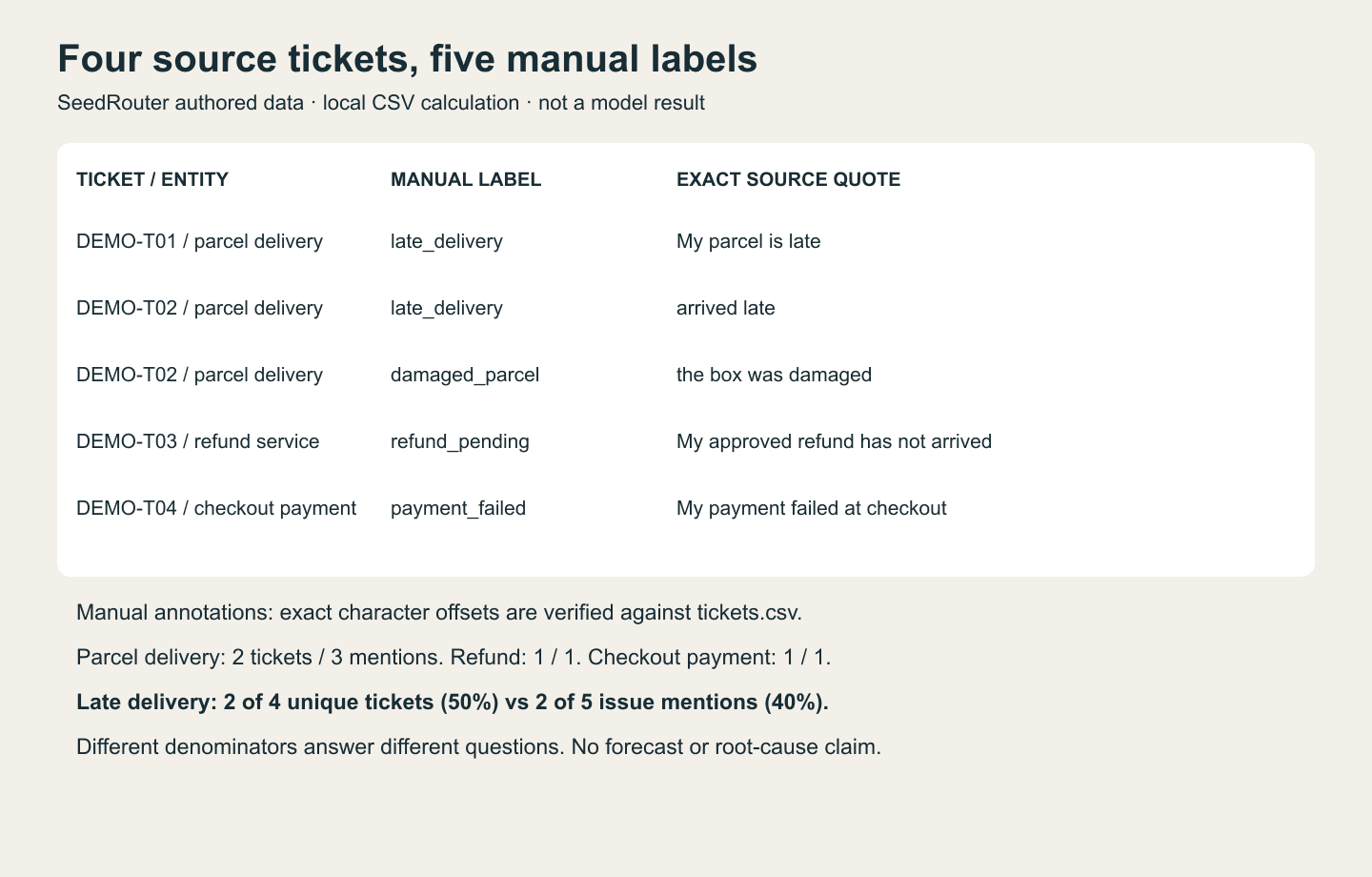
Use a taxonomy your team can apply consistently
Ticket analysis starts with labels that answer an operational question. Define the difference between a refund that has not arrived and a payment that failed, then keep an unknown category for messages that do not provide enough context.
- Give ticket analysis an example and boundary for every issue label.
- Compare ticket analysis decisions with a held-out labeled sample.
- Allow multiple issues when the message clearly describes more than one.
Ticket analysis: one message, two issues
- Message
- My parcel arrived late and the box was damaged
- Issue 1
- Late delivery
- Issue 2
- Damaged parcel
- Ticket count
- 1
- Issue-mention count
- 2
The label choice is an authored reference for this sample, not a measured model judgment.
Reconcile ticket analysis counts before writing
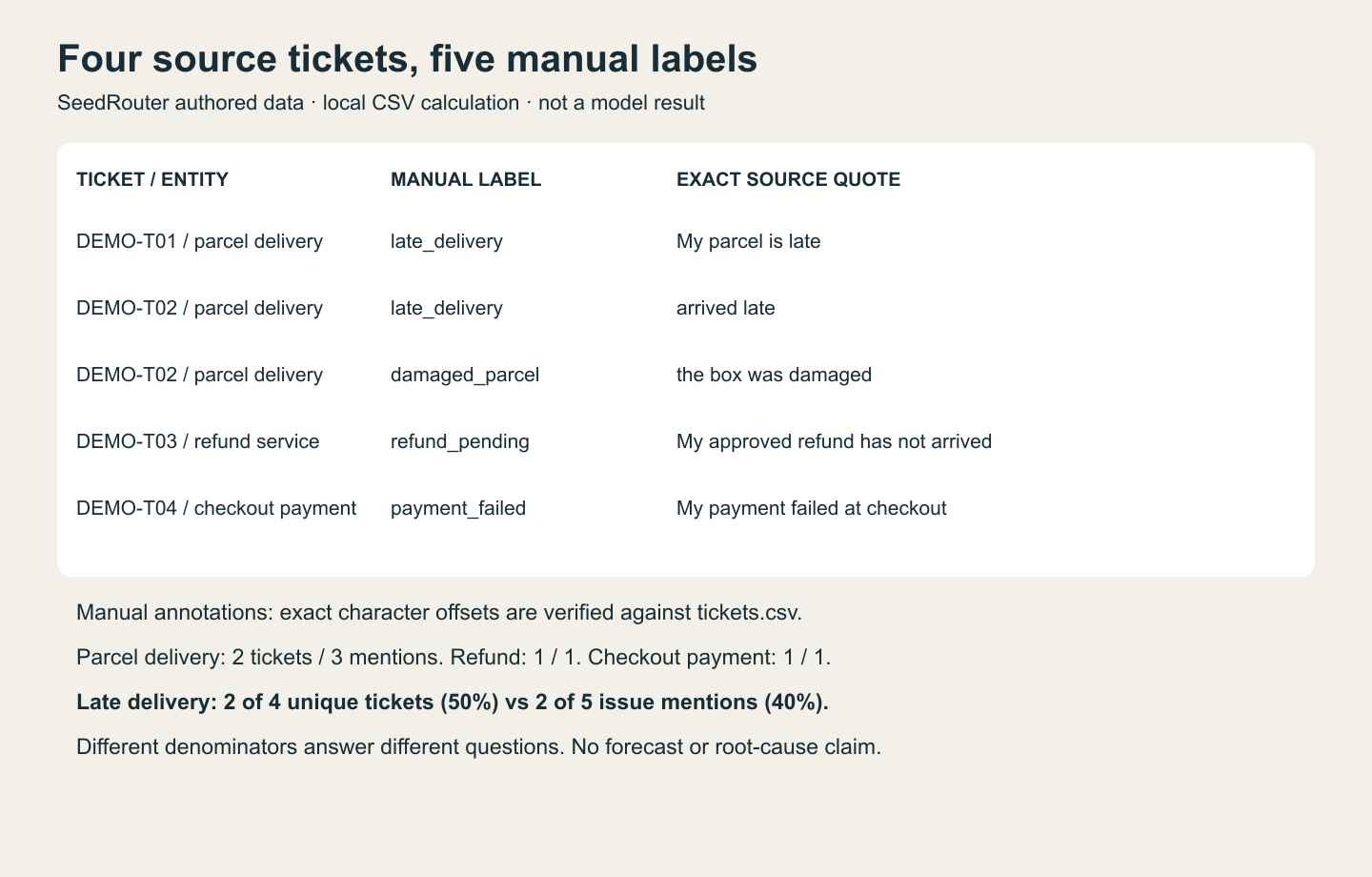
Give ticket analysis accepted labels with their record identifiers, then calculate totals in code or SQL. In this sample, late delivery appears in two of four tickets; counting five issue mentions as the denominator would answer a different question.
- Match every expected input identifier to a returned record.
- Keep ticket analysis exclusions and duplicate rules inspectable.
- Calculate percentages from the named denominator outside the model.
Ticket analysis · follow a theme back to its messages
- DEMO-T01
My parcel is late. It was due yesterday.
- DEMO-T02
My parcel arrived late and the box was damaged.
- DEMO-T03
My approved refund has not arrived.
- DEMO-T04
My payment failed at checkout.
4 unique tickets · 5 issue mentions
Tickets with this issue: 2 / 4
Ticket analysis with a path back to the evidence
The downloadable ticket analysis example includes full messages, exact supporting text and groups for parcel delivery, refunds and checkout. A useful summary names the affected records, then leaves causes open when the messages do not establish why the problem occurred.
- Link each theme to representative source messages.
- Ask ticket analysis to separate customer reports from verified causes.
- Track taxonomy revisions so changes in labels do not masquerade as trends.
Ticket analysis: a theme with inspectable support
- Theme
- Late delivery
- Supporting records
- DEMO-T01 · DEMO-T02
- Observed
- Both messages report a late parcel
- Not established
- Carrier fault or warehouse cause
- Next owner
- Operations team investigates the records
A recurring complaint can justify investigation without proving the cause of the issue.
Choose a ticket analysis approach
Match ticket analysis to the output you need. Classification, aggregation and narrative are distinct jobs, and each can fail in a different way even when the final summary reads well.
| Job | Starting point | What to verify |
|---|---|---|
| Ticket analysis classification | GPT-6 Sol or Claude Opus 5.5 | Labels supported by the original message. |
| Ticket analysis aggregation | Code or SQL over accepted records | Identifiers, duplicates and denominators. |
| Ticket analysis summary | Text model with calculated totals | Accurate counts and traceable examples. |
Turn a sample into a repeatable feedback review
Begin ticket analysis with a small set your team has labeled and a clear reporting question. Preserve the same reference cases when changing categories, prompts or model choices.
- 1
Define and label
Prepare ticket analysis categories with examples and exclusions. Keep product area and issue separate, and agree how to handle ambiguous or multi-issue messages.
- 2
Classify, then count
Run ticket analysis in controlled batches with stable record identifiers. Review unclear labels, confirm every record is accounted for and calculate the accepted aggregates in code.
- 3
Summarize with evidence
Supply ticket analysis with calculated totals and representative messages. Check that the written summary preserves the denominator and does not turn a customer complaint into a verified cause.
Ticket analysis questions
Can ticket analysis handle thousands of messages?
Your application can iterate over a large dataset while retaining identifiers and classification status. For ticket analysis, use controlled batches and calculate totals from accepted records; placing all messages into one long prompt does not establish that none were skipped or counted twice.
Is sentiment enough for ticket analysis?
Sentiment can describe tone, but it rarely identifies the operational problem by itself. Ticket analysis usually needs an issue category and product or service context, so a frustrated customer reporting a payment failure is distinguishable from one asking about a delayed refund.
What if a ticket contains several issues?
Allow multiple labels when that matches your reporting question, and keep the unique ticket count separate. Ticket analysis should disclose whether a percentage uses tickets, customers or issue mentions as its denominator; these can all produce valid but different results.
How should I compare classification models?
Use the same held-out labeled sample and inspect categories that are often confused. Evaluate ticket analysis on missed issues, unsupported labels and reviewer corrections, rather than accepting valid JSON or fluent summaries as evidence that the classifications are correct.
Does SeedRouter connect to Zendesk or another help desk?
Your application or workflow tool retrieves the permitted messages and saves the results. SeedRouter supplies model calls for ticket analysis, while help-desk access, retention rules and record permissions remain in your existing systems; no dedicated connector is implied by this example.
How do I estimate the cost of a monthly run?
Measure actual classification calls, retries you choose to make and summary requests using current model rates. Keep ticket analysis review time separate, and rerun a stable sample when your taxonomy changes so a cheaper model is not accepted simply because it produces shorter output.
Inspect the messages and reproduce the counts
SeedRouter authored these four messages and five reference labels for ticket analysis. The validator checks the quoted text and reproduces both late-delivery ratios: two of four tickets, or two of five issue mentions. The result demonstrates counting and traceability, without claiming customer research or model accuracy.
- Download the ticket analysis fixture
- Ticket analysis source messages
- Manual labels and evidence spans
- Run the evidence and count checks
- Ticket analysis calculation receipt
- n8n integration guide
- Business data analysis workflow
- Current model prices
Related solutions
- Ecommerce operations
Create reviewable product copy and campaign drafts from approved product and business information.
- Lead classification and handoff
Extract details from incoming leads, review uncertain classifications and hand records to your business systems.
- Customer support workflows
Connect sourced answers to explicitly approved actions in your existing customer systems.
- Invoice and document extraction
Extract invoice fields and line items, then validate quantities, totals and source evidence.
- Internal knowledge assistants
Build answers around retrieved passages, technical terminology and traceable document sources.
- Business data queries
Turn business questions into reviewable queries and explain results calculated by your data systems.
Start with the issue your team wants to understand
Bring a labeled sample and a specific question about recurring problems. Test ticket analysis on the labels, the counts and the messages behind the summary before applying it to a full month of feedback.