
OpenClaw research with sources you can inspect
Watch the case videoTurn supplied creator profiles into a shortlist with evidence and open questions. Connect OpenClaw to a suitable SeedRouter text model, then compare the saved draft with the original material before expanding the assignment.
For developers and teams connecting their existing tools.
What can OpenClaw do with your model connection?
OpenClaw is an agent application that connects models to tools and ongoing sessions. SeedRouter supplies model access; your installation supplies the workspace, permissions and task context. Together, they let you test practical jobs using the documents and processes your team already understands.
Research with a source trail
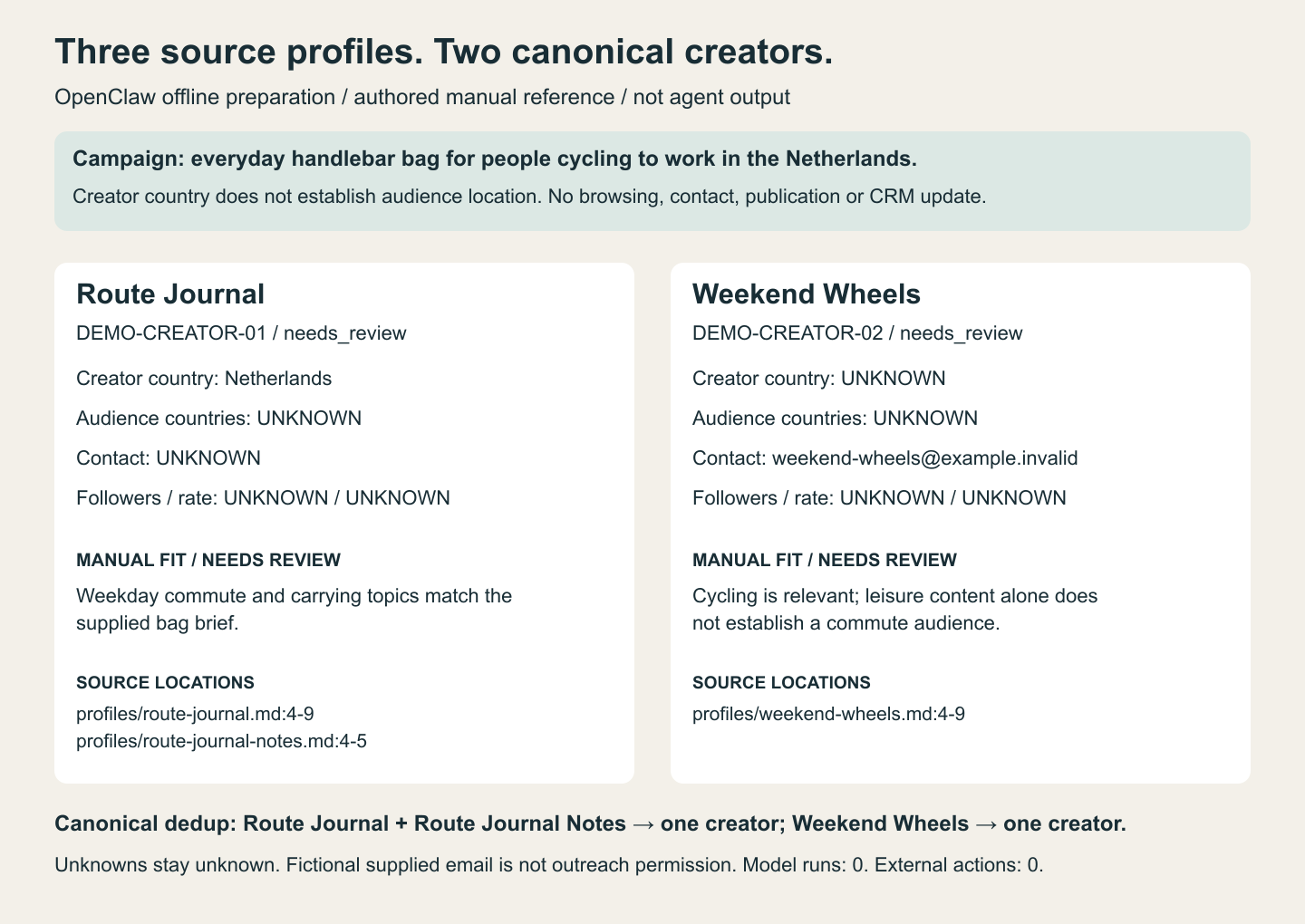
Ask OpenClaw to turn supplied creator profiles into a reviewable shortlist. Keep the profile identity and source passages with each fit reason, so another person can check duplicates and distinguish a missing fact from a conclusion.
Explore this use caseDraft from approved product facts
Use OpenClaw to prepare a description or campaign outline from a product record. Ask for the draft and a list of unanswered questions together, making the handoff useful even when the source information is incomplete.
Explore this use caseReview a bounded project task
Give OpenClaw a small file or workflow to inspect, with an explicit stopping point. A useful initial outcome is a proposed change and its evidence, before the agent gains permission to edit business records or publish anything.
Explore this use case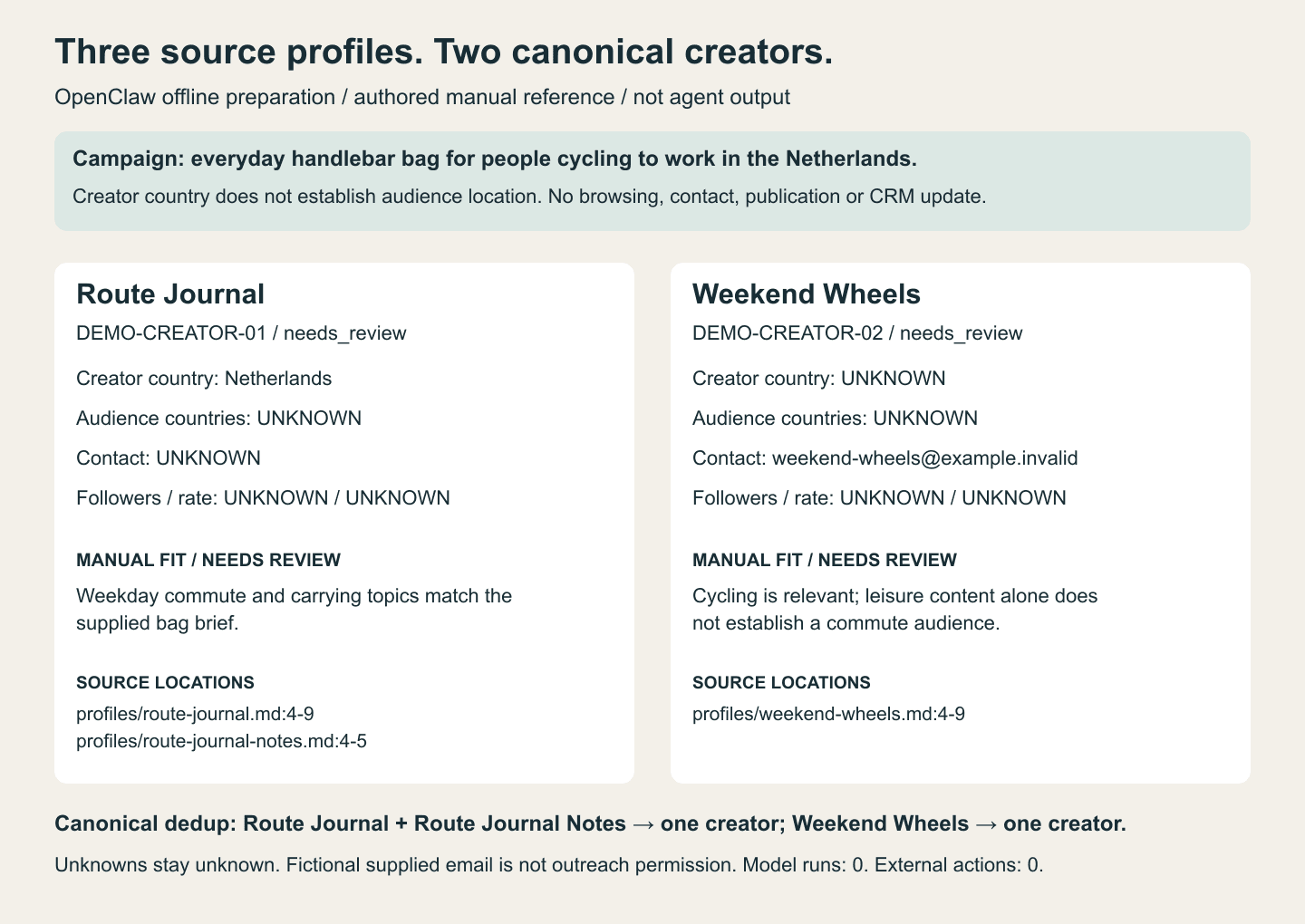
Match OpenClaw to the model protocol
Start with the API format supported by your chosen model. OpenClaw documents separate adapters for Chat Completions, Responses and Anthropic Messages, so a matching base URL alone does not establish a working tool session.
- Use the exact model identifier from its SeedRouter model page.
- Add the OpenClaw connection without replacing unrelated model settings.
- Check context and input capabilities against the selected model documentation.
OpenClaw connection checklist
- Address
- https://api.seedrouter.ai/v1 for OpenAI-compatible calls
- Protocol
- Choose the adapter that matches the model
- Authentication
- Private environment or secret reference
- Capabilities
- Declare only documented model features
Keep secrets out of exported task briefs and shared screenshots.
Measure the work, including the follow-up
An OpenClaw session may ask for clarification, read tools and revise its answer before it finishes. Compare the full cost of the accepted result, including those follow-up calls, with the same task completed using your current process.
- Keep the input and completion criteria unchanged between model comparisons.
- Record OpenClaw tool failures separately from weak answers.
- Count revisions and review time alongside actual model usage.
OpenClaw comparison: check the finished shortlist
- Route Journal
- Weekday commuting topics fit the supplied brief
- Weekend Wheels
- Leisure cycling alone does not establish a commute audience
- Duplicate rule
- The same canonical profile URL identifies one creator
- Unknowns
- Audience location, missing contacts, follower counts and rates
These are manual reference decisions. Do not treat them as recorded agent output or infer a contact address.
Give OpenClaw a brief with a stopping point
The OpenClaw download includes a campaign brief, three complete source profiles and a manual reference shortlist. Use the same files to check a draft, then stop at review: researching a creator does not authorize contacting them.
- Write the requested deliverable before selecting additional tools.
- Use the OpenClaw checklist to distinguish an answer from an action.
- Save the installed version with the result so later comparisons remain meaningful.
OpenClaw brief: research to a draft file
- Campaign
- DEMO-CYCLE-01 · a handlebar bag for everyday cycling
- Sources
- Route Journal, its second source and Weekend Wheels
- Output
- Shortlist CSV + questions + source references
- Stop
- Draft saved for review; no outreach or publication
All profiles are fictional; reserved example.invalid addresses are deliberately non-deliverable.
Choose a starting task for OpenClaw
Choose the smallest OpenClaw job that would save someone useful work. More tools and longer context introduce more variables; establish the outcome you need before expanding either. The options below compare tasks, not model rankings.
| Your task | Useful starting input | What to inspect |
|---|---|---|
| OpenClaw creator research | Supplied profiles and a campaign brief | Distinct creators, source-backed fit and unresolved facts. |
| OpenClaw product drafts | Approved specifications and tone examples | Accurate claims and a usable first draft. |
| OpenClaw project review | One file and a concrete review question | Findings tied to the actual file contents. |
Build the first repeatable task
Prepare OpenClaw around one assignment, then expand only after you understand its result. Keep the model connection and tool permissions separate in your checklist so a successful reply is not mistaken for a complete integration.
- 1
Prepare the source and expected answer
Choose a task you can check yourself. Give OpenClaw the campaign brief, source profiles and required columns, including fields such as audience location that the supplied material leaves unanswered.
- 2
Connect and inspect the session
Confirm the active model and API format before running your assignment. Check OpenClaw output against the source, including tool arguments and any proposed action, rather than accepting the closing summary alone.
- 3
Record the result before expanding
Save the output, actual usage and installed version. Add another OpenClaw task only when you know which parts need review and which tool permissions the next assignment genuinely requires.
OpenClaw connection questions
Does OpenClaw work with every model on SeedRouter?
No blanket compatibility claim applies. OpenClaw needs a suitable text model, the correct API adapter and the capabilities used by its tools; a model being listed in the directory does not prove that every agent feature works with it.
Which base URL should I use for OpenClaw?
For an OpenAI-compatible connection, use https://api.seedrouter.ai/v1 and the matching request adapter. OpenClaw also documents other protocol adapters, so follow the selected model documentation instead of copying a configuration for a different model family.
Where should the OpenClaw API key live?
Keep the key in a private environment or the documented secret-reference mechanism. OpenClaw configuration exports and task briefs should describe the credential source without containing its value, particularly when you share a workspace with teammates.
Can OpenClaw update my store automatically?
Only the tools and permissions you configure can provide those business actions. SeedRouter supplies the model calls; OpenClaw and your connected application must handle authorization, product records and publishing, with a review step appropriate to the changes you permit.
How should I compare OpenClaw model costs?
Use the same task and acceptance criteria, then compare total usage for completed work. OpenClaw sessions can involve repeated context and tool calls, so include revisions and review time instead of choosing solely by the price of a short answer.
Has this OpenClaw setup been benchmarked here?
No new OpenClaw session has been benchmarked here. The downloadable sources and shortlist are authored references, and their evidence checks run locally; test the assignment with your installed client and exact model before treating the connection as ready for ongoing work.
Official references and practical next steps
Inspect the OpenClaw preparation package: three fictional profiles, two manual shortlist rows and exact source locations. Local checks preserve duplicate identity and unanswered fields. The official connection reference explains configuration; this material demonstrates a testable assignment, not a recorded agent session or customer result.
- OpenClaw custom connection reference
- Download the OpenClaw source package
- Read the reference shortlist PDF
- Read the campaign brief
- Inspect the reference shortlist
- OpenClaw source evidence map
- Run the local evidence checks
- SeedRouter API overview
- Build a knowledge assistant
- View usage history (sign in)
Related solutions
- Ecommerce operations
Create reviewable product copy and campaign drafts from approved product and business information.
- Lead classification and handoff
Extract details from incoming leads, review uncertain classifications and hand records to your business systems.
- Monthly reports
Combine deterministic spreadsheet processing with model-assisted classification and written analysis.
Bring one task you can verify
Start with sources and a deliverable your team can inspect. Choose a suitable model for OpenClaw, compare its saved draft with the brief and use the evidence to decide whether the task is ready to repeat.