
Hermes Agent, connected to a job worth repeating
Watch the case videoTurn recurring questions and research notes into a checked deliverable. Connect Hermes Agent to a suitable SeedRouter text model, supply the material it needs and build a repeatable task before handing it a longer assignment.
For developers and teams connecting their existing tools.
What does Hermes Agent add to your workflow?
Hermes Agent is an agent application that combines a model with tools, session context and task execution. SeedRouter supplies the model connection; your installation controls the documents and actions available to it. Start with work that has a recognizable finished output.
Compare supplied material
Give Hermes Agent product sheets, internal notes or a short policy set and ask for a comparison you can review. Require the answer to identify its source so differences in wording do not become invented differences in fact.
Explore this use casePrepare a research handoff
Use Hermes Agent to organize provided research into a decision brief. Name the questions and distinguish recorded facts from assumptions, making it easier for the next person to continue without repeating the entire investigation.
Explore this use caseDraft the next routine deliverable
Ask Hermes Agent to prepare a product description or internal summary from approved information. Keep a stable example of the desired output and revise the brief when the same misunderstanding appears in more than one run.
Explore this use case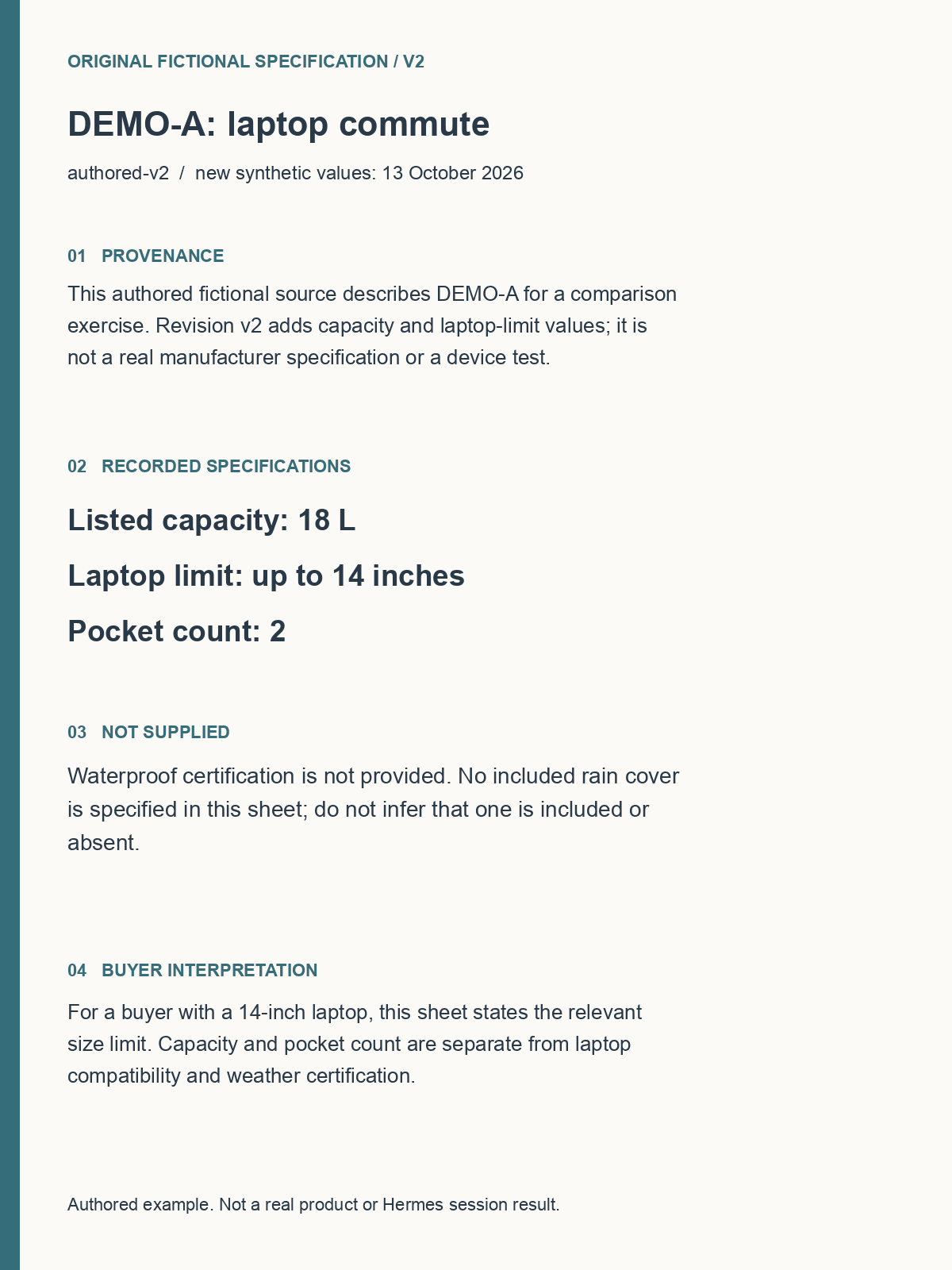
Give Hermes Agent enough working context
The official quickstart requires a model with at least 64,000 tokens of context. Check the actual model limit before connecting Hermes Agent; a large value typed into a configuration cannot create capacity the selected model does not support.
- Choose a text model with the API format the custom connection expects.
- Confirm the context detected by Hermes Agent against the model documentation.
- Keep source material relevant so the useful details survive a longer session.
Hermes Agent connection essentials
- Model selection
- Use the hermes model configuration flow
- Custom address
- https://api.seedrouter.ai/v1
- Context requirement
- At least 64,000 tokens in the official quickstart
- Model name
- Exact identifier from the model directory
Record the installed version because configuration behavior and defaults can change between releases.
Keep the brief when you change the model
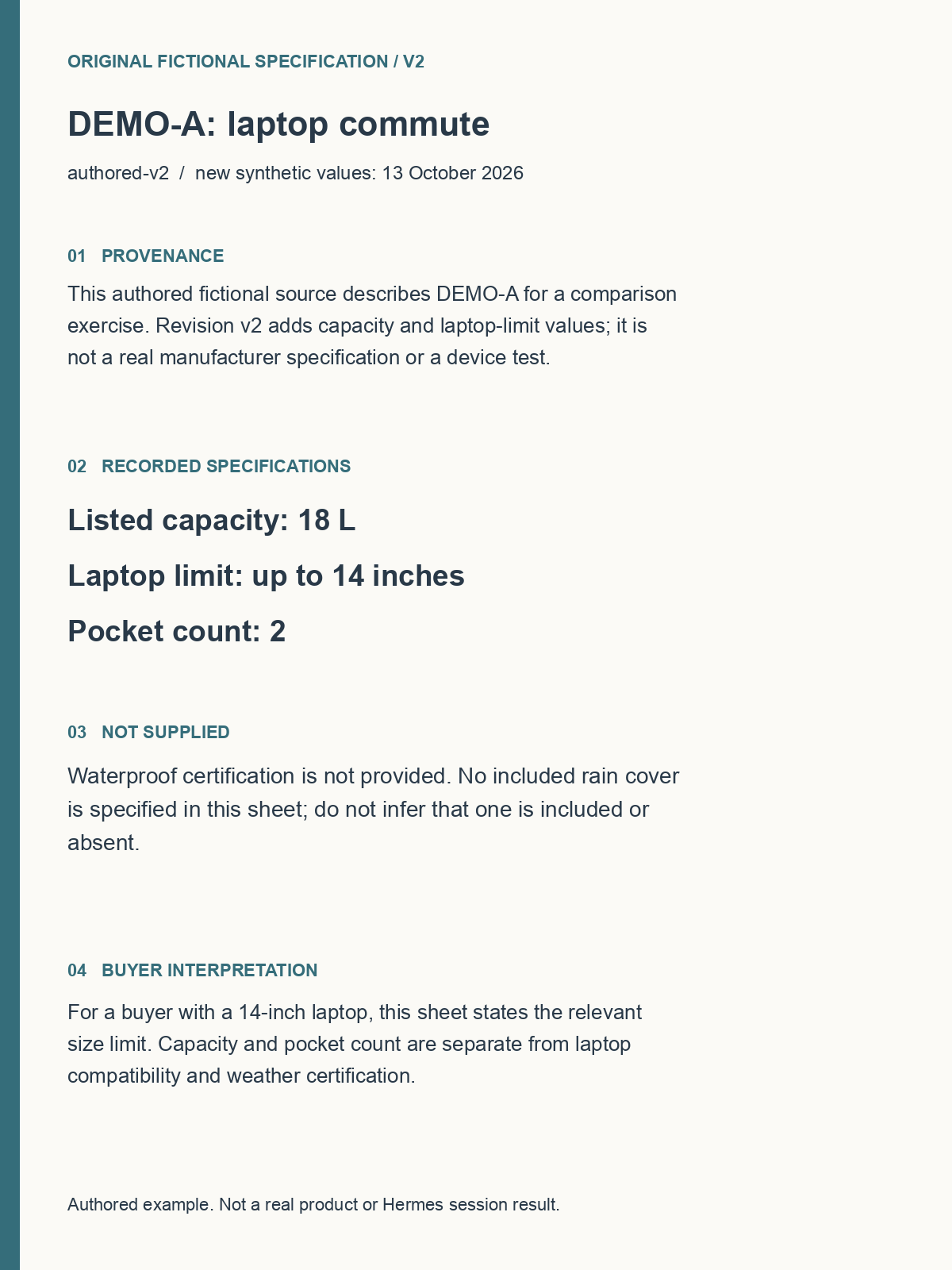
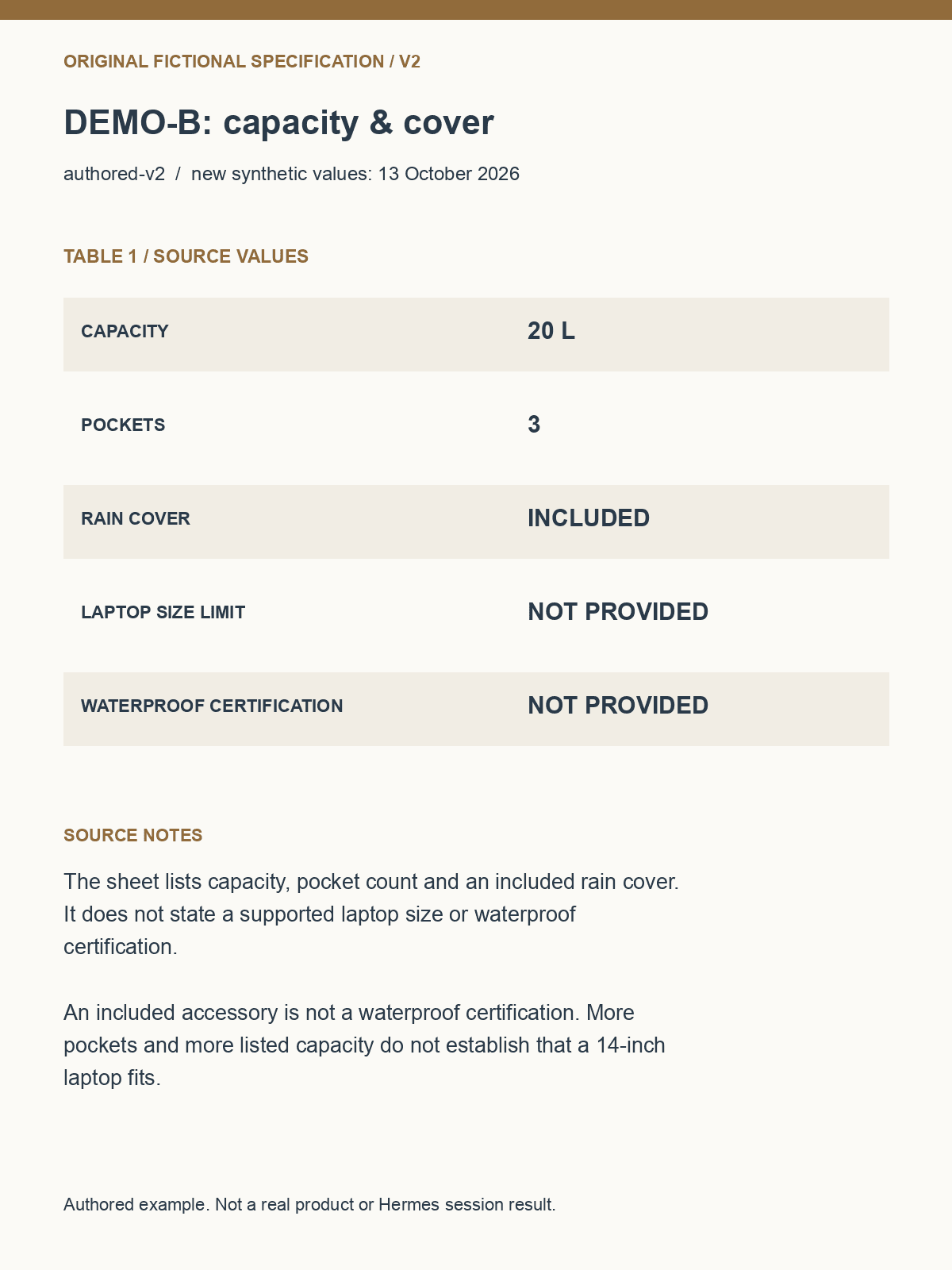
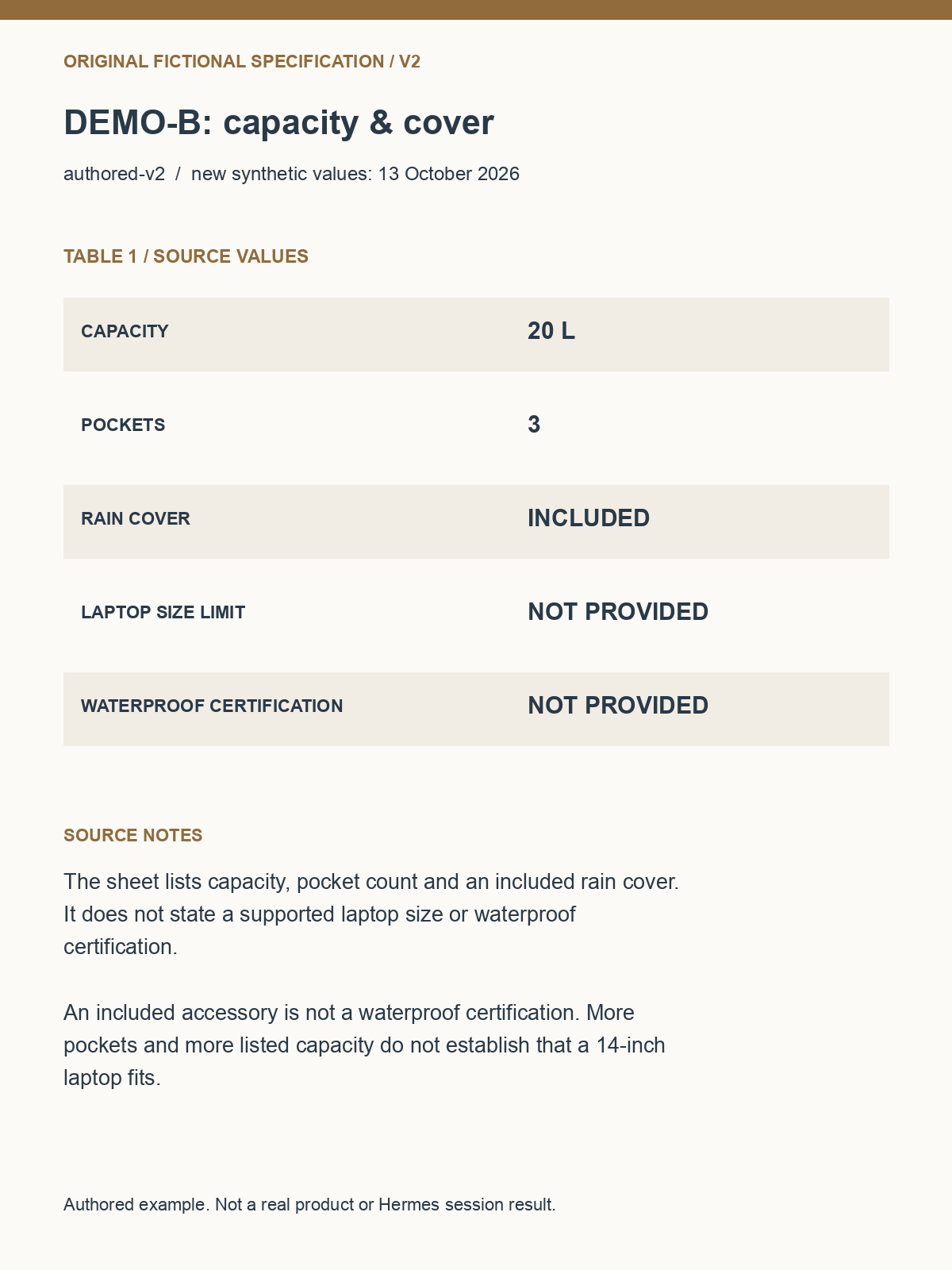
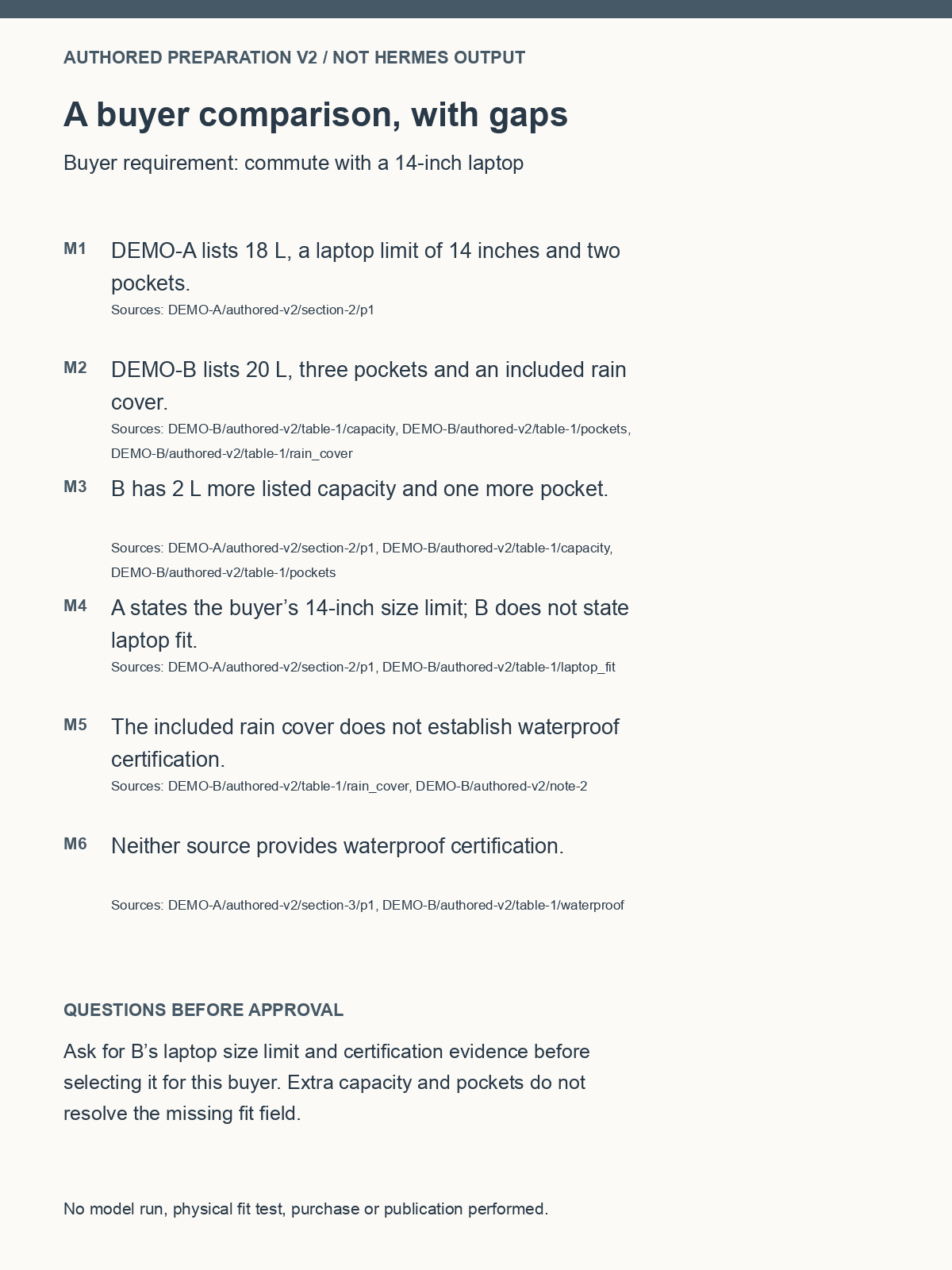
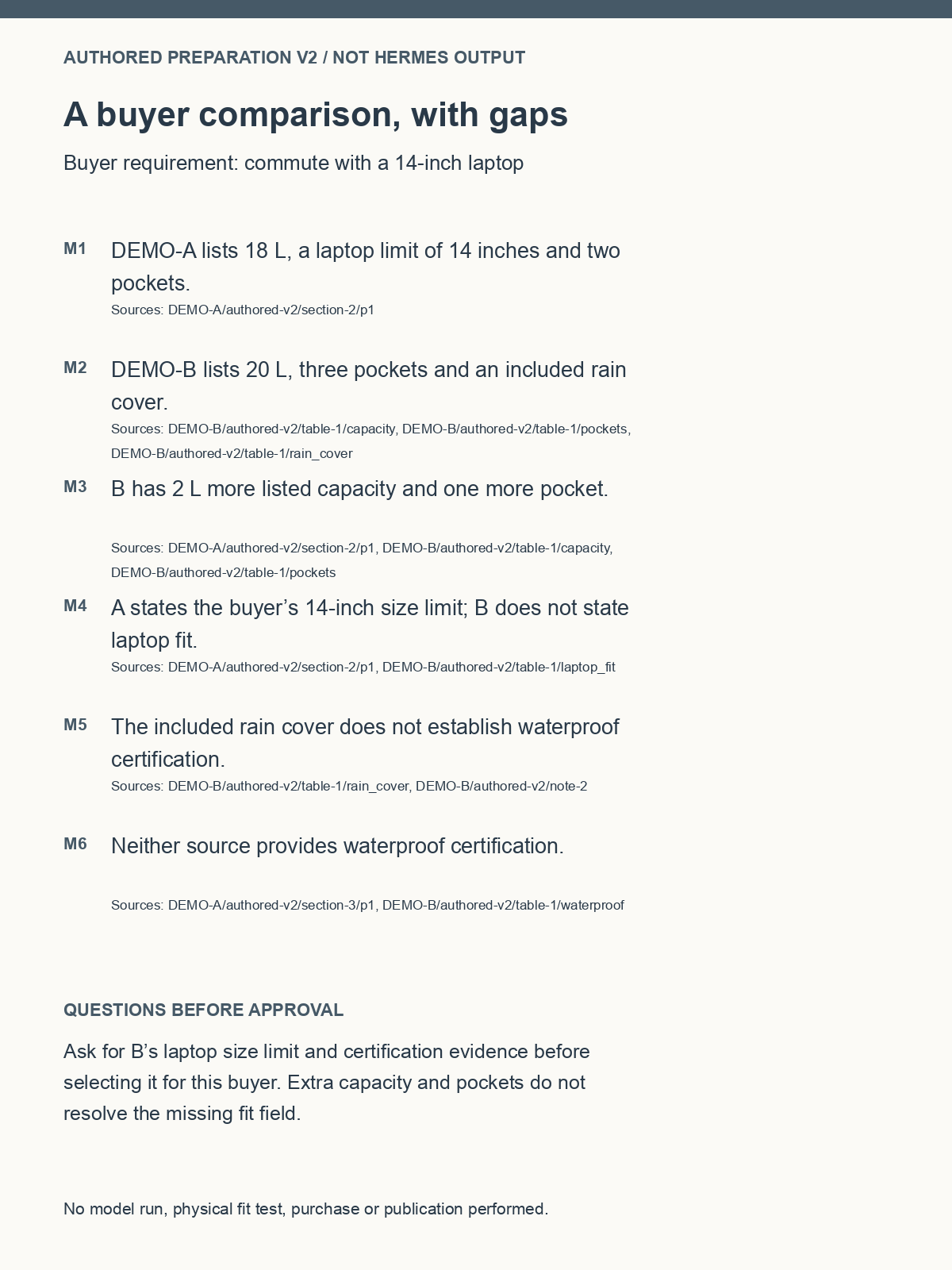
Keep the same buyer requirement and source revisions when comparing Hermes Agent models. Here A lists 18 litres, a 14-inch laptop limit and two pockets; B lists 20 litres, three pockets and a rain cover, but no laptop limit or waterproof certification.
- Check whether each comparison statement cites the correct source.
- Ask Hermes Agent to distinguish extra capacity from evidence of laptop fit.
- Track complete session usage and corrections when you run the case.
Download a task before building a larger agent
Download both complete sheets, the buyer brief and a six-claim reference memo. The Hermes Agent task asks for differences with citations and unresolved questions. The supplied memo is authored preparation; use it to inspect your own run, not as a claimed model response.
- Include source revisions so you can repeat the same comparison later.
- Limit Hermes Agent to reading and drafting for this initial assignment.
- Keep credentials outside the brief and outside shared project exports.
Choose a task for Hermes Agent
Match Hermes Agent to work that benefits from several connected steps. If one fixed script already produces the correct output, keep it as your baseline; an agent needs to justify its extra decisions and review effort.
| Assignment | Why use an agent? | Accept the result when |
|---|---|---|
| Hermes Agent comparison | Find relevant differences across supplied sources | Each factual difference has a source. |
| Hermes Agent research brief | Organize evidence around a question | Facts, assumptions and unanswered questions remain distinct. |
| Hermes Agent product draft | Turn facts and tone guidance into copy | The draft preserves specifications and avoids unsupported claims. |
Go from connection to a useful deliverable
Run the smallest Hermes Agent assignment that resembles your real work. The sequence below separates connection setup from task quality, so a successful answer to a greeting is not your only evidence that the workflow is ready.
- 1
Choose the source material
Pick a short task whose result you can judge. Give Hermes Agent relevant documents and a specific output, such as a comparison table with one source reference for every factual difference.
- 2
Configure the model connection
Use the documented custom endpoint flow and private credential storage. Confirm Hermes Agent is using the intended model and enough context before starting the task with business material.
- 3
Check and record the completed work
Compare the deliverable with the original sources and save the corrections. Record Hermes Agent version, model, usage and tool issues so the next run has a clear point of comparison.
Hermes Agent connection questions
How do I connect Hermes Agent to SeedRouter?
Use hermes model and select the documented custom endpoint option for your installed version. Hermes Agent needs the base URL, API key and exact model name to agree; use https://api.seedrouter.ai/v1 for the OpenAI-compatible connection and check the model contract.
Why does Hermes Agent require a large context window?
The official quickstart sets a minimum of 64,000 tokens for its tool-based workflows. Hermes Agent must have room for instructions, conversation and tool results, so verify supported and detected capacity before troubleshooting a longer assignment as a writing-quality problem.
Where does Hermes Agent store credentials?
The official quickstart separates secrets in ~/.hermes/.env from ordinary settings in ~/.hermes/config.yaml. Use the Hermes Agent configuration flow to place values correctly, and omit real keys from downloaded briefs, shared screenshots and version-controlled project files.
Does Hermes Agent need permission to act on my systems?
Yes, tool access and application permissions determine what it can actually read or change. Connecting Hermes Agent to a model does not automatically connect your store, mailbox or document system; configure each required tool and the actions you intend to allow.
How do I estimate Hermes Agent costs?
Compare the full usage of a completed assignment with current model rates. A Hermes Agent session may include several calls and revisions, so track accepted output and editing time alongside tokens rather than treating one successful reply as the cost of an ongoing assistant.
Is the Hermes Agent example a tested production setup?
It is an illustrative task and acceptance checklist, not a newly measured deployment. The Hermes Agent documentation was reviewed on October 12, 2026; the selected model, tools and installed release still need a task-level check in your own environment.
References for the connection and the task
This Hermes Agent exercise contains original fictional sources, a buyer brief, a cited manual memo and a reproducible checker. Local calculations confirm the two-litre and one-pocket differences; separate checks reject invented fit and certification claims. These are source checks, not model accuracy results.
- Hermes Agent source A (PDF)
- Hermes Agent source B (PDF)
- Hermes Agent claim-to-source map
- Hermes Agent local check results
- Hermes Agent official quickstart
- SeedRouter model API overview
- Knowledge assistant workflow
- Review your model usage (sign in)
Related solutions
- Ecommerce operations
Create reviewable product copy and campaign drafts from approved product and business information.
- Customer support workflows
Connect sourced answers to explicitly approved actions in your existing customer systems.
- Internal knowledge assistants
Build answers around retrieved passages, technical terminology and traceable document sources.
- Business data queries
Turn business questions into reviewable queries and explain results calculated by your data systems.
Start with a question your sources can answer
Choose a suitable model, bring two documents and define a useful comparison. Use Hermes Agent to prepare the first draft, then decide what to automate after you have checked the sources and the actual work involved.