GPT Image 2.6 Flare vs Sunburst: which one should you use?
Compare GPT Image 2.6 Flare and Sunburst on speed, edit stability, the new complexity setting, GIF and SVG output, and token cost, with measured runs.
Read as MarkdownUse GPT Image 2.6 Flare for drafts, volume and anything a person is waiting on. Move to Sunburst when an edit has to leave the rest of the frame alone. Both models charge the same per token, so you are choosing between time and edit stability, not between two prices. [1][2][3]
A caveat before the details. OpenAI released GPT Image 2.6 on November 4, 2026. GPT Image 2.6 is now available on SeedRouter, but the controlled Flare-versus-Sunburst comparison below is from the previous release. The measurements in this article come from GPT Image 2.5 Flare and Sunburst, the previous pair, which we run in production. Everything said about 2.6 itself is quoted from OpenAI and marked that way.
What OpenAI changed for each model in 2.6
OpenAI kept the two-model split it introduced with GPT Image 2.5 and gave each side a sharper job description. [1][2][3]
| GPT Image 2.6 Flare | GPT Image 2.6 Sunburst | |
|---|---|---|
| Model ID | gpt-image-2.6-flare | gpt-image-2.6-sunburst |
| OpenAI's description | Image generation and editing for fast iteration | Image generation and editing for detailed visual work |
| Speed claim | As little as six seconds when quality is low | None given |
| Edit claim | None given | Greater consistency across edits at medium or high quality |
| Layout claim | Better layouts for posters and product imagery | Higher-quality generation |
| Quality steps | low to max | low to max |
| New in 2.6 | Complexity, SVG output, animated GIF output | Same |
On top of the per-model claims, OpenAI says Images 2.6 generates images 50% faster than before. [1] Look at how each claim is tied to a setting. The six-second figure is for Flare at low. The consistency claim is for Sunburst at medium or high. That tells you where OpenAI expects each model to be used. It is not a benchmark you can plan capacity around.
The API changelog lists three additions for both 2.6 models: adjustable complexity, SVG generation and animated GIF generation. Markup-guided editing arrived the same day, but for GPT Image 2.5 and 2.6 alike, so it is not a reason to upgrade. [5]
Complexity is a third dial, and it changes the choice
Before 2.6 you had two levers: which model, and what quality. The new complexity field adds a third. Quality controls detail and fidelity. Complexity controls how much the model plans before it renders. [4]
Both models accept low, medium and high, and both default to high when you leave the field out. It costs nothing extra. OpenAI suggests low for focused edits such as changing a background or a sign, and higher settings for dense text, complex layouts and scenes where objects relate to each other. It also warns that higher complexity can add latency and introduce changes you did not ask for. [4]
That warning matters for the Flare-or-Sunburst question. The reason to pay Sunburst's extra time on an edit is that it leaves more of the image intact. An edit request with no complexity field runs at high, which pushes the other way. So for a Sunburst edit, setting complexity: "low" is the first thing to try. Keep high for the crowded poster you are generating from scratch on Flare.
Does the choice matter for GIFs and SVGs?
Both models produce both formats, and both are generation-only. The edit endpoint returns neither. [4]
For GIFs you set output_format: "gif" and control the animation with frame_count (2 to 64, default 9) and frame_duration_ms (20 to 2,000, default 200). Frame count, frame size and the number of animations share one pixel budget, so a long animation forces smaller frames. OpenAI's own example in its guide, a lantern loop of nine frames at 200 ms each, was made with Sunburst. [4] We have no GIF timings for either model. Our inference is that a request carrying many frames will show the speed gap more than a single still does, so it makes sense to find the motion on Flare.
SVG works differently. The API first renders a reference image, then a separate authoring model writes the vector file. The quality setting applies to that reference image. You pay the image rate for the reference plus the authoring model's tokens, and n must be 1. [4] OpenAI's guide shows both models drawing the same bakery logo. Flare drew a loaf over a two-line wordmark. Sunburst added wheat sprigs and a rolling pin. More elements means more paths to clean up, so for icons and simple marks the plainer output can be the more useful one.
What our GPT Image 2.5 runs show about the split
We have not repeated this controlled comparison on GPT Image 2.6. The previous release gives us a baseline, not proof of the speed or edit quality of 2.6.
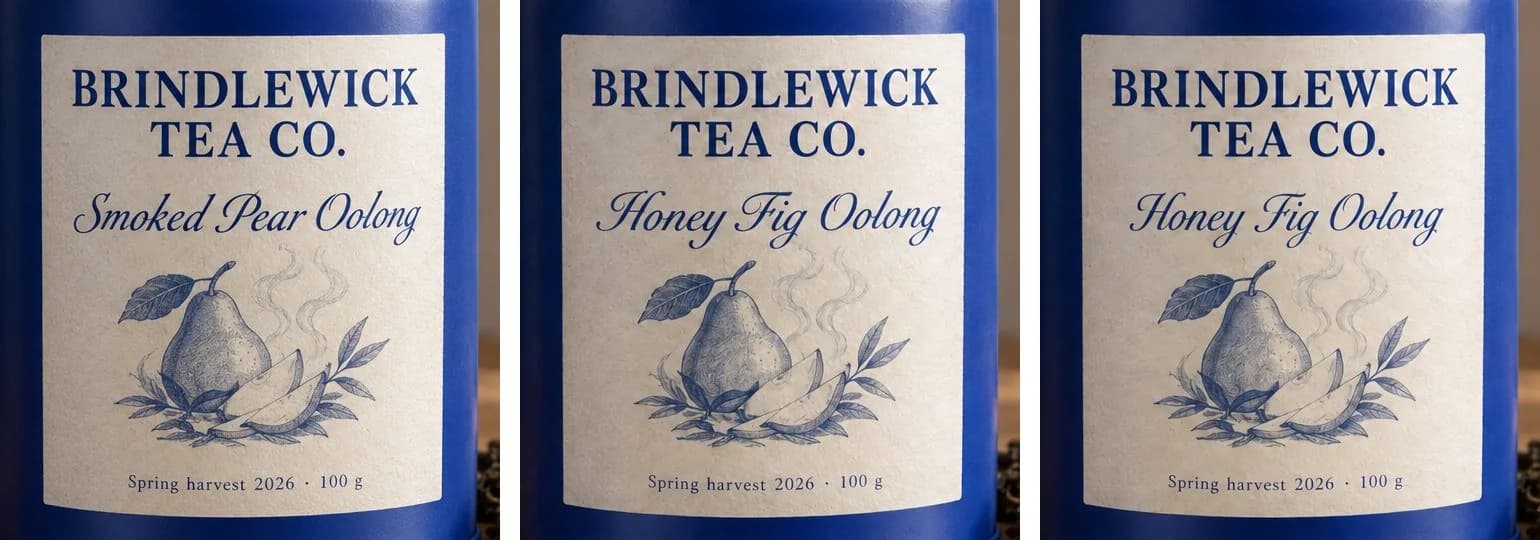
On November 5, 2026 we sent one prompt to both 2.5 models through the SeedRouter production API: a product photo of a fictional tea tin with three lines of label text. Each configuration ran once, as PNG with one image per request. Time is measured from submission until the finished file was stored, so it includes our upload step as well as rendering. For the edit, both models received the same Flare image and were asked to change only the second label line, from "Smoked Pear Oolong" to "Honey Fig Oolong".
| Run | Flare | Sunburst |
|---|---|---|
| 1024×1024, low: output tokens | 196 | 196 |
| 1024×1024, low: time | 21 s | 21 s |
| 1536×1024, high: output tokens | 1,372 | 1,372 |
| 1536×1024, high: time | 25 s | 36 s |
| One-line edit, 1536×1024, high: time | 29 s | 73 s |
| Edit: input tokens | 1,615 (1,536 image, 79 text) | 1,615 (1,536 image, 79 text) |
| Edit: pixels outside the edited line changed by more than 12 of 765 | 21.5% | 16.2% |
| Edit: pixels changed by more than 30 of 765 | 3.6% | 3.9% |
Four things stood out.
The token counts were identical at every setting, so the cost was identical too. Nothing in the bill tells the two models apart.
The time gap grew with the amount of work. There was none at low. A high generation took 11 seconds longer on Sunburst, and the edit took 44 seconds longer, two and a half times as long.
Both edits got the new line right and kept the pear drawing and the bottom line. Sunburst left fewer pixels slightly changed, about a quarter fewer at the small threshold, but at the larger threshold the two were level. In practice that means less faint noise across the frame, not a visibly cleaner edit. One sample cannot settle this, and it is the area where OpenAI says 2.6 Sunburst improved most.
Both models also invented text we never asked for. Books on the shelf came back with made-up titles on their spines, and Sunburst added more props and more of that text. If an image is going on a product page, write "no other text" into the prompt and check the background before you ship it.
One more data point from the same day, with a different prompt: a two-image Sunburst request at max quality and 1536×1024 used 10,976 output tokens, an average of 5,488 per image. That is four times the 1,372 tokens at high. These measurements remain specific to GPT Image 2.5; a matching GPT Image 2.6 comparison is still pending.
Same token rates, different bills
As checked on November 5, 2026, OpenAI lists the same rates for both 2.6 models: $5 per million text input tokens ($1.25 cached), $8 per million image input tokens ($2 cached) and $30 per million image output tokens. These match the GPT Image 2.5 rates. [2][3][6]
At the $30 output rate, the 2.5 token counts above work out to about $0.0059 for 196 tokens, $0.041 for 1,372 tokens and $0.165 for 5,488 tokens. Treat those as a reference point, not as a 2.6 quote. OpenAI's image-token calculator estimates 823 image output tokens for a 1024×1024 GPT Image 2.6 image at low quality; final usage can also include text output. Its estimates do not replace measured billing. [7] Complexity adds no fee, markup edits cost the same as other edits, and SVG output adds the authoring model's tokens. [4]
With equal rates, the real cost difference between Flare and Sunburst is the number of attempts you throw away. A Sunburst edit that passes review the first time is cheaper than two Flare edits where the second one fixes what the first one broke. Count cost per accepted image, not per request.
Current SeedRouter rates and the Playground are on the GPT Image 2.6 page. Compare them with the current GPT Image 2.5 rates.
A starting rule for routing jobs
These are starting points built from OpenAI's guidance and our 2.5 runs. Change one variable at a time when you adjust them.
| Job | Model | Settings |
|---|---|---|
| Exploring concepts, many variants | Flare | Quality low or medium; complexity high (default) |
| Social image someone is waiting for | Flare | Quality low; complexity low for a simple scene |
| Poster with several blocks of text | Flare first | Quality high; complexity high |
| Copy or color change on an approved product shot | Sunburst | Quality medium or high; complexity low |
| Edit inside a crowded scene | Sunburst | Quality high; complexity medium |
| Animated GIF | Flare to find the motion, Sunburst for the final loop | Quality medium; complexity medium |
| Logo or icon as SVG | Either; compare how many shapes you have to clean up | Quality medium; complexity low |
The simplest version is: draft on Flare, finish on Sunburst. Generate the composition fast, pick a winner, then run the edit on Sunburst with low complexity so the rest of the frame stays put. For a longer look at the same split in the previous release, see our GPT Image 2.5 Flare vs Sunburst guide.
Questions people are already asking
How do I know whether I am using Flare or Sunburst?
In the API you pick one yourself with the model field, so the choice is always in your request. In ChatGPT, OpenAI's launch post does not say which of the two generates a given image, and it describes no setting for choosing. [1]
Can I download GPT Image 2.6 Flare or Sunburst for Android?
No. Both are hosted models. Images 2.6 is available in the ChatGPT and Codex apps on desktop, mobile and web for every subscription tier, and developers reach Flare and Sunburst through the API. There are no model files to install. [1]
Is Sunburst always better than Flare?
No. In our 2.5 runs the low-quality images were equally correct, and Sunburst's extra set dressing was not always welcome. OpenAI positions Sunburst for detailed work and consistent edits, not for every image.
Does GPT Image 2.6 cost more than GPT Image 2.5?
Not per token. OpenAI lists identical text and image rates for both releases. Whether a 2.6 image costs more or less depends on its token usage. OpenAI provides a static-image token estimator; the final bill follows actual usage. [2][3][6]
When can I use GPT Image 2.6 on SeedRouter?
GPT Image 2.6 is available now. Select an available model in the Playground or use a model ID listed for your SeedRouter API key.
Sources
-
OpenAI: Introducing Images 2.6, November 4, 2026.
-
OpenAI: Image generation guide (complexity, SVG output, animated GIF output, costs).
-
OpenAI: GPT Image token calculator source, checked November 5, 2026.