Fix model_not_found in OpenAI-compatible APIs: debug checklist
Fix model_not_found 404 errors in OpenAI-compatible APIs with a 5-minute debug checklist covering base URLs, model ID naming, casing, key scope and /models.
Read as Markdown{
"error": {
"code": "model_not_found",
"message": "The model `gpt-6-1-sol` does not exist or you do not have access to it."
}
}A model_not_found error (HTTP 404 or HTTP 400) in an OpenAI-compatible API almost always reduces to a single gap: where your request actually landed does not match the exact model string that host expects. Even when two platforms accept the exact same POST /v1/chat/completions JSON payload, their model IDs, vendor-prefix conventions, capitalization rules, endpoint paths and API-key permissions differ.
Instead of guessing model names from old blog posts or tweaking random SDK flags, work through the five-minute checklist below in order. You will isolate whether the bug lives in your environment variables, your base URL path, your model string, your endpoint type, or your key permissions, and confirm the working call with one bare curl command.
Why "OpenAI-compatible" does not mean identical model IDs
"OpenAI-compatible" standardizes the HTTP route shape and JSON schema (messages, model, tools, stream, max_tokens). It does not standardize the catalog of model strings across services.
| Platform style | Example GPT-6.1 Sol ID | Example Claude Opus 5.5 ID | Example MiniMax ID |
|---|---|---|---|
| Bare canonical ID (e.g. SeedRouter) | gpt-6.1-sol | claude-opus-5-5 | MiniMax-M3.1-Flash |
Namespaced vendor/model style | openai/gpt-6.1-sol | anthropic/claude-opus-5-5 | minimax/minimax-m3.1-flash |
| Dated snapshot alias | gpt-6.1-sol-2026-09-29 | claude-opus-5-5-20260922 | varies by host |
When you change base_url in an SDK or coding agent while keeping the old model string (or update model while a stale OPENAI_BASE_URL variable in ~/.zshrc still points to OpenAI), the receiving server cannot resolve the string and returns model_not_found.
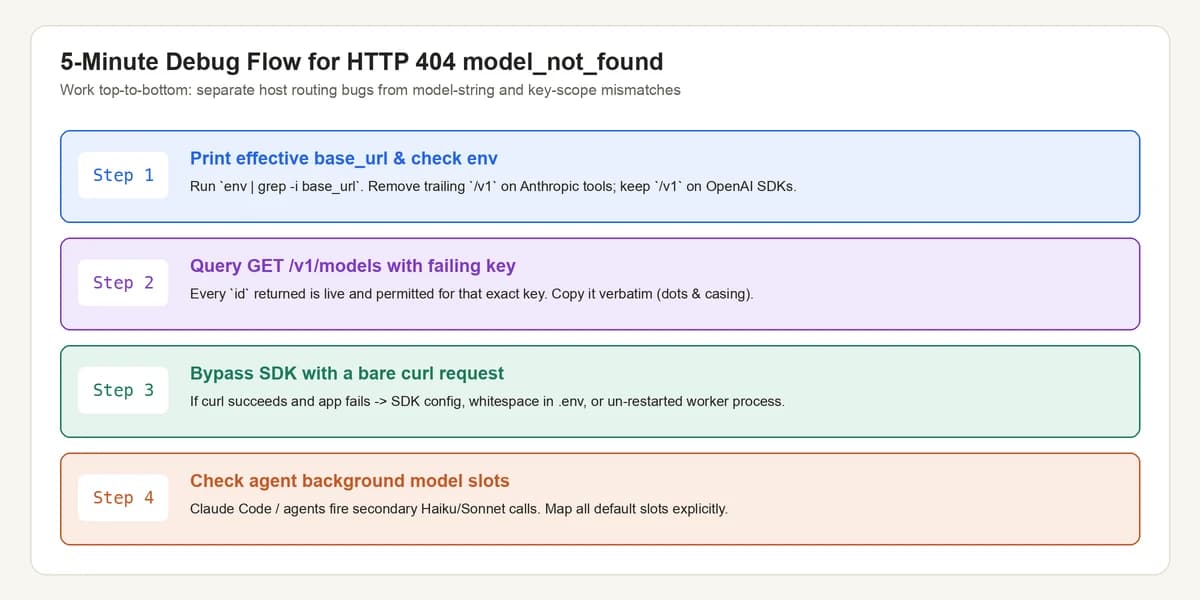
Five-minute debug matrix: check these six items in order
Stop as soon as you find the first mismatch:
| Step | What to verify | Fastest way to check | Classic mistake |
|---|---|---|---|
1. Effective base_url | Confirm the exact host and path actually hit | Log client.baseURL at runtime or run env | grep -i base_url | Stale shell export overrides .env, or /v1 is duplicated (/v1/v1/...) |
| 2. Prefix convention | Confirm whether the host uses bare IDs or vendor/model prefixes | Call GET /v1/models with the same key | Sending openai/gpt-6.1-sol to a bare-ID endpoint, or vice versa |
| 3. Dots, hyphens & casing | Match every character verbatim against /v1/models | Diff your string character-by-character | Writing gpt-6-1-sol instead of gpt-6.1-sol, or minimax-m3.1-flash instead of MiniMax-M3.1-Flash |
| 4. Endpoint vs modality | Confirm the model belongs to /v1/chat/completions, /v1/responses, /v1/images/generations or /v1/videos/generations | Check the model's API docs | Sending an image or video model ID to /v1/chat/completions |
| 5. API key scope & group | Confirm this specific key can call the target model | Run GET /v1/models using the exact failing key | Testing with an old restricted key that lacks access to newer models |
| 6. Retired preview alias | Confirm the model ID has not been renamed or deprecated | Check the live model directory | Leaving a temporary preview slug hard-coded in CI or a Docker env file |
Verify the exact live model ID in 10 seconds
Never copy a model ID from a web page URL slug (URLs use hyphens like /models/gpt-6-1-sol, whereas API IDs often contain dots or uppercase letters like gpt-6.1-sol or MiniMax-M3.1-Flash). Ask the endpoint directly using the exact same API key that is failing:
curl -s https://api.seedrouter.ai/v1/models \
  -H "Authorization: Bearer $SEEDROUTER_API_KEY"
Filter the response for the model family you want (sol, opus, deepseek, minimax, kimi):
curl -s https://api.seedrouter.ai/v1/models \
  -H "Authorization: Bearer $SEEDROUTER_API_KEY" | grep -i "sol"
Every id returned by GET /v1/models is live, active and authorized for that key. Copy the id field verbatim into your request body. You can also browse canonical model pages and live rates in the SeedRouter models directory.
The four most common real-world mismatches
Mismatch 1: Duplicate /v1 in the base URL
OpenAI SDKs (Python openai, Node openai, Codex CLI) expect base_url to include /v1:
from openai import OpenAI

client = OpenAI(
    api_key="sk-your-seedrouter-key",
    base_url="https://api.seedrouter.ai/v1",
)
Anthropic Messages clients such as Claude Code expect ANTHROPIC_BASE_URL without /v1 (https://api.seedrouter.ai), because they append /v1/messages themselves. Appending /v1 to ANTHROPIC_BASE_URL routes traffic to /v1/v1/messages and fails immediately.
Mismatch 2: Unmapped background model slots in coding agents
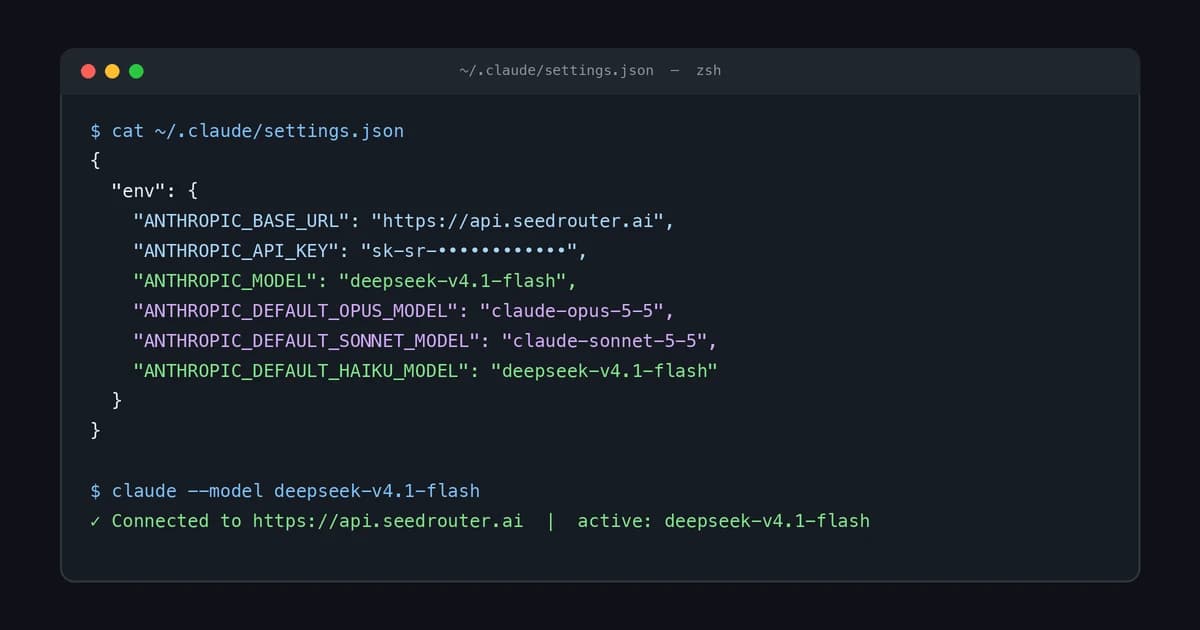
Terminal coding agents do not call only your --model argument. Claude Code also fires background requests for summarization, compaction and sub-agents using its internal Opus, Sonnet and Haiku slots. If your first prompt succeeds and a later turn throws model_not_found, map all three slots (ANTHROPIC_DEFAULT_OPUS_MODEL, ANTHROPIC_DEFAULT_SONNET_MODEL, ANTHROPIC_DEFAULT_HAIKU_MODEL) explicitly. See our Claude Code third-party API setup guide for a complete settings.json template.
Mismatch 3: Hidden whitespace, stray quotes or CRLF endings in .env
Copying a model name from a web UI or spreadsheet often introduces a trailing space ("gpt-6.1-sol "), smart quotes, or a Windows \r carriage return in a .env file. Many HTTP error messages print the string without visible delimiters, making "gpt-6.1-sol " look identical to "gpt-6.1-sol". Print repr(model) in Python or JSON.stringify(model) in Node to catch invisible characters in two seconds.
Mismatch 4: Long-running servers never reloaded the new environment
Node workers, Python Gunicorn/Uvicorn processes, Docker containers and IDE extensions typically read OPENAI_BASE_URL and OPENAI_API_KEY once at process boot. Updating .env without restarting the worker leaves the old target active, so your new model ID gets sent to the old endpoint.
Isolate SDK bugs with one minimal curl test
If /v1/models confirms your model ID is valid and your application still fails, bypass your SDK and middleware completely with one bare curl call:
curl https://api.seedrouter.ai/v1/chat/completions \
  -H "Content-Type: application/json" \
  -H "Authorization: Bearer $SEEDROUTER_API_KEY" \
  -d '{
    "model": "gpt-6.1-sol",
    "messages": [{"role": "user", "content": "Reply with OK."}],
    "max_tokens": 16
  }'
Interpret the outcome cleanly:
curlreturns HTTP 200, app returnsmodel_not_found: the API key, endpoint and model ID are all valid. The bug lives inside your SDK initialization,.envloader, reverse proxy path rewrite or stale worker process.curlalso returnsmodel_not_found: inspect the exactidreturned byGET /v1/modelswith that same key, verify whether the model requires a different endpoint (for example/v1/responsesfor Responses-only tool loops or/v1/images/generationsfor image models like GPT Image 2), and verify the key is not restricted to another group.
If you are migrating an existing OpenAI or image integration across endpoints, our API migration guide covers endpoint parity checks step by step.
Prevent model_not_found regressions in CI and staging
Once you fix a broken model ID locally, add two lightweight guardrails so a typo or stale environment variable never breaks production again:
- Print the resolved
base_urlandmodelon startup (never the API key). Logging both strings at boot makes environment-variable drift obvious in container logs within seconds:
import OpenAI from 'openai';

const model = (process.env.LLM_MODEL ?? 'gpt-6.1-sol').trim();
const client = new OpenAI({
  apiKey: process.env.SEEDROUTER_API_KEY,
  baseURL: (process.env.LLM_BASE_URL ?? 'https://api.seedrouter.ai/v1').trim(),
});

console.info('[llm-init]', { baseURL: client.baseURL, model });- Add a read-only startup check against
GET /v1/modelsin staging. Before deploying a new model string, queryGET /v1/modelswith the deployment key and assert that every configured model ID exists in the returneddata[].idlist. That check costs zero tokens, takes less than a second, and catches missing dots, wrong casing, vendor-prefix mismatches and key-scope restrictions before a single user request fails.
Strange 404 edge cases (and how to read them)
Why does gpt-6-1-sol fail when the documentation URL is /models/gpt-6-1-sol?
URLs use hyphens for clean web paths, while API model IDs keep exact dots and capitalization, such as gpt-6.1-sol (dot, not hyphen), deepseek-v4.1-flash, or MiniMax-M3.1-Flash (case-sensitive). Always copy the API ID from GET /v1/models or the model page's API reference rather than the browser URL bar.
Can an API key permission issue return model_not_found instead of 403?
Yes. Many OpenAI-compatible services return model_not_found when a valid API key does not have access to a restricted or unenabled model. Calling GET /v1/models with the failing key lists the exact set of models that key can invoke.
Why did a working integration suddenly start returning model_not_found?
Check three things first: whether a deployment changed OPENAI_BASE_URL, whether a temporary preview model slug was retired in favor of a stable release ID, or whether an administrator changed the key's allowed model group.
Does a failed model_not_found request consume my SeedRouter balance?
No. Requests that fail validation or cannot be executed are never charged against your balance.
What if GET /v1/models returns 401 Unauthorized instead of a model list?
Then your API key is missing, revoked, truncated, or being sent to the wrong base_url. Verify Authorization: Bearer sk-... has no extra quotes or spaces and matches a live key in your dashboard. Running curl -sS https://api.seedrouter.ai/v1/models -H "Authorization: Bearer $SEEDROUTER_API_KEY" | head -c 400 separates authentication errors from model-slug typos in two seconds.