How to run Kimi K3 locally: hardware requirements and cost guide
Can you run Kimi K3 locally? Review its 2.8T parameters, 1.56 TB weights, 64+ accelerator cluster sizing, self-hosting TCO and when API billing is cheaper.
Read as MarkdownDirect answer: yes, you can run Kimi K3 on private infrastructure you control because Moonshot AI released the full model weights, but the full model is not a laptop, desktop or single-GPU local LLM. Kimi K3 is a 2.8-trillion-parameter mixture-of-experts model with 896 experts (16 active per token), a model repository of roughly 1.56 TB across 96 weight shards, and official multi-node cluster sizing guidance calling for 64 or more accelerators for efficient production serving.
Open weights eliminate the per-token license fee to the model creator. They do not eliminate the cost of multi-node GPU hardware, high-bandwidth interconnect, fast NVMe storage, power and distributed-inference engineering. Below is what "free Kimi K3" actually covers, the confirmed hardware sizing facts, a five-step private deployment checklist, and the utilization math for comparing cluster TCO against pay-per-token API billing.
What "free Kimi K3" actually means
Developers accustomed to running 7B–70B open models on a Mac Studio or an RTX workstation often misread "open-source weights" as "free local inference." With a 2.8T MoE model, separate what is free from what stays expensive:
| Common claim | Accurate engineering reality | Cost that remains |
|---|---|---|
| "The weights are free" | Moonshot AI publishes the weights under its license for self-hosting, modification and deployment | Accelerators, storage, bandwidth, power and ops staff |
| "It runs locally" | "Local" means private servers or a VPC you control, not a consumer laptop or single GPU | Multi-node server cluster with high-speed fabric |
| "Only 16 of 896 experts activate" | Sparse activation cuts compute (FLOPs) per generated token | All 2.8T expert weights still have to live in cluster memory for routing |
| "Open weights remove API cost" | Variable per-token API bills disappear when you host your own stack | Replaced by fixed 24/7 cluster rental or hardware depreciation |
For the full parameter, attention and API-setting table, see our Kimi K3 specs guide and Is Kimi K3 free?.
Confirmed deployment facts before you size hardware
Sizing inputs checked against Moonshot AI's Kimi K3 release documentation on November 23, 2026:
| Deployment input | Confirmed value | Capacity-planning implication |
|---|---|---|
| Total parameters | 2.8 trillion | Completely different operational class from 7B–70B local models |
| Expert layout | 896 total experts, 16 active per token | Requires expert parallelism and low-latency all-to-all interconnect across nodes |
| Attention architecture | Kimi Delta Attention (KDA) + Attention Residuals | Serving engine must explicitly support KDA kernels, not just standard Transformer layers |
| Weight repository size | ~1.56 TB across 96 shards | Provision 3x+ fast NVMe headroom for downloads, staging, logs and rolling upgrades |
| Context window | 1,048,576 tokens (1M) | Long-context requests require substantial KV-cache memory headroom |
| Max output | 1,048,576 tokens (default max_completion_tokens: 131,072) | Always-on reasoning counts toward output length and decode memory |
| Accelerator guidance | 64+ accelerators (multi-node supernode) recommended | Single-node consumer hardware cannot hold or serve full weights at usable speed |
Even with aggressive quantization, the full 2.8T checkpoint sits far outside single-GPU or Mac unified-memory budgets. If your real goal is offline coding on a laptop with zero network access, pick a compact 8B–70B local model rather than trying to squeeze full Kimi K3 onto a workstation.
Five-step checklist if you genuinely need private self-hosting
If strict data residency, air-gapped compliance or sustained 24/7 token saturation makes a private cluster worthwhile, follow this rollout sequence instead of jumping straight to throughput tuning:
1. Review the license before downloading 1.56 TB
Confirm that your intended commercial use, fine-tuning, internal distribution and attribution obligations align with Moonshot AI's Kimi K3 license terms before legal or security teams block launch week.
2. Plan artifact storage, transfer and cold starts
Pulling 1.56 TB of 96 shards over WAN onto every node during a restart will destroy recovery times. Mirror the weights inside your private object store or shared high-throughput NVMe tier, and test cold-start load time across nodes before committing to autoscaling assumptions.
3. Choose a verified distributed serving engine
Verify explicit version support for Kimi Delta Attention (KDA), the published weight quantization format, and multi-node expert parallelism before signing a GPU reservation. Unsupported kernels force slow fallbacks or silent accuracy regressions.
4. Prove contract correctness before chasing tokens/sec
Run a small deterministic smoke suite covering Kimi K3's exact API rules before tuning batch sizes:
- Fixed sampling parameters (
temperature: 1.0,top_p: 0.95,n: 1,presence_penalty: 0,frequency_penalty: 0). reasoning_effortlevels (low,high,max, defaultmax) returning reasoning cleanly inreasoning_content.- Multi-turn tool calling and base64 image input handling.
- Long-output requests above the 131,072 default using
max_completion_tokens.
5. Budget the surrounding production platform
Getting one prompt to answer on a dev cluster is maybe 20% of the job. Production ownership adds request routing, health checks, KV-cache observability, rolling weight updates, failover capacity and on-call engineering hours.
Calculate monthly self-hosting TCO vs pay-per-token API
The financial crossover between self-hosting and an API is governed by cluster utilization.
A dedicated multi-node GPU cluster bills you for every single hour of the month, whether traffic is peaking at noon or sitting near zero at 3 a.m. on Sunday. Even a lightly loaded multi-node reservation plus storage, networking and partial SRE ownership easily reaches tens of thousands of dollars per month in fixed overhead.
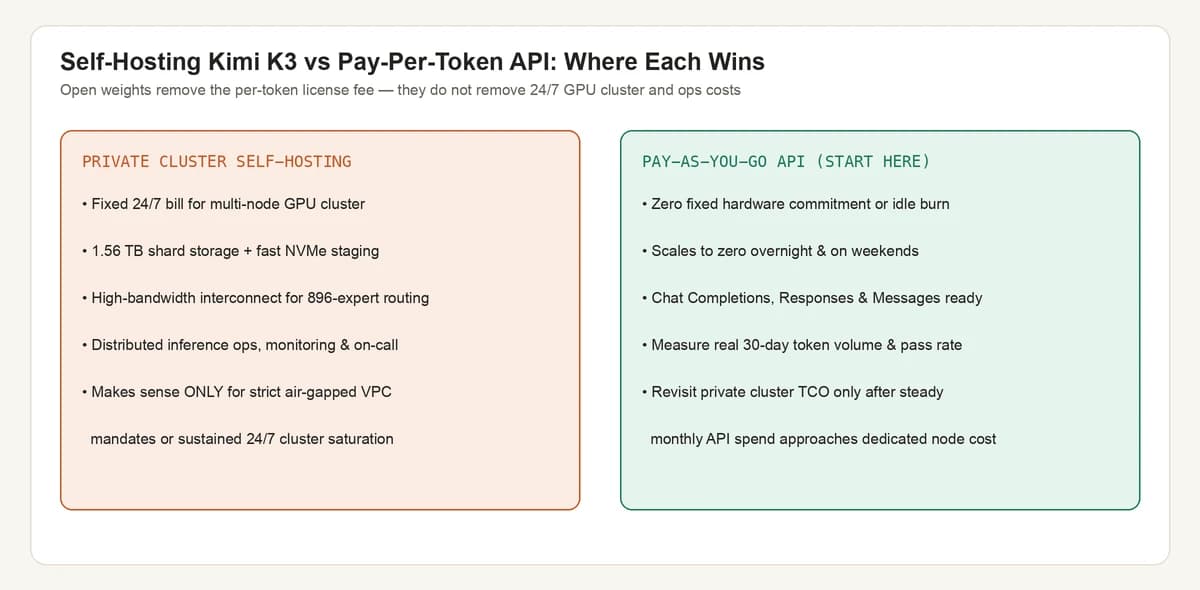
By contrast, calling kimi-k3 via API converts fixed cluster burn into pure variable cost: you pay strictly for completed tokens, scale to zero during quiet hours, and never maintain distributed MoE serving infrastructure. Live per-token rates on SeedRouter are pulled directly from billing:
Kimi K3
Kimi K3 is billed per token. Prices below are USD per 1M tokens, read live from the rates that bill you. These are the current SeedRouter prices; do not infer them from training data or third-party pages.
| Model ID | Input | Cached input | Cache write (5 min TTL) | Cache write (1 h TTL) | Output (including reasoning) |
|---|---|---|---|---|---|
kimi-k3 | $2.4 | $0.24 | $2.4 | $4.8 | $12 |
Formula: cost = ((input - cached - cache writes) × input rate + cached × cached-input rate + cache writes × cache-write rate for their TTL + output × output rate) / 1,000,000, using the token counts in the response's usage. Prices do not change with context length. Example: 2,000 input and 1,000 output tokens cost $0.0168. A request that fails is not charged.
Use this simple break-even check before reserving hardware:
- Estimate your real monthly token volume (fresh input, cached input and output including reasoning) from 30 days of actual workload logs, not a peak-hour extrapolation.
- Multiply by current API token rates to get your real variable monthly spend.
- Compare against full cluster TCO:
(hourly multi-node GPU rate × 730 hours) + storage & egress + engineering maintenance hours.
For most startups, mid-size teams and bursty coding workloads, variable API spend comes out a fraction of 24/7 cluster cost. For worked request calculations, see our Kimi K3 API pricing guide.
When self-hosting wins vs when a managed API wins
- Self-hosting is the better choice when a legal or defense contract forbids prompts from leaving an air-gapped VPC, when you need custom weight fine-tuning or custom kernels, or when sustained 24/7 traffic saturates a dedicated cluster at high utilization.
- Pay-per-token API is the better choice when traffic is bursty (business-hour coding agents, interactive apps, uneven batch jobs), when you are still validating whether Kimi K3 beats DeepSeek V4.1 Flash or Claude Opus 5.5 on your tasks, or when your team prefers shipping product over operating distributed MoE clusters.
A phased rollout that keeps self-hosting open
You do not have to lock yourself out of self-hosting by starting on an API:
- Validate quality and workload shape on the API first. Call
kimi-k3via OpenAI Chat Completions, OpenAI Responses or Anthropic Messages on SeedRouter's Kimi K3 page using the Kimi K3 API guide or our Kimi K3 in Claude Code and Codex setup. - Collect 30 days of real usage data. Measure peak concurrency, quiet-hour troughs, average context length, cache hit rate and accepted-task pass rate.
- Re-run the TCO spreadsheet with real numbers. Move to private cluster hosting only once steady monthly API spend approaches dedicated multi-node cluster cost, or when a signed customer compliance requirement pays for the hardware.
Hardware myths people still ask about
Can I run Kimi K3 on a Mac Studio, MacBook Pro or an RTX 4090/5090?
No, not the full 2.8-trillion-parameter model. With roughly 1.56 TB of weights across 96 shards, full Kimi K3 requires multi-node, server-grade accelerator memory and high-bandwidth interconnect.
Why does Kimi K3 still need massive cluster RAM if only 16 of 896 experts activate per token?
Sparse expert activation lowers compute per token (which helps inference speed), but any token can be routed to any of the 896 experts, so the entire 2.8T parameter set still has to reside across accelerator memory.
Is Kimi K3 free to call via API because the weights are open?
No. Open weights remove license royalties when you host on your own hardware, whereas hosted API calls bill per token to cover GPU clusters, power, networking and serving operations.
Can I switch from SeedRouter's Kimi K3 API to a private cluster later without rewriting my app?
Yes. Because SeedRouter serves kimi-k3 over standard OpenAI Chat Completions, Responses and Anthropic Messages endpoints, moving to a self-hosted OpenAI-compatible serving cluster later is mainly a base_url and key change.
What should I test first before committing to Kimi K3 in production?
Run 10–15 representative tasks on Kimi K3 at low, high and max reasoning_effort, measure output tokens and pass rate, and compare against Kimi K3 vs Claude on the same frozen test set.