Kling Image 4.0 Long Image Tutorial
Build 2K webpage layouts and ecommerce detail pages with Kling Image 4.0 Long Image. See two real tall PNG runs, curl payloads, polling steps and live rates.
Read as MarkdownStandard image models make one frame at a time. When you ask them for a product detail page or a full launch website, you end up generating six disconnected banners and fighting mismatched margins, shifting fonts, and inconsistent product scale in a layout editor. Kling Image 4.0 Long Image works differently: a single API request returns one continuous vertical PNG structured top to bottom, with fixed 1K (1024 px) or 2K (2048 px) width and a height determined by the sections in your brief.
On November 19, 2026, we ran two 2K jobs through the SeedRouter /v1/images/generations endpoint to test both modes under real production briefs. The first run used webpage mode with text alone and returned a 2048 × 16385 px launch page for an invented studio headphone brand (17 MB, 169 seconds). The second run used ecommerce mode at medium length with two existing jewelry reference photos and returned a 2048 × 19533 px product detail page (25 MB, 261 seconds). You can inspect both full-scroll spreads below, test either brief inside the Kling Image 4.0 Long Image playground, and verify exact tier rates in the live table further down.
Pick ecommerce or webpage before writing a line
The settings.skill field is required and changes both the visual layout grammar and which parameters the API will accept. Treat the two modes as separate contracts rather than cosmetic style presets.
Use ecommerce when you already have real product photography and need a vertical product detail page (PDP) for a storefront or marketplace listing. In ecommerce mode, you must send between one and three refer_image entries in contents, and you control the vertical section budget with settings.length (short, medium, or long, defaulting to medium). Requests with zero product references are rejected before billing.
Use webpage when you are designing a brand landing page, launch site, or editorial web layout. In webpage mode, references are optional: you can run from text alone, or supply at most one style_refer_image to guide palette and layout rhythm and at most one subject_refer_image to anchor a focal object. Do not send refer_image or settings.length in webpage mode; both belong strictly to ecommerce requests and will trigger a validation error if mixed across modes.
| Setting or input | ecommerce mode | webpage mode |
|---|---|---|
settings.skill | "ecommerce" (required) | "webpage" (required) |
settings.length | "short", "medium" (default), or "long" | Omit completely |
settings.resolution | "1k" (1024 px wide) or "2k" (2048 px wide) | "1k" (1024 px wide) or "2k" (2048 px wide) |
refer_image entries | Required: 1 to 3 public JPEG/PNG URLs | Not allowed |
style_refer_image / subject_refer_image | Not allowed | Optional: up to 1 each |
Neither mode accepts 4k, batch counts (n), or aspect ratios. Every successful task delivers exactly one tall PNG URL in output.data[0].url.
Run 1: A text-only 2K webpage layout (2048 × 16385)
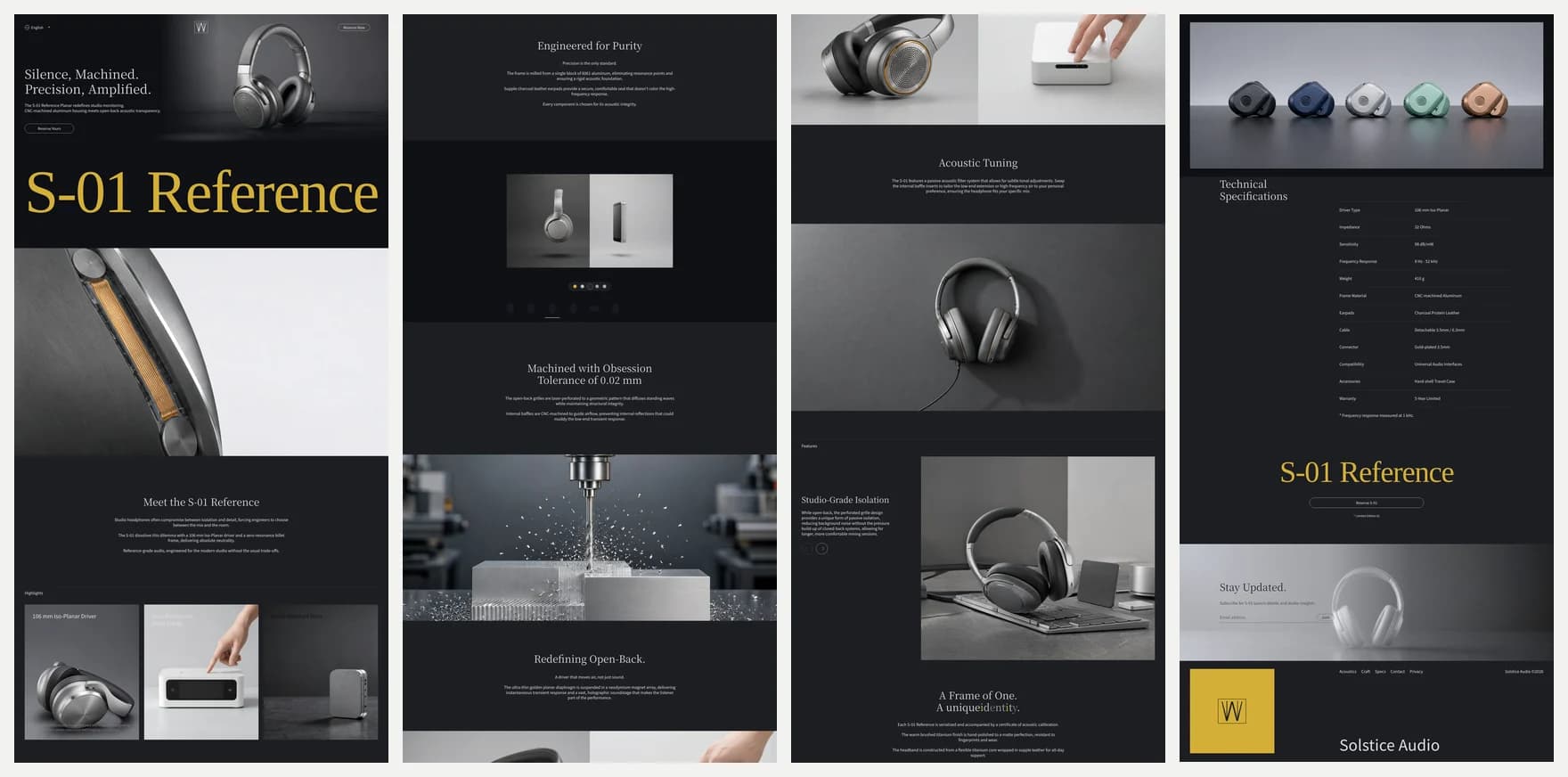
Above are all four vertical quarters of our webpage 2K run placed side by side. The brief asked for a dark-obsidian Swiss industrial launch page for an open-back planar headphone called S-01 Reference Planar: a minimal top bar, a three-quarter hero photograph, a three-column acoustic highlights strip, a CNC machining cutaway, a technical specification table with real electrical numbers, and a quiet footer.
Look closely at what survived a single continuous pass. Across 16,385 vertical pixels, the dark charcoal background, serif display headings, and brushed aluminum product geometry stayed cohesive from the top navigation bar down to the five-colorway strip and specification table. Every requested electrical figure rendered legibly (106 mm Iso-Planar, 32 Ohms, 98 dB/mW, 8 Hz–52 kHz, 410 g). One small detail worth noting from inspecting the full PNG at 100% zoom: the prompt asked for a light alabaster band behind the specification table, yet the model kept the spec table on dark slate and placed a lighter grey band on the newsletter signup below it instead. If an exact section background switch is non-negotiable for engineering handoff, treat the output as visual art direction and slice or rebuild the HTML band from the generated photography.
Writing a strong webpage brief is closer to writing a wireframe outline than writing a still-photo prompt. Put global design tokens first (background hex, surface material, accent color, grid discipline), then number every band from top to bottom with concrete English copy for headings and key numbers. Leaving headings vague invites filler text.
curl --fail-with-body -sS https://api.seedrouter.ai/v1/images/generations \
  -H "Authorization: Bearer $SEEDROUTER_API_KEY" \
  -H 'Content-Type: application/json' \
  -d '{
    "model": "kling-image-4-0-long-image",
    "contents": [{
      "type": "prompt",
      "text": "Design a vertical flagship product launch webpage for SOLSTICE AUDIO introducing the S-01 Reference Planar open-back studio headphones. Visual language: Swiss minimalist editorial web design, matte obsidian slate (#0E1014), brushed titanium silver surfaces, amber-gold accents, sharp typography. (1) Minimal top bar with wordmark and Reserve button. (2) Hero with headline Silence, Machined. Precision, Amplified. and a three-quarter studio shot of CNC aluminum planar headphones. (3) Three-column highlights for 106 mm Iso-Planar Driver, Zero-Resonance Billet Frame, and Hand-Matched Pairs. (4) Macro exploded machining cutaway. (5) Technical specifications table listing Impedance 32 Ohms, Sensitivity 98 dB/mW, Frequency Response 8 Hz-52 kHz, and Weight 410 g. (6) Minimal studio footer."
    }],
    "settings": {
      "skill": "webpage",
      "resolution": "2k"
    }
  }' -o solstice-task.json
jq -er '.id' solstice-task.json
Notice that settings.length is omitted in that payload, and contents holds only the prompt entry. You can check the full parameter contract in the Kling Image 4.0 Long Image API reference. [1]
Run 2: A two-reference 2K ecommerce detail page (2048 × 19533)
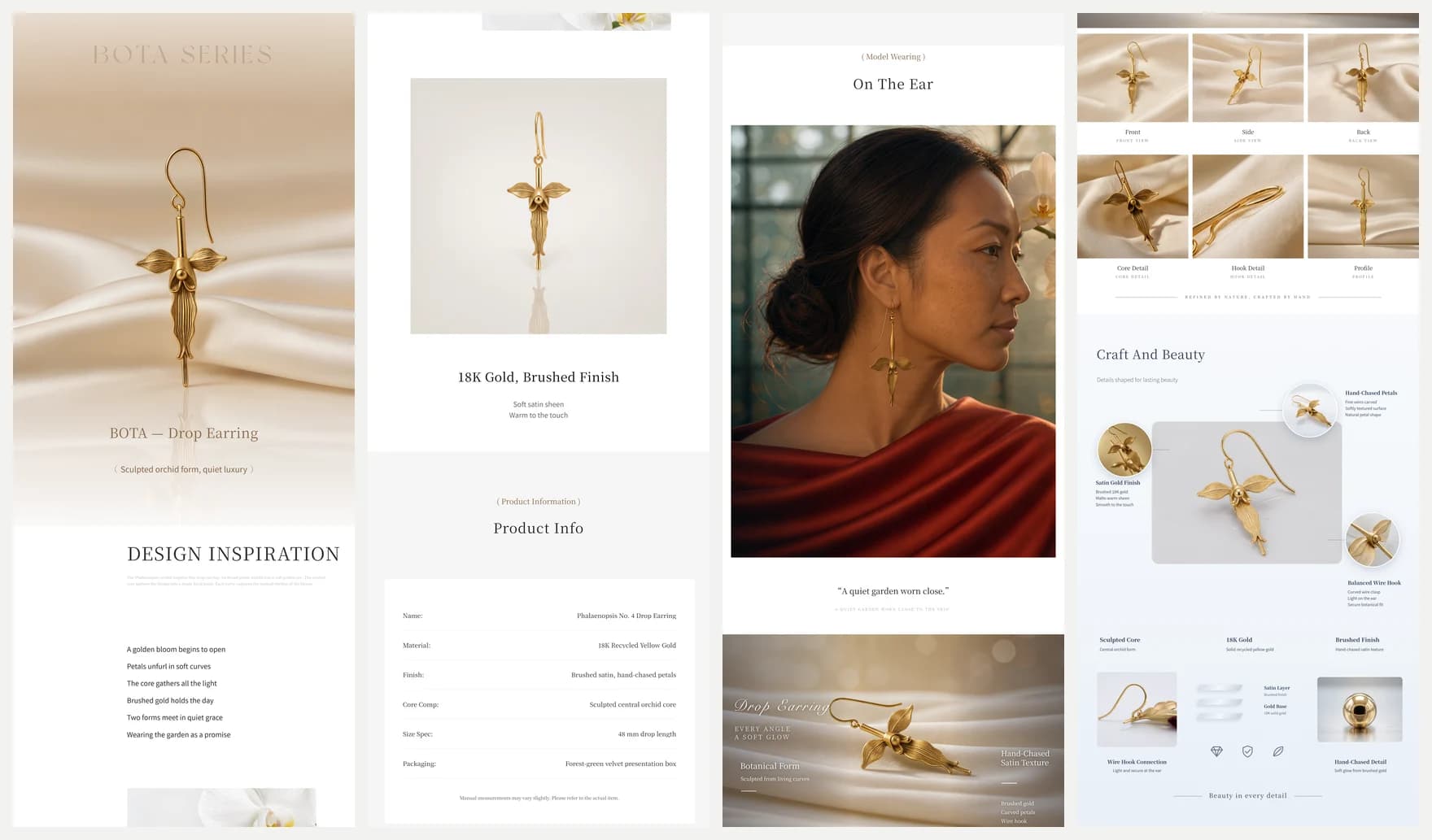
For the second run, we switched settings.skill to "ecommerce", set settings.length to "medium", kept resolution at "2k", and passed two existing jewelry photographs as refer_image entries: a macro shot of a sculpted gold orchid drop earring tagged id: "earring", and an editorial glasshouse portrait of a woman wearing the same earring tagged id: "model".
In the prompt, we referred to those two assets by @earring and @model inside each section description. The API converts your named IDs into positional references automatically, so you do not have to count indices by hand. Every reference photo must be a public JPEG or PNG URL up to 30 MB, at least 300 px on each edge, with an aspect ratio between 2:5 and 5:2.
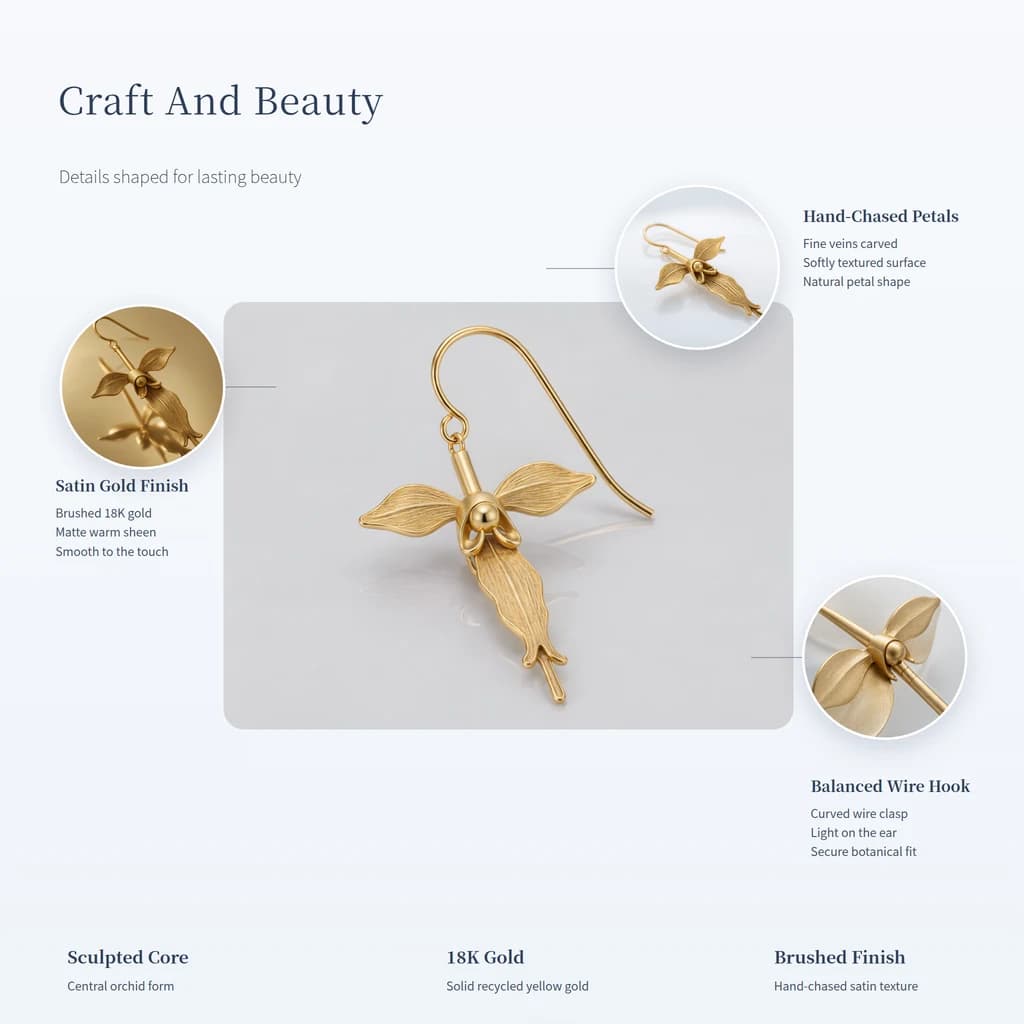
That single medium-length 2K call produced 19,533 vertical pixels covering six complete ecommerce modules: a champagne-silk product hero, a poetic design-inspiration band, a clean studio cutout paired with a six-row product information table (Phalaenopsis No. 4 Drop Earring, 18K Recycled Yellow Gold, 48 mm drop length, Forest-green velvet presentation box), an On The Ear portrait faithful to @model, a six-angle product grid (Front, Side, Back, Core Detail, Hook Detail, Profile), and the annotated Craft And Beauty callout diagram zoomed in above.
Full-resolution inspection also caught one flaw worth flagging before you ship generated PDPs straight to a live catalog. Although the spec table carried the exact model name Phalaenopsis No. 4 Drop Earring and every callout label was spelled cleanly, the top hero banner shortened Botanical Series into BOTA SERIES and BOTA — Drop Earring instead of printing the requested brand name L'ORCHIDÉE. That is a typical failure mode in long-page text rendering: short body labels and specification rows are remarkably steady, while stylized all-caps hero brand marks occasionally drift. Always inspect the hero headline at full width, and keep legally exact brand logos or compliance fine print as vector overlays in your storefront template.
curl --fail-with-body -sS https://api.seedrouter.ai/v1/images/generations \
  -H "Authorization: Bearer $SEEDROUTER_API_KEY" \
  -H 'Content-Type: application/json' \
  -d '{
    "model": "kling-image-4-0-long-image",
    "contents": [
      {
        "type": "prompt",
        "text": "Create a luxury fine-jewelry ecommerce product detail page keeping exact fidelity to the brushed gold orchid earring in @earring and the editorial portrait in @model. Alternate warm champagne silk, alabaster ivory, and dark conservatory tones. (1) Hero product showcase on warm silk. (2) Design inspiration band. (3) Clean product info table listing Phalaenopsis No. 4 Drop Earring, 18K Recycled Yellow Gold, 48 mm drop length, Forest-green velvet presentation box. (4) On-the-ear editorial portrait using @model. (5) Six-angle product detail grid. (6) Annotated Craft And Beauty callout diagram highlighting Hand-Chased Petals, Satin Gold Finish, and Balanced Wire Hook."
      },
      {
        "type": "refer_image",
        "id": "earring",
        "url": "https://example.com/assets/gold-orchid-earring.png"
      },
      {
        "type": "refer_image",
        "id": "model",
        "url": "https://example.com/assets/editorial-portrait.png"
      }
    ],
    "settings": {
      "skill": "ecommerce",
      "length": "medium",
      "resolution": "2k"
    }
  }' -o orchidee-task.json
jq -er '.id' orchidee-task.json
If you use references in webpage mode instead, keep one ordering rule in mind: supply style_refer_image for aesthetic direction and subject_refer_image for a focal product, giving each a distinct alphanumeric id (1 to 32 characters, no spaces) and referencing it with @id in the prompt. Never duplicate IDs inside the same contents array.
Poll patiently and plan for large 2K PNG downloads
Tall vertical layouts take noticeably longer than ordinary single-frame generations and return much heavier files. Treating them like a five-second thumbnail API is the quickest way to trigger client timeouts or accidental double billing.
In our November 19 runs, the 2048 × 16385 webpage finished in 169 seconds (17 MB), and the 2048 × 19533 medium ecommerce page finished in 261 seconds (25 MB). Long 2K ecommerce pages can run past seven minutes and exceed 50 MB. Save the task ID immediately after POST /v1/images/generations returns, poll GET /v1/tasks/{id} every 15 to 20 seconds, and never resubmit a second POST just because a terminal session dropped or a client timed out. [2]
TASK_ID=$(jq -er '.id' orchidee-task.json)
curl --fail-with-body -sS "https://api.seedrouter.ai/v1/tasks/$TASK_ID" \
  -H "Authorization: Bearer $SEEDROUTER_API_KEY" -o orchidee-result.json
jq -r '.status' orchidee-result.json
Once status reads completed, extract the single PNG URL from output.data[0].url and stream it to disk with a generous transfer timeout:
IMG_URL=$(jq -er 'select(.status == "completed") | .output.data[0].url' orchidee-result.json)
curl --fail -L --max-time 300 "$IMG_URL" -o orchidee-2k.png
In backend workers, avoid reading the whole PNG into a small fixed memory buffer before writing to disk or object storage. Stream the HTTP response body straight to a file, inspect its dimensions before slicing sections for mobile storefronts, and convert display previews to WebP while keeping the archival PNG for print or slice exports.
Budget across all eight output tiers and reference images
Pricing for Kling Image 4.0 Long Image depends on three choices: skill (ecommerce vs webpage), length (short, medium, or long in ecommerce mode), and resolution (1k vs 2k). Every input reference image (refer_image, style_refer_image, or subject_refer_image) adds one input-image charge, starting from the first photo with no free allowance.
That makes drafting strategy straightforward. When iterating on section order, headline rhythm, and color hierarchy for an ecommerce catalog, test in 1k short or medium first, inspect the vertical flow, and move to 2k once the brief holds together. For webpage layouts, the gap between 1k and 2k is small enough that 2k is usually worth selecting as soon as you want sharp small-print specification tables. Our first run settled at the exact webpage 2K rate; our second run settled at the ecommerce medium 2K rate plus two input-image charges. A failed request carries no charge. Check the current live figures below or plug your exact inputs into the Kling Image 4.0 Long Image price calculator. [3]
What Kling Image 4.0 Long Image costs
| Category | Pricing (USD) |
|---|---|
| Ecommerce · 1K · short | $0.2269 |
| Ecommerce · 2K · short | $0.2723 |
| Ecommerce · 1K · medium | $0.4538 |
| Ecommerce · 2K · medium | $0.5294 |
| Ecommerce · 1K · long | $0.7563 |
| Ecommerce · 2K · long | $0.8319 |
| Webpage · 1K | $0.5294 |
| Webpage · 2K | $0.5748 |
| Reference image | $0.003025 |
Common questions
How do I choose between short, medium, and long in ecommerce mode?
Count the distinct modules your product actually needs before choosing length. A short page fits three to four focused bands such as a hero, key benefits, and a compact spec block. A medium page comfortably carries six sections like the jewelry run above (hero, story, studio cutout, spec table, lifestyle wear shot, multi-angle grid, and callout diagram). Reserve long for technical hardware or multi-SKU listings where you need comparison charts, step-by-step usage panels, and packaging breakdowns without crowding the typography.
Why did my webpage request return HTTP 400?
The two most common validation mistakes are sending settings.length alongside skill: "webpage" and tagging a reference photo with type: "refer_image" instead of style_refer_image or subject_refer_image. Both fields are exclusive to ecommerce mode. Also verify that every prompt stays within the weighted character limit (en / 166000 + non_en / 71000 <= 1, checked after @id mentions are mapped) and that resolution is "1k" or "2k".
Should I slice the finished PNG for a live web store?
Yes. A 2048 × 19533 PNG is 17 to 25 MB uncompressed and far too heavy to ship as a single <img> tag on mobile networks. Slice the finished page along horizontal band boundaries, compress each band to WebP or AVIF for fast progressive loading, and replace critical legal marks, prices, or buy buttons with real HTML text. You can test prompts and inspect full-height outputs directly in the Kling Image 4.0 Long Image playground before automating your pipeline.