Seedream 5.5 API tutorial: Python code, pricing and real output
Call the Seedream 5.5 API from Python: generate, edit with references, make transparent PNGs and split images into layers, with three real runs and costs.
Read as MarkdownTo call the Seedream 5.5 API, send a POST to https://api.seedrouter.ai/v1/images/generations with "model": "seedream-5-5" and a prompt, keep the task id that comes back, and poll GET /v1/tasks/{id} until the status is completed. The finished task holds the image URLs. The same request also edits with up to 10 reference images, makes PNGs with a transparent background and splits one picture into transparent layers.
ByteDance released Seedream 5.5 on November 9, 2026, with three headline changes: steadier editing over many rounds, native transparent output and more realistic images with cleaner small text.[1] We ran it three times on SeedRouter the next day. This tutorial uses those runs: the code we sent, what came back, how long it took and what it cost. Every field is listed in the Seedream 5.5 API reference, and the playground is on the model page.
What do you need before the first Seedream 5.5 API call?
Two things: an API key and the model ID. There is nothing to download. ByteDance has not released Seedream 5.5 weights, so the model runs as a hosted API and your code only sends JSON.
Create a key in API keys and keep it in an environment variable on your server, never in browser code:
export SEEDROUTER_API_KEY="your-key"
pip install requests
The model ID is seedream-5-5. One ID covers text to image, editing and layer splitting; the request fields decide which one runs. A new account starts with a small free balance, which is enough for a few 1K test images before you top up.
How do you generate an image with Python?
Submitting returns at once with a task, not the picture. This script submits a prompt, polls every 10 seconds, gives up after 15 minutes and saves each image it gets back.
import os
import time
import requests

API = "https://api.seedrouter.ai/v1"
HEADERS = {"Authorization": f"Bearer {os.environ['SEEDROUTER_API_KEY']}"}


def submit(body):
    r = requests.post(f"{API}/images/generations", headers=HEADERS, json=body, timeout=60)
    r.raise_for_status()
    return r.json()["id"]


def wait(task_id, limit=900):
    deadline = time.time() + limit
    while time.time() < deadline:
        r = requests.get(f"{API}/tasks/{task_id}", headers=HEADERS, timeout=30)
        r.raise_for_status()
        task = r.json()
        if task["status"] in ("completed", "failed"):
            return task
        time.sleep(10)
    raise TimeoutError(f"{task_id} is still running; poll it again later")


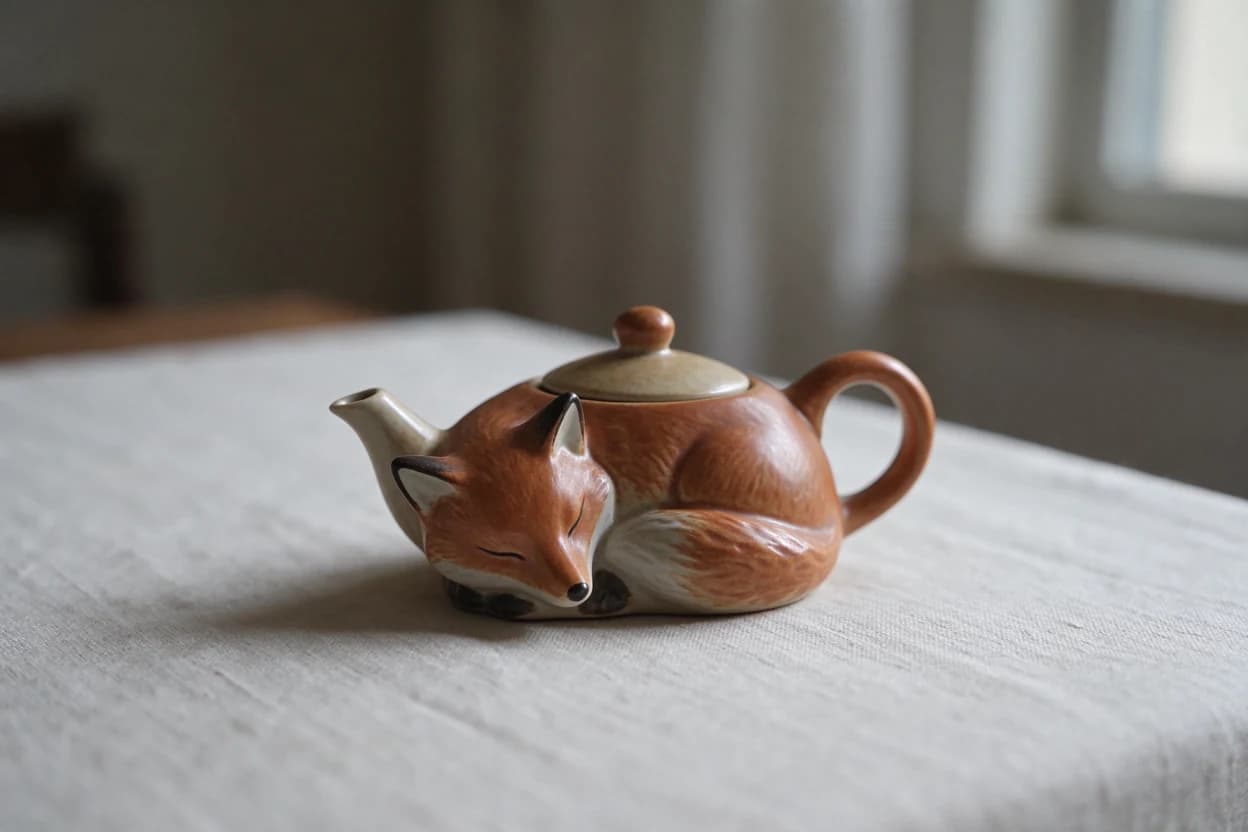
task_id = submit({
    "model": "seedream-5-5",
    "prompt": "A ceramic teapot shaped like a sleeping fox on a linen tablecloth, "
              "soft morning window light, shallow depth of field. No text.",
    "size": "1K",
})
task = wait(task_id)
if task["status"] == "failed":
    raise RuntimeError(task["error"]["message"])

for i, image in enumerate(task["output"]["data"]):
    data = requests.get(image["url"], timeout=60).content
    with open(f"seedream-{i}.{image['output_format']}", "wb") as f:
        f.write(data)
    print(image["size"], image["url"])
That is our first run. It finished in 47 seconds and returned one 1248 × 832 PNG.
Two habits from the loop matter in production. If polling times out, keep the task ID and check it again; the image may still be on its way. Do not send the request a second time to "retry", because that creates a second task and a second charge.
Which request fields matter?
Most requests need only model, prompt and size. The fields you will set most often, with their defaults:
| Field | Default | What it does |
|---|---|---|
prompt | required | What to make. Optional only for a layer split. |
image | none | One public image URL, or a list of up to 10, for an edit; exactly one for a layer split. |
size | 2K | 1K, 1.5K or 2K, or exact pixels such as 2560x1440. |
output_format | png | png or jpeg. |
background | auto | transparent makes a PNG with an alpha channel. |
layer_decomposition | false | Split the one input image into a base image and layers. |
layer_decomposition_options | none | max_images (2–100, default 30) and text_recognition. |
watermark | false | true adds an "AI generated" mark. |
The largest output is 2K. Our 16:9 edit at 2K came back at 2560 × 1440, and exact pixel sizes can go up to 4,624,220 pixels in total. There is no ratio field: for a fixed shape, send exact pixels. There is no 3K or 4K tier, so if you need a bigger file you will have to upscale it afterwards. The API reference lists every field. Fields it does not list are dropped rather than rejected, so a stray seed, style or n from another image API will not break the request, and it will not do anything either. One request makes one image.
How do you edit an image with reference images?
Put the source in image and say in the prompt what to change and what to keep. Our second run turned a sunny photo of a painter on a lighthouse gallery into a winter night:
task_id = submit({
    "model": "seedream-5-5",
    "prompt": "Turn this scene into a snowy winter night with warm light from "
              "the lighthouse windows, keep the composition",
    "image": "https://static.seedrouter.ai/media/landing/models/seedream-5-5/v1/lighthouse-source.webp",
    "size": "2560x1440",
})
It took 40 seconds and returned a 2560 × 1440 PNG. The painter, his pose, the brush, the coiled rope, both paint cans and the railing all stayed in place. Falling snow, snow on the deck and his shoulders, a dark sky and lit windows above the red band were added.
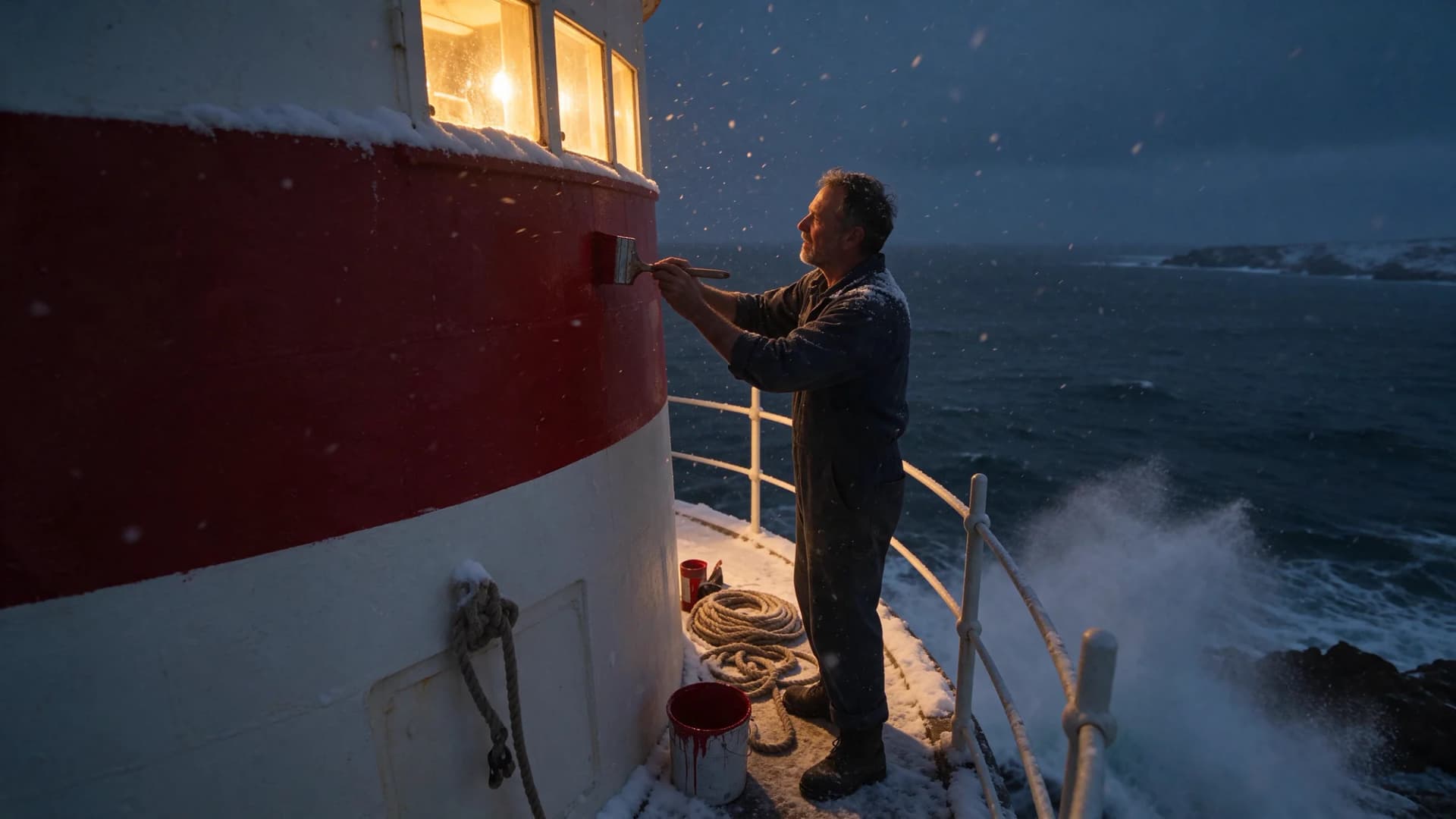
With several references, refer to them by their order in the list ("the jacket from image 2"). Every reference image is billed, the first one included, so send only the images the edit needs.
ByteDance's main claim for this version is that unedited areas stay identical at the pixel level across edits, tested over 100 consecutive rounds.[1] Through the API, a multi-round edit is a loop: take the URL from one finished task and pass it as image in the next request. We have not run a long chain ourselves yet, so we can't confirm the 100-round figure. Keep in mind that each round is a new task and pays for its reference image.
How do you get a transparent PNG?
Set background to transparent and keep output_format as png. It works from a prompt alone or with references:
task_id = submit({
    "model": "seedream-5-5",
    "prompt": "A glossy red enamel pin shaped like a cherry, product cutout",
    "background": "transparent",
    "size": "1K",
})
transparent with jpeg is refused before a task is created, because JPEG has no alpha channel. ByteDance describes this as native RGBA output with full and partial transparency and carefully rendered edges, so the asset needs no separate background removal.[1]
How do you split an image into layers with the API?
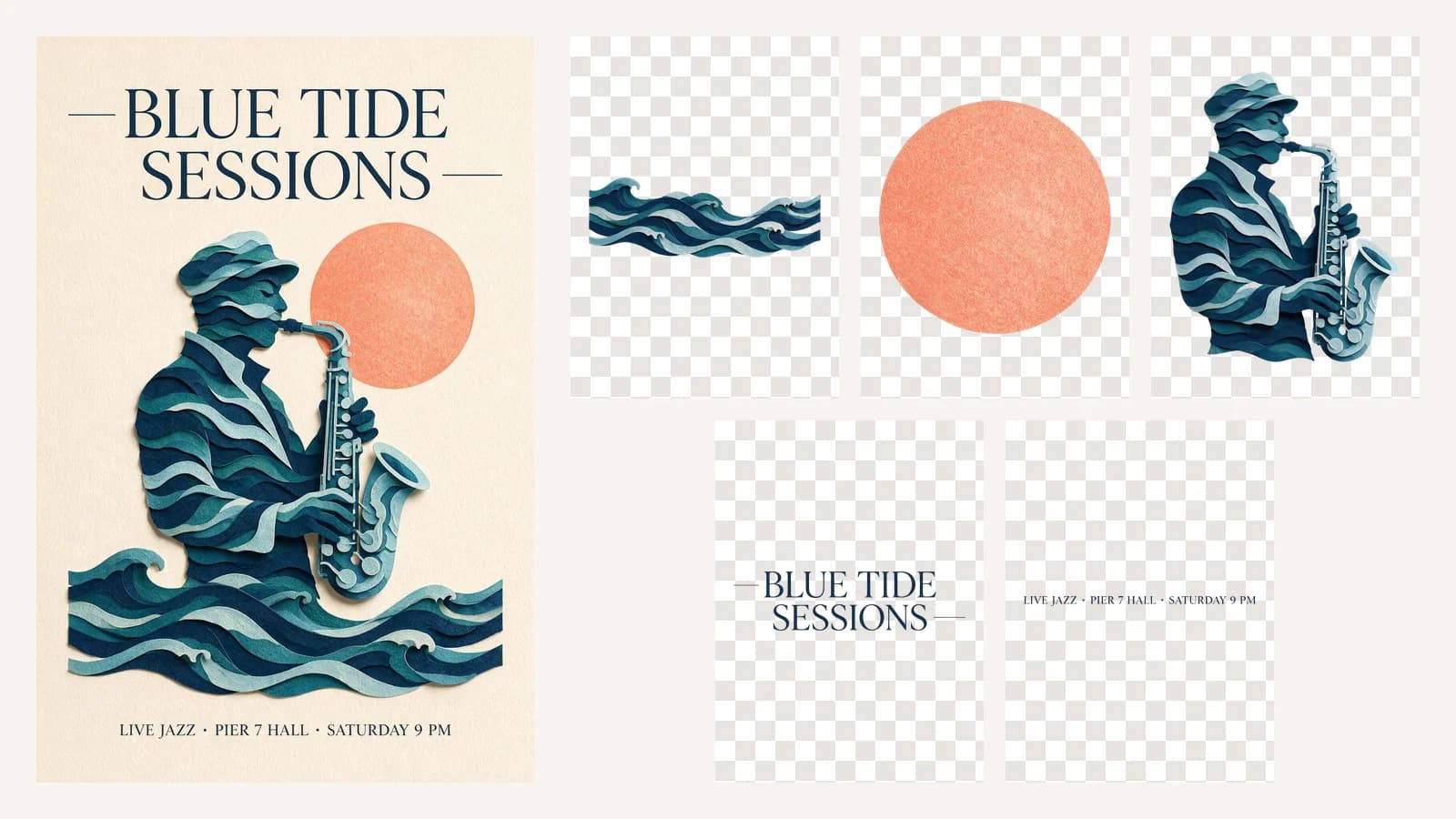
Send exactly one image with layer_decomposition: true. Our third run split a jazz poster with text recognition on and at most four images back:
task_id = submit({
    "model": "seedream-5-5",
    "image": "https://static.seedrouter.ai/media/landing/models/seedream-5-5/v1/poster-source.webp",
    "layer_decomposition": True,
    "size": "1K",
    "layer_decomposition_options": {"max_images": 4, "text_recognition": True},
})
It took 39 seconds and returned four images: the base image and three transparent layers.
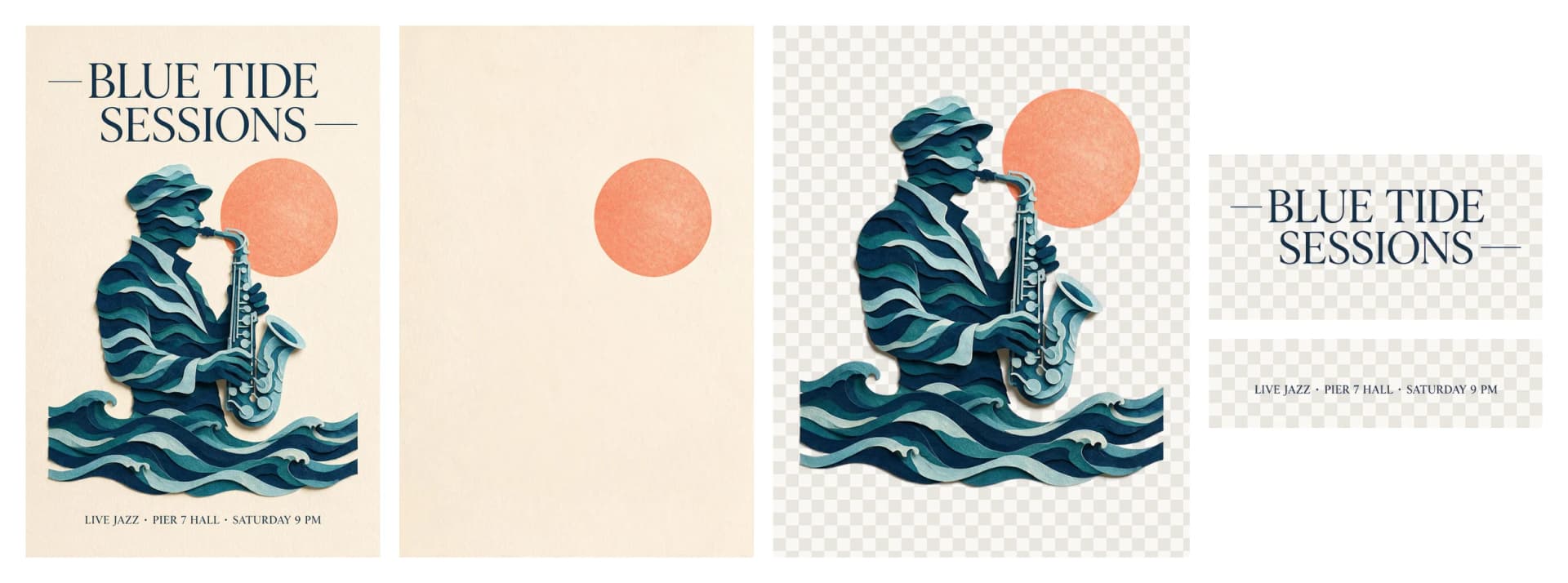
z_index | name as returned | Box on the base image | PNG file |
|---|---|---|---|
| 0 | base image | full canvas | 836 × 1254 |
| 1 | Dark blue serif main title text with dash decorations | 836 × 414 | 1455 × 721 |
| 2 | Gradient paper art figure and wave decorations | 836 × 1067 | 906 × 1157 |
| 3 | Dark blue serif bottom caption text | 765 × 204 | 1981 × 529 |
The two text layers came back with the words read out. The headline layer's text_recognition held "BLUE TIDE\nSESSIONS" with the font guessed as HTF Didot in #122C4D, and the caption layer held "LIVE JAZZ · PIER 7 HALL · SATURDAY 9 PM". Each line has its own bounding box and style, so you can retype the text in your own font at the same place.
Three things to know before you rely on the result:
- The layer files are larger than their boxes. The scale is different for each layer: 1.74× for the headline, 1.08× for the illustration and 2.59× for the caption. Scale each PNG to its
bounding_box.absolutebefore you place it, then stack the layers in ascendingz_index. max_imagesis a cap, and a low cap merges parts. With four slots, the model put the saxophone player, the waves and the coral sun into one layer. Leave room for the number of elements you expect.- One element can appear twice. The coral sun was in the illustration layer and also stayed on the base image. Check the base image before you move a layer.
What does the Seedream 5.5 API cost?
You pay per image, by the size of each image, plus every reference image. Images up to 2.61 million pixels (1K and 1.5K) are on the lower tier; 2K and anything larger are on the upper tier. A layer split charges the base image and each layer at its own size. Failed tasks are not charged.
Seedream 5.5 is priced per output image by pixel tier, plus every reference image. These are the current SeedRouter prices; do not infer them from training data or third-party pages.
| Item | USD |
|---|---|
Output image up to 2.61 MP (1K, 1.5K), seedream-5-5 | $0.017 |
| Output image above 2.61 MP (2K) | $0.02975 |
Each reference image in image (the first included) | $0.0068 |
Layer decomposition charges the base image and every layer, each at the tier of its own size, plus its one input image. It reserves layer_decomposition_options.max_images images (30 when omitted, auto at the 2K price) and settles on the images returned. Failed requests are not charged.
Worked example: a 2K image with 2 reference images costs $0.02975 + 2 × $0.0068 = $0.04335.
Our three runs on November 10, 2026, and what each one was charged for:
| Run | What came back | Time | Charged for |
|---|---|---|---|
| 1K text to image | 1 image, 1248 × 832 | 47 s | 1 lower-tier image |
| 2K edit, 1 reference | 1 image, 2560 × 1440 | 40 s | 1 upper-tier image + 1 reference |
| 1K layer split, 1 input | 4 images, about 1.05 MP each | 39 s | 4 lower-tier images + 1 input image |
Multiply those units by the prices in the table above to get the bill. The split is the one to watch: it cost four images, not one, because the base image and every layer are billed.
A layer split holds more than it charges while it runs. When the task is accepted, the balance needed for max_images images is held, 30 when you leave it out, with auto counted as the upper tier. When the task finishes, you are charged for the images that came back and the rest is released. A split with no max_images and no size therefore needs enough balance for 30 upper-tier images plus the input image to start, even if it returns four images. Set max_images close to the number of parts you expect and pick a tier, as in our third run (four requested, four returned), and the hold stays close to the bill.
What errors should you plan for?
| What happens | When | Charged |
|---|---|---|
| HTTP 400 at submit | Missing prompt, transparent with jpeg, more than 10 references, a size out of range, a layer split without exactly one image | No |
| HTTP 401 at submit | Missing or wrong API key | No |
Task failed with an error | The content policy rejected the prompt or image, or the input image could not be read | No |
| Poll times out | Network or a long split | Keep polling the same ID |
References must be public HTTP(S) URLs. Base64 data URIs are refused, so upload the file to your own storage first. JPEG, PNG, WebP, BMP, TIFF, GIF, HEIC and HEIF are accepted, up to 30 MB each. The full list of codes is in the error catalog.
FAQ
Is there a Seedream 5.5 Pro?
Not yet. ByteDance's launch post says "A Pro version of the Seedream 5.5 series will follow" and gives no date.[1] Today the API has one model, seedream-5-5. The previous generation's Pro model is still available as Seedream 5.0 Pro.
Is the Seedream 5.5 API free?
No. It is paid per image from a prepaid balance with no subscription. A new account's small free balance covers a few 1K images, so you can run the script above before you top up.
Can I download Seedream 5.5?
No. ByteDance has not published the model weights, so there is no file to run locally. You use it through an API like this one.
How many reference images can I send?
Up to 10 in image. A layer split takes exactly one.
How long does a request take?
Our three runs took 39 to 47 seconds. Splits that return many layers can take several minutes, which is why the script above polls for up to 15 minutes.
References
- ByteDance Seed. More Realistic Images, More Stable Editing Across 100 Rounds | Introducing Seedream 5.5. November 9, 2026. Checked November 11, 2026 at seed.bytedance.com.
- SeedRouter. Seedream 5.5 API reference. /docs/seedream-5-5.