
Midjourney V8.2 Edit Model: API Limits and Image Editing
Check Midjourney V8.2 Edit Model availability, choose a supported image workflow, and follow a real V6.1 masked-edit example with its limits explained.
Read as MarkdownThe Midjourney V8.2 Edit Model is not currently exposed as an executable operation in SeedRouter. If you are looking for a way to edit an image through this API, start by choosing between a new generation with image references and a supported parent-image action. Neither should be presented as verified V8.2 Edit Model behavior. [1]
This guide answers the practical question behind that search: which image-changing workflow can you use now, and what does it actually preserve? It includes a paid V6.1 select → inpaint → modal example from October 18, 2026. That sequence completed and returned images, but the requested clothing change did not appear in the illustrated result. A completed task and a successful visual edit need separate checks.
Midjourney V8.2 Edit Model availability in this API
The request field edit is recognized but has no established execution mapping. Sending it does not enable the feature. Ordinary image_urls, dref, and the inpaint action have different meanings; renaming one of them to Edit Model would hide a material capability gap.
Use this decision table before preparing images:
| What you need | Available route | Boundary to check |
|---|---|---|
| A new V8.2 image influenced by a picture | imagine with image_urls | Creates a new composition; does not promise unchanged regions |
| A change to a generated image | A compatible variation or remix action | Requires the original public task ID and an available action |
| A masked region edit | Supported V6.1 or Niji 6 inpaint → modal sequence | V8.2 does not currently expose this sequence |
| V7 Omni Reference | A V7 request with oref | Does not become a V8.2 Edit Model request by changing the version |
| The V8.2 Edit Model itself | Not exposed here | Do not send edit expecting equivalent behavior |
The API reference lists model-specific limits. Follow those limits rather than copying a parameter from a different interface or an older saved prompt. If your application requires V8.2 Edit Model specifically, the workflows below are not a substitute for that requirement.
Use image references when a new composition is acceptable
An ordinary image prompt is useful when you want the source picture to influence a fresh generation. Supply a publicly reachable image URL in image_urls and describe the intended result. Keep the reference image, model ID and exact prompt with your output record.
A reference-guided generation is a poor fit when every unmarked pixel must stay unchanged. Before accepting the result, compare the subject, geometry, clothing and background against the source. A recognizable subject does not establish exact preservation.
The dref field is a separate depth-reference input. It is not an alias for Edit Model, and this article does not claim a verified V8.2 editing effect from it. Use the Raw comparison for styling controls; Raw also does not create a masked-edit operation.
Follow the tested V6.1 editing sequence
Begin with a completed midjourney-v6.1 generation owned by your account. Each step uses the public ID returned by the preceding applicable step, not an image URL or an ID copied from another service.
First select one image from the generation:
{
  "model": "midjourney-v6.1",
  "action": "upscale",
  "mode": "select",
  "parent_task_id": "task_COMPLETED_GENERATION",
  "index": 1,
  "speed": "fast"
}
Poll the returned task until it completes. select retrieves an existing image choice; it does not perform a resolution-enhancing upscale. In the paid check, it returned one 1024 × 1024 image with no generation charge.
Next open the editing-input stage using the completed selection task:
{
  "model": "midjourney-v6.1",
  "action": "inpaint",
  "parent_task_id": "task_COMPLETED_SELECTION",
  "speed": "fast"
}
Read the result and require output.awaiting_input: true. This stage returns no images. Save its returned public ID for the continuation; do not reuse the original generation ID in the final step.
Finally submit the replacement prompt and mask:
{
  "model": "midjourney-v6.1",
  "action": "modal",
  "parent_task_id": "task_AWAITING_INPUT",
  "prompt": "Cinematic portrait of a young woman with freckles and wind-swept auburn hair, wearing a deep red wool coat, laughing on a coastal cliff at golden hour, 85mm film photograph",
  "mask_url": "https://your-image-host.example/mask.png",
  "speed": "fast"
}
The mask URL is a placeholder: replace it with your accessible PNG. The final operation returns its own public task ID to poll. The successful modal step is charged once; opening the input stage does not add another generation charge. Keep the current operation prices alongside the request, rather than estimating from the number of thumbnails.
Prepare a mask that matches the intended change
For this workflow, transparent mask areas are redrawn and white areas are preserved. Use a PNG with transparency and dimensions matching the parent image. A white rectangle drawn over a shirt does not select it for repainting under this convention. [1]
Inspect the mask against the source picture before submitting. Check that the editable area covers the object you actually want changed, including its boundary. A successful upload or accepted URL does not prove that the mask identifies the intended region.
For broad compatibility, keep images within the documented 12 MiB limit for this masked-edit path. Supply URLs that return image bytes directly, without a sign-in page. The API accepts URL references rather than inline image data.
Read the actual result separately from task success
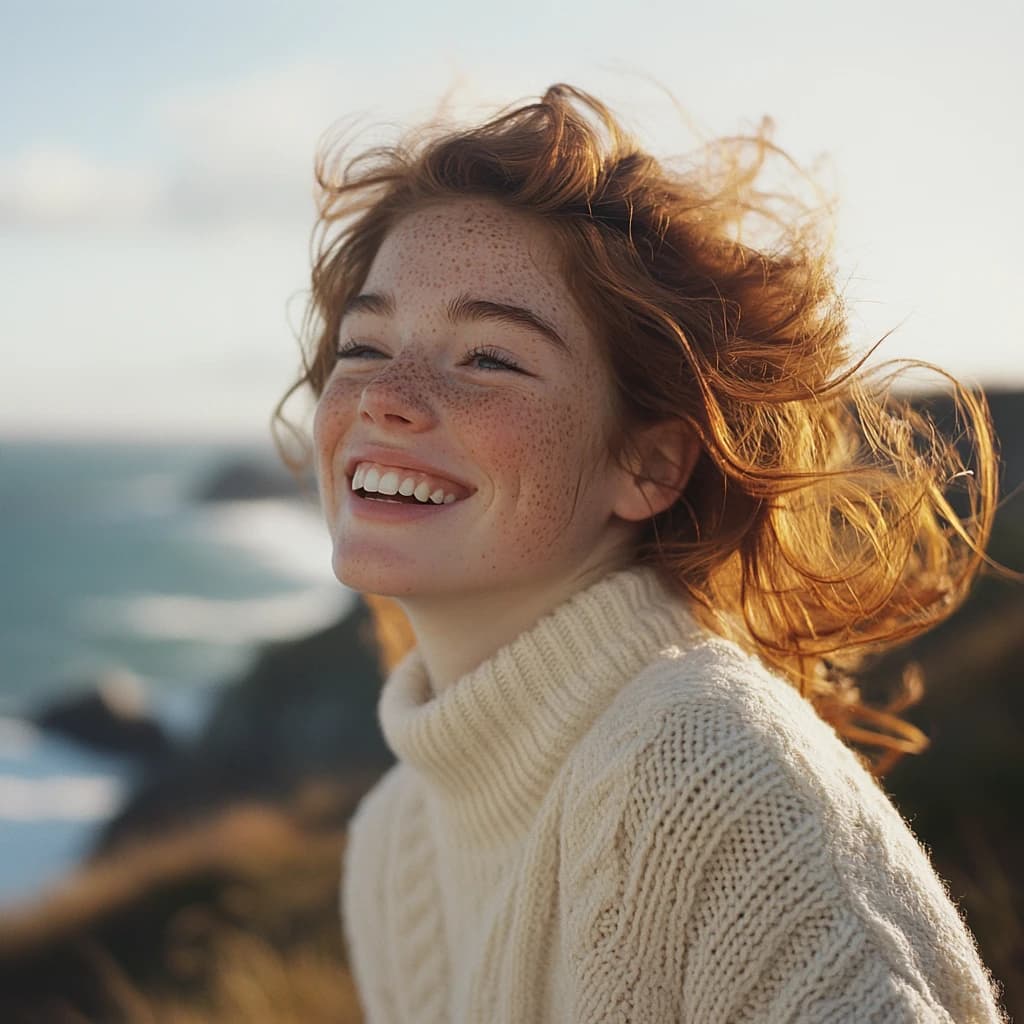
Selected parent image: V6.1
First completed modal result: V6.1
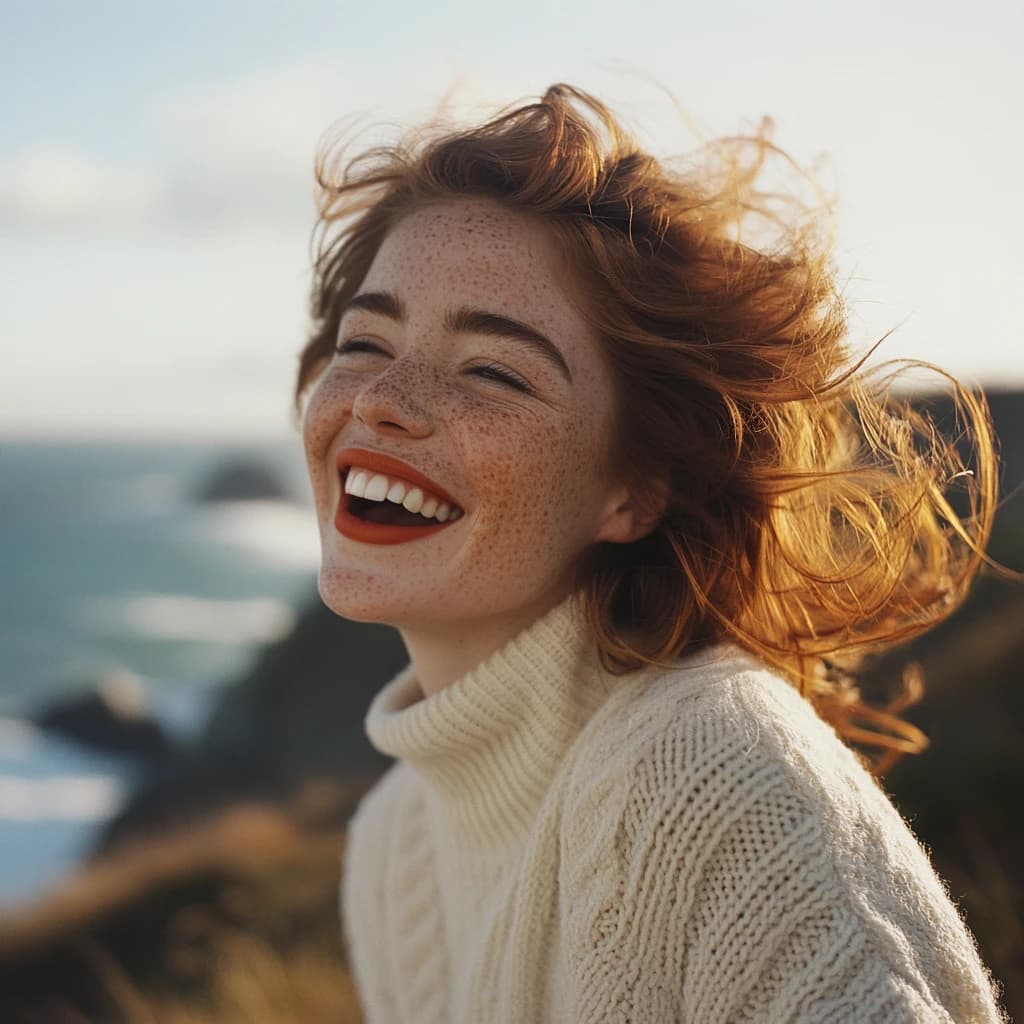
The requested prompt described a deep red wool coat. The first completed result still shows a cream sweater, while the face and expression differ from the selected parent. It demonstrates that the sequence returned images; it does not demonstrate that the clothing instruction was satisfied. The evidence here does not isolate whether the mask, model behavior or their interaction caused that mismatch.
Result 2, result 3 and result 4 are also available for inspection. Retain the input, mask and all results when diagnosing a missed edit. For a revised attempt, choose the source image and editable region deliberately instead of merely repeating the same submission.
Keep dependent actions with their parent task
A task-dependent action remains attached to its original execution context. It cannot switch accounts to continue an unavailable task. In the October 18 checks, a separate V8.2 remix failed because its original execution context lacked capacity; it was not replaced with an unrelated generation.
An editing-input task can be continued only once. If a continuation response is lost, inspect task history and the saved result before submitting again. Reusing an already continued input was rejected in the paid checks without a new generation charge.
Frequently asked questions
Can I call the V8.2 Edit Model with the edit field?
No executable mapping is currently exposed. The request is rejected rather than silently converted into another editing operation.
Can I continue a V6.1 parent as V8.2?
No. A dependent action must use the same model as its parent. To evaluate another version, start a separate generation with that version.
Does a completed modal task prove that my edit worked?
No. It proves that the operation completed and returned output. Inspect whether the requested change appeared and whether the details you wanted to preserve remained correct.
Can I remove the mask to retry the same local edit?
Removing mask_url changes the documented modal operation to outpainting. It is not an equivalent retry of the masked edit, so prepare and price it as a different request.
For a Midjourney V8.2 Edit Model requirement, check availability before building the interface around it. Where the supported V6.1 workflow fits, retain every task ID and review the actual images before accepting the edit.
Sources
Contract and execution evidence checked October 18, 2026. The images shown here are outputs from paid integration checks, not a general model benchmark.