
Invoice extraction you can check against the page
Watch the case videoTurn invoice text or supported page images into fields your team can review. Build invoice extraction with SeedRouter’s model APIs, preserving source references and checking line amounts before the data reaches your accounting workflow.
For document-processing developers and accounts payable teams.
What useful invoice extraction returns
Invoice extraction converts document content into structured header fields and line items. SeedRouter provides the model call; your application prepares the document, validates the extracted record and presents uncertain values beside the original page.
Invoice extraction for header fields
Use invoice extraction to capture supplier, invoice number, issue date and currency without losing the source file. Separate the supplier address from bill-to and ship-to details so a plausible name does not end up in the wrong field.
Explore this use caseInvoice extraction for line items
For invoice extraction, descriptions, quantities and unit prices need different fields even when the layout is cramped. Keep the row’s source text so the reviewer can spot a quantity read as a price.
Explore this use caseInvoice extraction for reviewable exceptions
Make invoice extraction useful when a scan is incomplete: flag the unreadable amount, missing currency or mismatched total. The review task should identify the field and page instead of asking someone to reread the entire document.
Explore this use case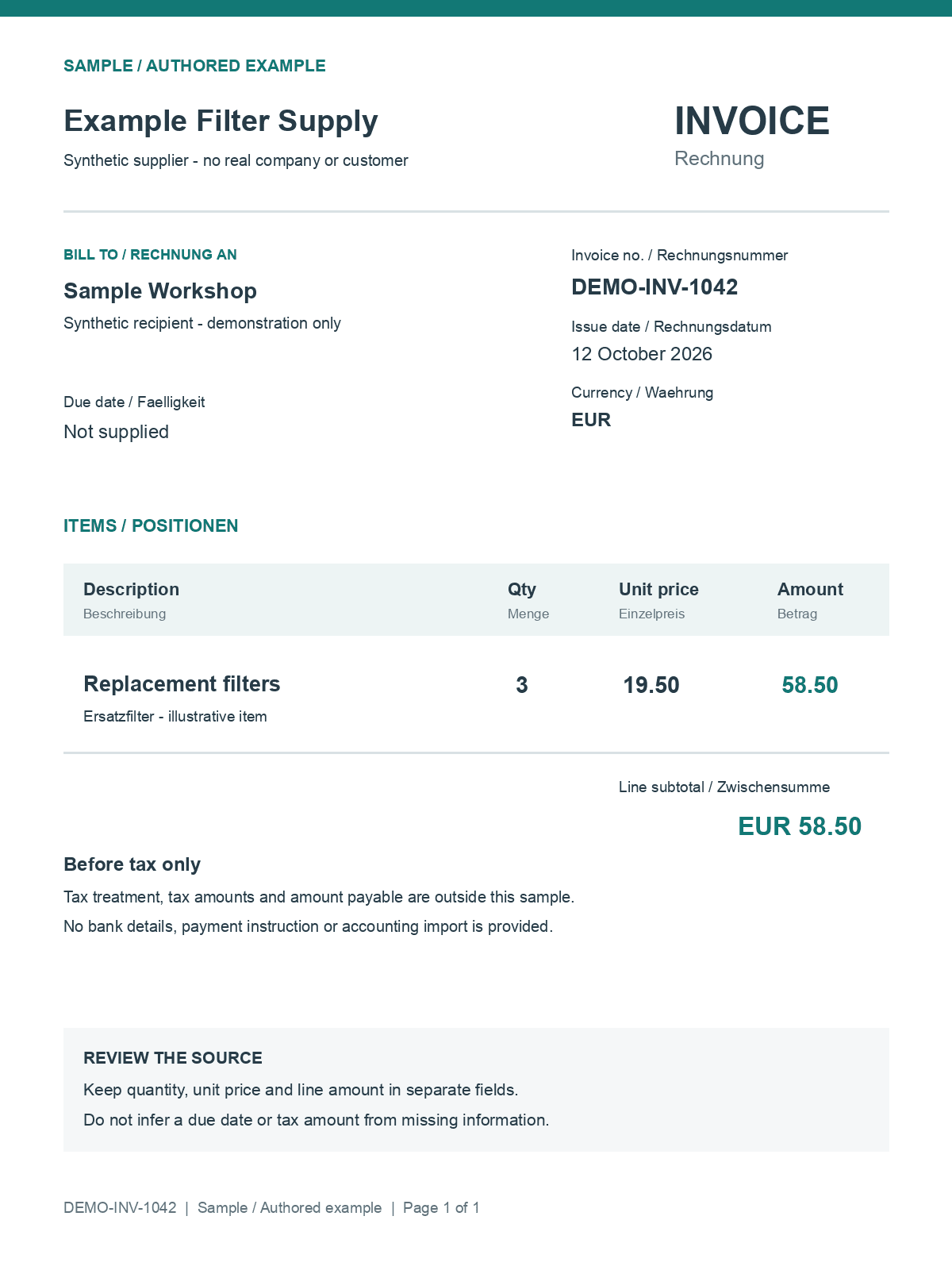
Keep the source beside each extracted value
Give invoice extraction stable document and page identifiers. If your preparation step preserves text locations, attach those references to the output so a reviewer can move directly from a suspicious field to the relevant part of the invoice.
- Keep missing, unreadable and zero distinct in invoice extraction.
- Test invoice extraction on scans as well as clean digital documents.
- Keep raw text alongside any normalized date or currency value.
Invoice extraction: a field with its source
- Field
- invoice_number
- Value
- DEMO-INV-1042
- Source
- Page 1 · Invoice no. DEMO-INV-1042
- Currency
- EUR, explicitly supplied
- Unclear field
- Payment due date
Document coordinates are available only if your own parsing or image workflow retains them.
Invoice extraction with a separate arithmetic check
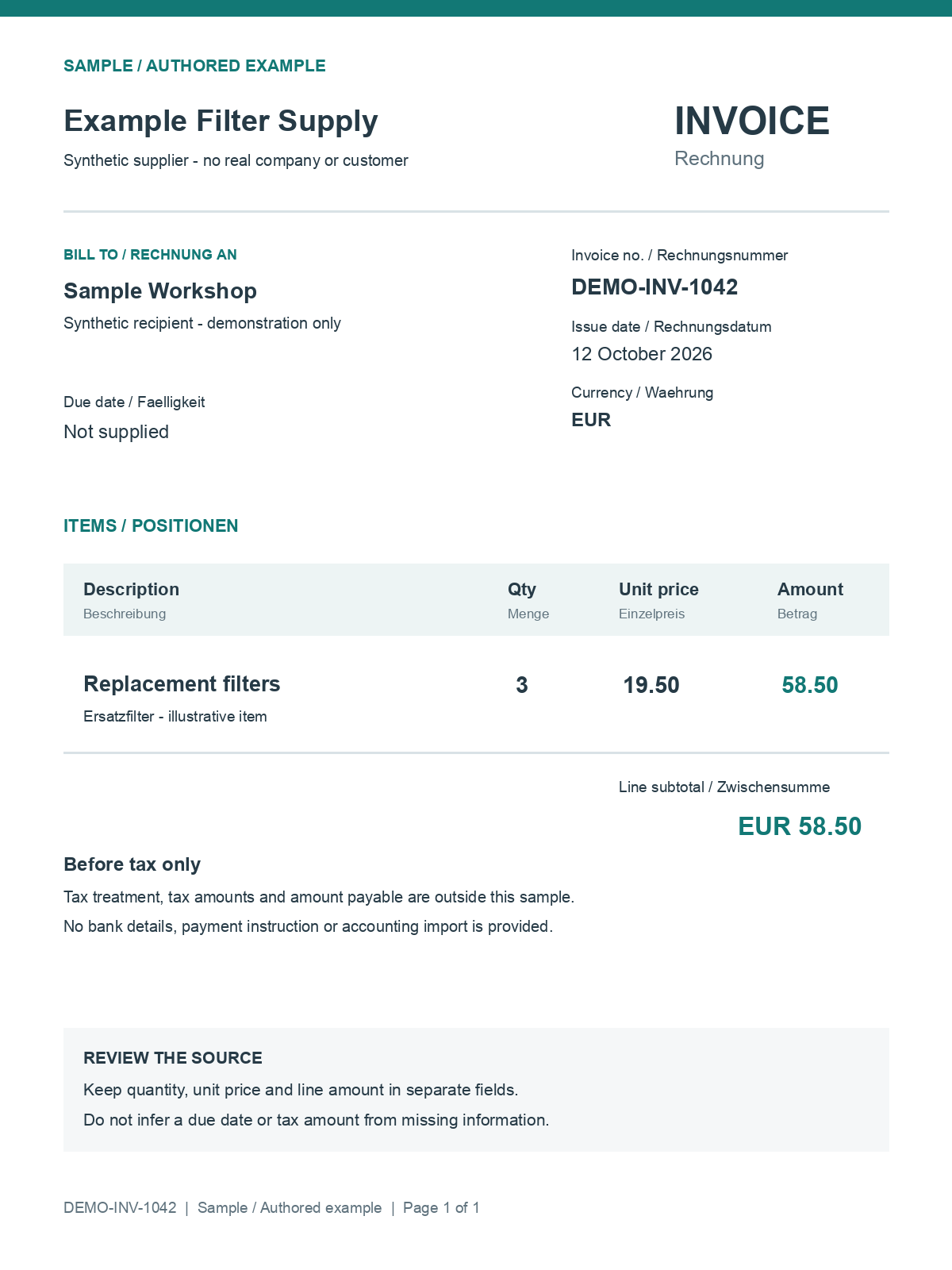
Invoice extraction can return a well-formed record with the wrong number. In this example, three items at 19.50 produce 58.50 before tax; an extracted amount of 585.00 should fail a separate decimal-arithmetic check.
- Recalculate quantities and unit prices outside the model.
- Check invoice extraction totals after applying your explicit tax and rounding rules.
- Keep discounts and credits visible instead of absorbing them into prose.
Invoice extraction · sample document
Example Filter Supply
DEMO-INV-1042 · page 1
| Description | Qty | Unit price |
|---|---|---|
| Replacement filters | 3 | 19.50 |
Invoice extraction candidate 58.50
Line amount matches. Difference: 0.00
Test invoice extraction on difficult layouts
The downloadable invoice extraction fixture separates a clean reference record from a deliberately flawed candidate. Add your own split tables, handwritten additions and repeated descriptions to compare models on the fields that matter to your team.
- Score header fields separately from line-item fields.
- Compare invoice extraction on the same labeled documents after each change.
- Show rejected values to a reviewer before creating an accounting import.
Invoice extraction: a record ready for review
- Document
- DEMO-INV-1042
- Check
- Line amount mismatch
- Candidate
- 585.00
- Reference
- 58.50
- Next step
- Confirm against page 1 before export
The fixture contains an output contract and test values, not a live accounting-system import.
Choose an invoice extraction approach
Match invoice extraction to the document you have. Clean text, scanned pages and complex tables may need different preparation; direct PDF input should not be assumed for every model.
| Source | Preparation to consider | Acceptance check |
|---|---|---|
| Invoice extraction from digital text | Preserve page and row context | Fields match the original document. |
| Invoice extraction from scans | OCR or supported image inputs | Unreadable fields remain unresolved. |
| Invoice extraction from line tables | Separate rows and decimal validation | Quantities, prices and totals reconcile. |
From a document to a reviewed record
Start invoice extraction with a labeled sample and a destination format. Keep document preparation, field extraction and accounting validation distinct enough to see which step needs work.
- 1
Prepare representative documents
Test invoice extraction on clean pages, poor scans and a table that continues onto another page. Have a person label the required fields and line items.
- 2
Extract and check
Request invoice extraction fields with supported source references, then validate types and amounts in code. Keep explicit unknowns rather than filling gaps with likely values.
- 3
Review before importing
Send invoice extraction exceptions to a reviewer with the source page attached. Export only the accepted record through your own accounting integration and retain its document identity.
Invoice extraction questions
Can invoice extraction process a PDF directly?
Input support depends on the selected model and endpoint. For invoice extraction, your application may need to parse digital text, run OCR or render pages as supported image inputs; check the model documentation before assuming that a PDF attachment will be accepted.
What is the difference between OCR and invoice extraction?
OCR reads characters and may preserve layout information, while invoice extraction maps document content to business fields such as supplier, quantity and unit price. A workflow can use both, but recognizable text alone does not establish correct field assignment or accounting totals.
How do I handle unreadable values?
Return an explicit unknown with a source reference and review reason. Invoice extraction should distinguish an unreadable amount from zero or an empty string, because those values lead to different downstream decisions and should not be silently substituted for one another.
Can a model check taxes and totals?
Use deterministic decimal calculations and your accounting rules for those checks. Invoice extraction supplies candidate values; tax treatment, discounts, currency rounding and approval remain separate business logic that you can test without relying on a model’s numerical explanation.
How should I compare models?
Use the same labeled invoices and score required fields and line items separately. Evaluate invoice extraction on correction effort, missing rows and amount mismatches as well as valid JSON, since a response can parse correctly while assigning numbers to the wrong columns.
Does this replace accounts payable software?
No, SeedRouter supplies model APIs for the extraction step of an application you build. Invoice extraction still needs document storage, validation, review and accounting-system access; compare actual model spending with current prices and record the human work needed per accepted document.
Inspect the arithmetic and source contract
SeedRouter authored this invoice extraction sample with a source PDF, reference fields and a deliberately incorrect candidate. The local Decimal check reproduces 3 × 19.50 = 58.50 and flags 585.00 with a 526.50 difference. No model extraction or accounting import was performed.
- Download the invoice extraction fixture
- Inspect the invoice extraction source PDF
- Reproduce the invoice extraction check
- See the local calculation receipt
- GPT-6 Sol input documentation
- Model selection
- Current prices
Related solutions
- Ecommerce operations
Create reviewable product copy and campaign drafts from approved product and business information.
- Lead classification and handoff
Extract details from incoming leads, review uncertain classifications and hand records to your business systems.
- Customer support workflows
Connect sourced answers to explicitly approved actions in your existing customer systems.
- Internal knowledge assistants
Build answers around retrieved passages, technical terminology and traceable document sources.
- Business data queries
Turn business questions into reviewable queries and explain results calculated by your data systems.
- Monthly reports
Combine deterministic spreadsheet processing with model-assisted classification and written analysis.
Begin with the invoice your team finds hardest to review
Bring a labeled document and the fields your accounting process needs. Test invoice extraction against that reference, inspect every mismatch and build the review step before expanding to a document batch.