
Customer service automation with an answer and a next step
Watch the case videoHelp customers find the right policy and help agents resolve the actual request. Build customer service automation with SeedRouter’s text APIs, current knowledge and the business actions your application explicitly permits.
For support teams and developers building around an existing help desk.
Where customer service automation helps
Customer service automation uses software to answer recurring questions and coordinate support work. SeedRouter provides model APIs for interpreting requests and drafting responses; your application supplies the knowledge, account context and tools needed to complete each task.
Customer service automation with current policies
Use customer service automation to turn approved policy passages into a clear reply. Retain a source link and version so an agent can see whether the wording reflects today’s policy or an older rule.
Explore this use caseCustomer service automation with explicit outcomes
Customer service automation can prepare a structured request to check an order or start an allowed process. Your business system validates the request and returns the actual outcome before the customer receives a completion message.
Explore this use caseCustomer service automation with useful handoffs
Give customer service automation a useful escalation format: the customer’s goal, facts already checked and the unresolved question. An agent should be able to continue the case without asking the customer to repeat everything.
Explore this use case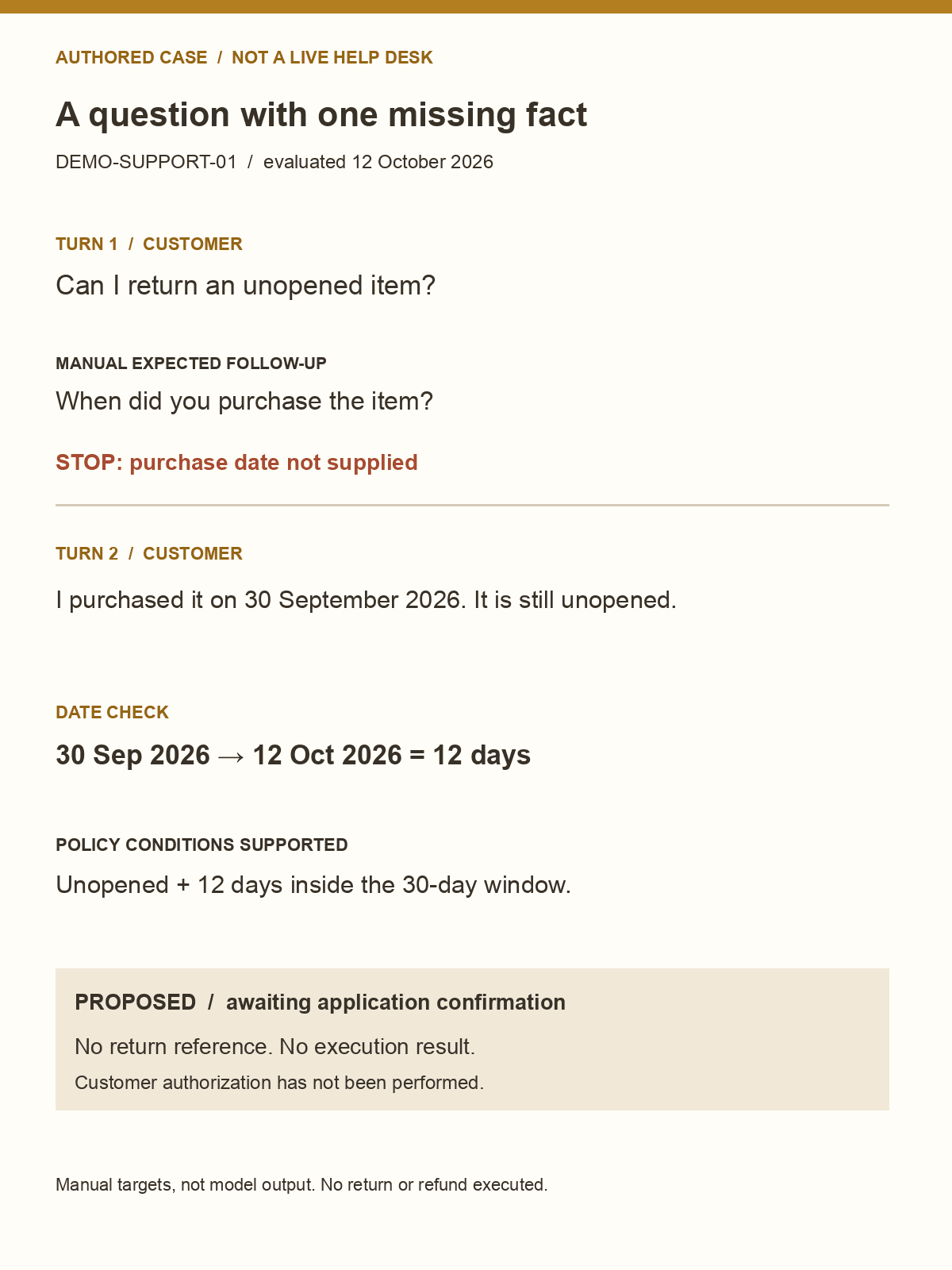
Answer the policy the customer is actually asking about
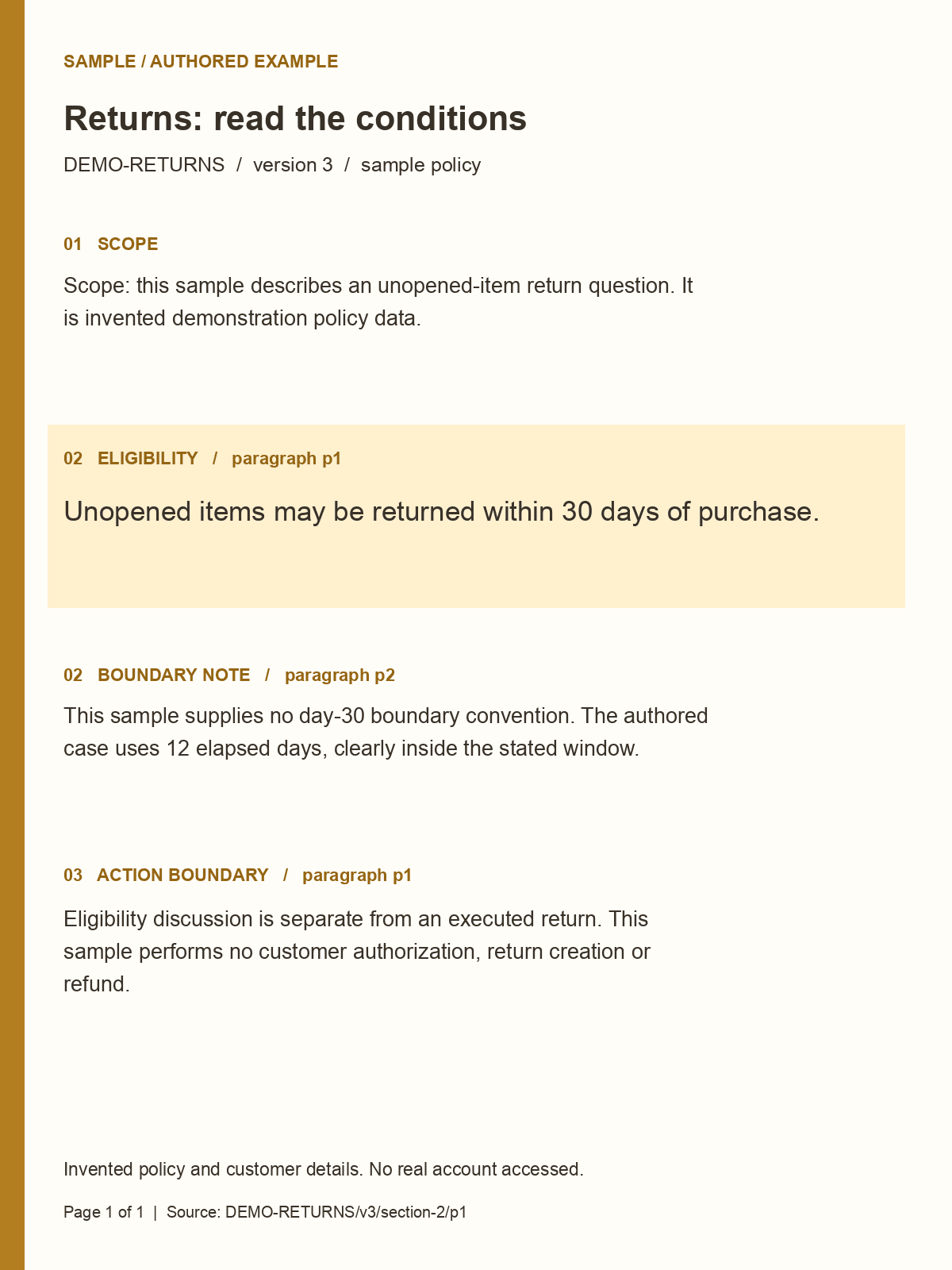
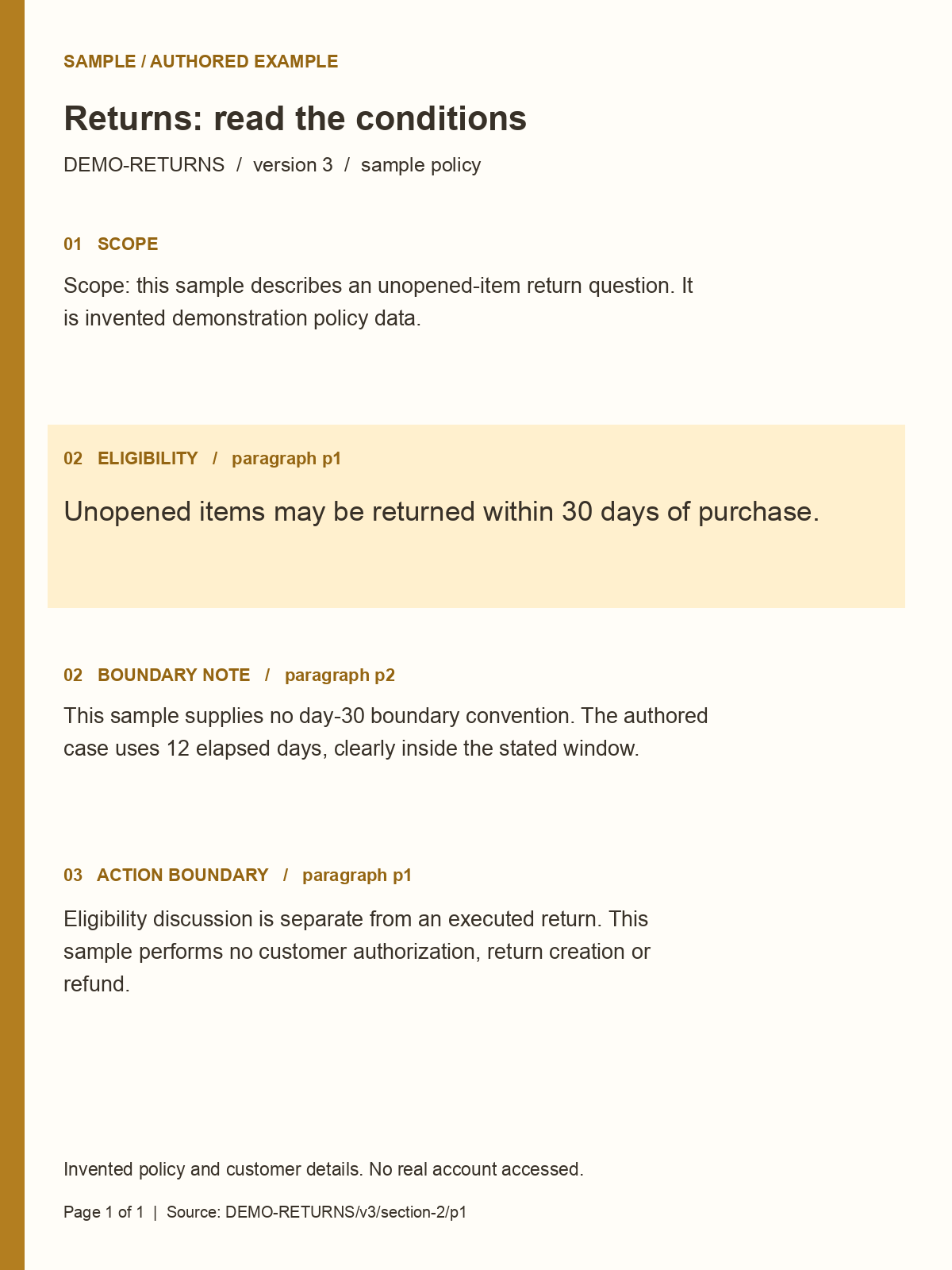
Anchor customer service automation in the passages relevant to the request. A return question may depend on purchase date, item condition and product category, so show missing conditions instead of making a blanket promise.
- Keep the policy section and revision with customer service automation answers.
- Test customer service automation after a policy changes.
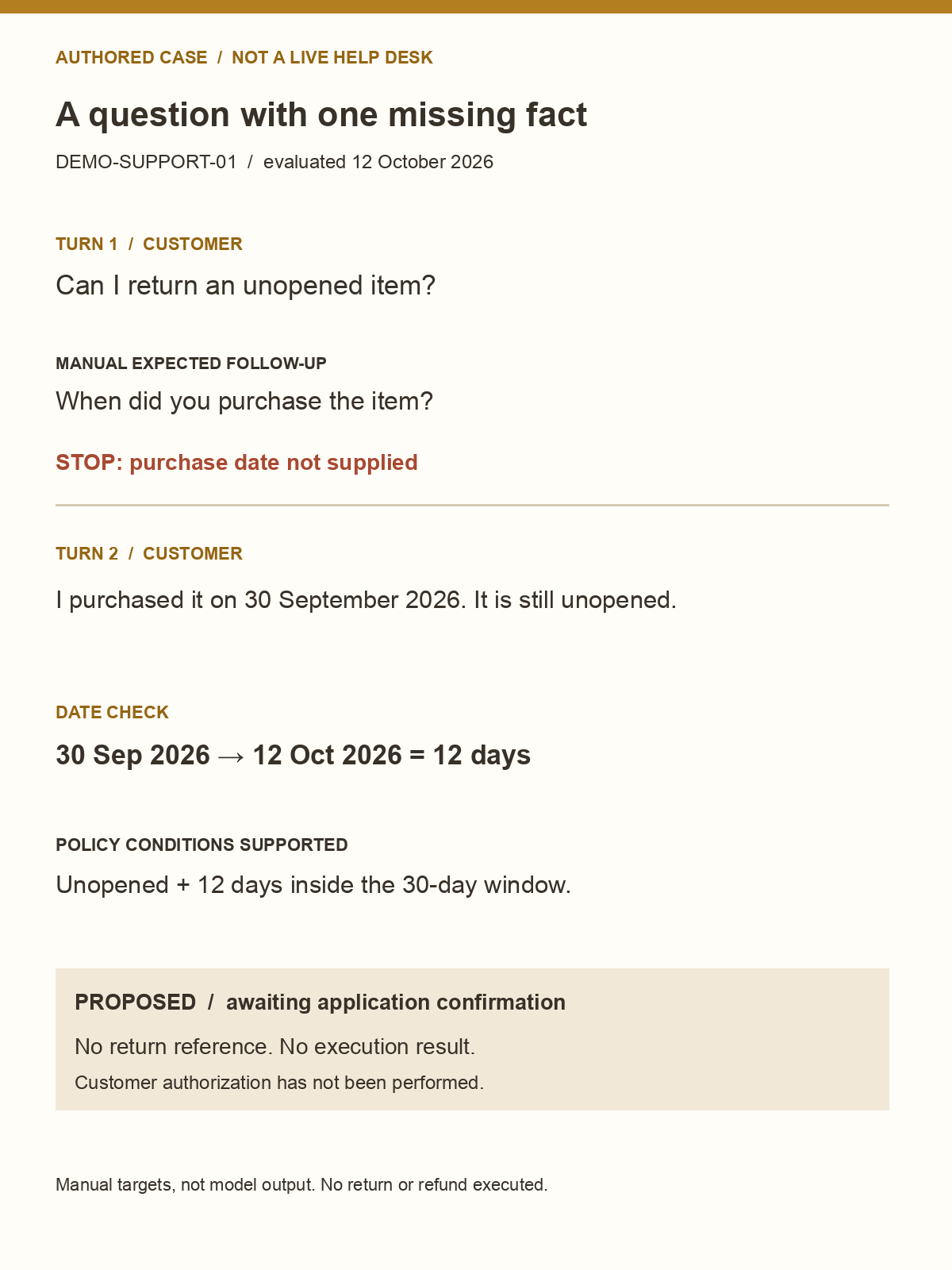
- Ask a focused follow-up when one condition remains unknown.
Customer service automation from intent to outcome
Customer service automation should distinguish a supported proposal from an executed action. In the follow-up example, the local date check finds 12 days since purchase, but customer authorization and application confirmation remain outstanding; no return has been created.
- Match customer service automation actions to the authenticated customer.
- Keep customer service automation confirmation separate from execution.
- Record a real reference number only after the business system returns one.
Customer service automation: a checked action
- Intent
- Request a return
- Before action
- Check customer, item and eligibility
- Approval
- Obtain any required confirmation
- After action
- Report the returned status
- If unresolved
- Explain the remaining step to the customer
The model does not acquire permission to modify orders merely because it can describe an action.
Customer service automation an agent can continue
A concise customer service automation handoff should tell the next agent what has been established and what still needs judgment. Download a sample with a policy passage, missing purchase date and acceptance checks for the reply.
- Preserve the original customer goal through customer service automation handoffs.
- Let customer service automation summarize completed checks without inventing outcomes.
- Assign unresolved cases to the support process your team already uses.
Customer service automation: the agent handoff
- Customer goal
- Return an unopened item
- Checked
- Current policy allows eligible unopened returns
- Missing
- Purchase date
- No action yet
- Return not created
- Agent task
- Confirm date and evaluate the request
This is a hand-written target format for testing; the sample makes no claim about response quality.
Choose a customer service automation starting point
Evaluate customer service automation by the job being performed. Answer quality, action accuracy and escalation quality need separate checks; a fluent response cannot prove all three.
| Support job | Starting point | Useful result |
|---|---|---|
| Customer service automation for answers | Text model plus supplied passages | A supported reply with its source. |
| Customer service automation for actions | Tool-capable model plus your application | Validated action and actual outcome. |
| Customer service automation for handoff | Structured summary in your help desk | Known facts, open questions and next owner. |
Start with one recurring support request
Build customer service automation around a case your agents know well. Keep the test small enough to examine every answer, source and proposed action before connecting it to live work.
- 1
Choose the evidence
Supply customer service automation with current policy passages and clearly identified account facts. Define the questions that require clarification and the cases a person should receive.
- 2
Compare the replies
Evaluate customer service automation on answered, unanswered and conflicting cases. Ask an experienced agent to check whether each citation supports the promise made in the reply.
- 3
Connect permitted actions
Add customer service automation actions through your existing application. Verify authorization and duplicate handling, then check that the customer sees the actual business result.
Customer service automation questions
Is this a ready-made customer support chatbot?
SeedRouter supplies model APIs for a chatbot or agent you build or connect. Customer service automation still needs your application to manage conversations, retrieve approved knowledge and integrate with the help desk; this page does not describe a hosted support product with those components included.
Can customer service automation handle refunds?
A model can help interpret a refund request and prepare an allowed action. Your customer service automation application must check identity, policy and required confirmation before executing anything through the business system, then report only the result that system actually returns.
How do I stop answers using an old policy?
Keep source versions and retrieval rules current in your knowledge system. Test customer service automation with questions affected by each policy update, and inspect whether answers cite the new passage rather than relying on an older conversation or an unsupported model assumption.
What should happen when an answer is missing?
Return a focused clarification question or an honest handoff. Customer service automation is more useful when it explains the missing purchase date or unavailable policy than when it gives a confident answer that an agent later has to retract.
Does a tool call mean the action succeeded?
No, a tool call requests an action; your application executes it and returns a result. Customer service automation should distinguish proposed, confirmed and completed work so customers are not told that an order changed when the business system rejected the request.
How can I evaluate quality and cost?
Review representative conversations for supported answers, correct actions and useful escalations separately. Measure customer service automation costs using actual conversation lengths and current model rates, then track agent correction time alongside them; there is no fixed per-resolution cost established by this example.
Review the case and implementation references
SeedRouter prepared the customer service automation fixture on October 12, 2026. Its return policy and customer message are invented; the example demonstrates evidence and handoff boundaries, not a completed support integration or a measured resolution rate.
- Download the customer service automation fixture
- Read the customer service automation policy
- Inspect both conversation turns
- Reproduce the customer service automation date check
- GPT-6 Sol documentation
- Knowledge assistant workflow
- Live model prices
Related solutions
- Ecommerce operations
Create reviewable product copy and campaign drafts from approved product and business information.
- Lead classification and handoff
Extract details from incoming leads, review uncertain classifications and hand records to your business systems.
- Invoice and document extraction
Extract invoice fields and line items, then validate quantities, totals and source evidence.
- Internal knowledge assistants
Build answers around retrieved passages, technical terminology and traceable document sources.
- Business data queries
Turn business questions into reviewable queries and explain results calculated by your data systems.
- Monthly reports
Combine deterministic spreadsheet processing with model-assisted classification and written analysis.
Build around the question your agents hear every day
Bring one current policy and a few representative conversations. Test customer service automation against your team’s accepted answers, then connect the next step that customers actually need.