
Logistics AI that keeps the trip and source connected
Watch the case videoExtract shipment details, draft questions over fleet data and prepare operational summaries. Connect logistics AI through SeedRouter APIs, with your own systems supplying the records, calculations and review steps that make an answer useful.
For transport operations, analysts and application developers.
Where logistics AI fits into operations
Logistics AI can help interpret documents and explain supplied operational information. SeedRouter provides model APIs; your transport and data systems retain authoritative records, execute calculations and control updates.
Extract useful document fields
Use logistics AI to propose shipment identifiers and document details from the material you supply. Keep page references and review uncertain fields before importing anything into the operational record.
Explore this use caseAsk a question of the data
Give logistics AI the relevant table definitions and business meaning of the metric. Review a proposed query before executing it in a controlled data environment.
Explore this use casePrepare a recurring report
Use logistics AI to draft the explanation around validated figures. Keep the reporting window, exclusions and source results together so the next period uses the same definitions.
Explore this use case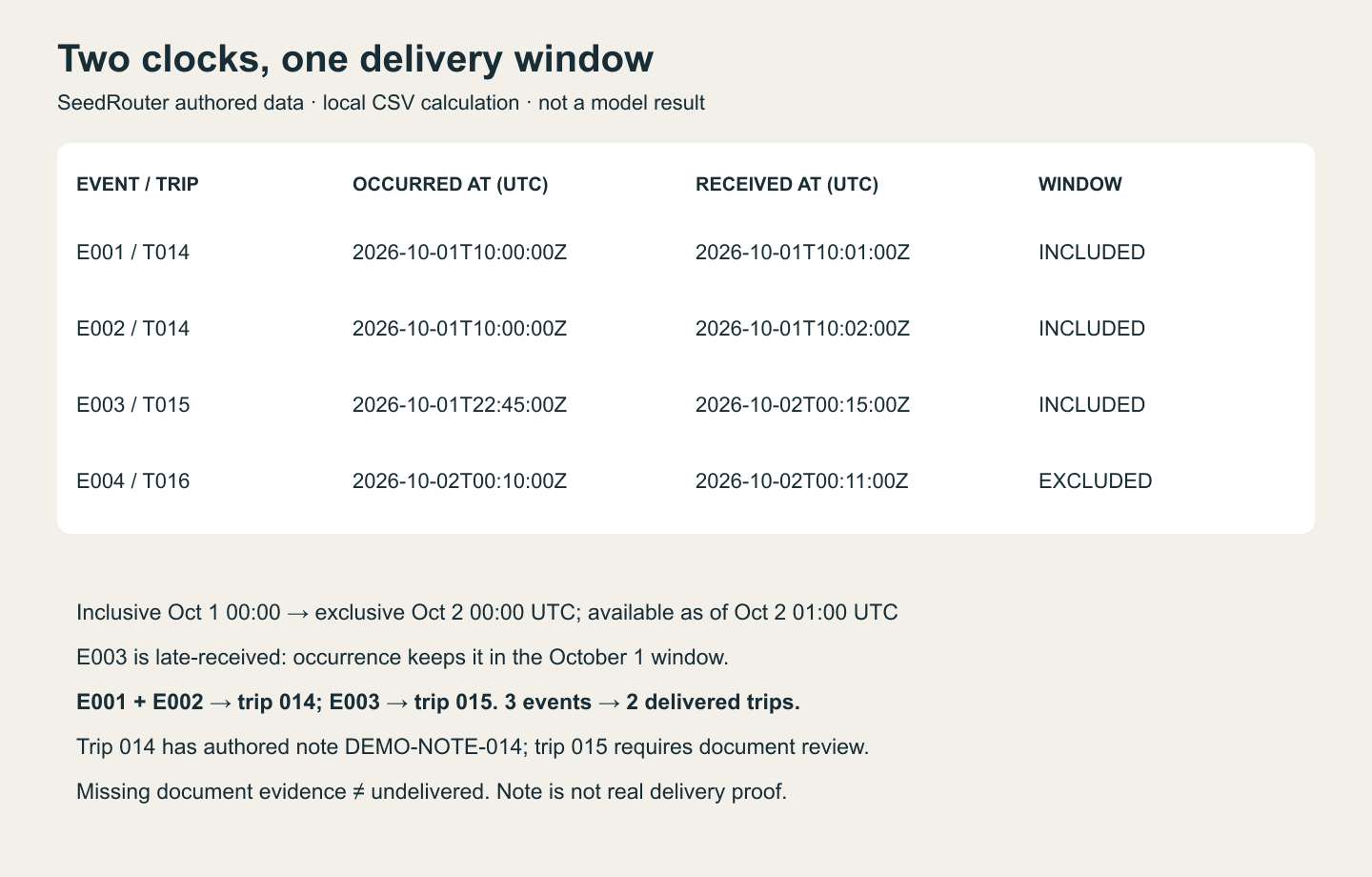
Match the document to the right movement
A plausible shipment reference is not enough if it identifies the wrong trip. Use logistics AI to extract a candidate value, then compare it with the operational record before connecting the two.
- Retain the document page and the extracted value.
- Route uncertain logistics AI matches to a reviewer.
- Keep duplicate documents from creating duplicate trips.
Logistics AI document handoff
- Source
- DEMO-NOTE-014 · page 1
- Candidate reference
- DEMO-TRIP-014
- Check
- Reference exists and matches the shipment
- Review
- Hold missing or conflicting identifiers
Logistics AI fixture for checking a document handoff, not an actual extraction result.
Define the metric before writing the query
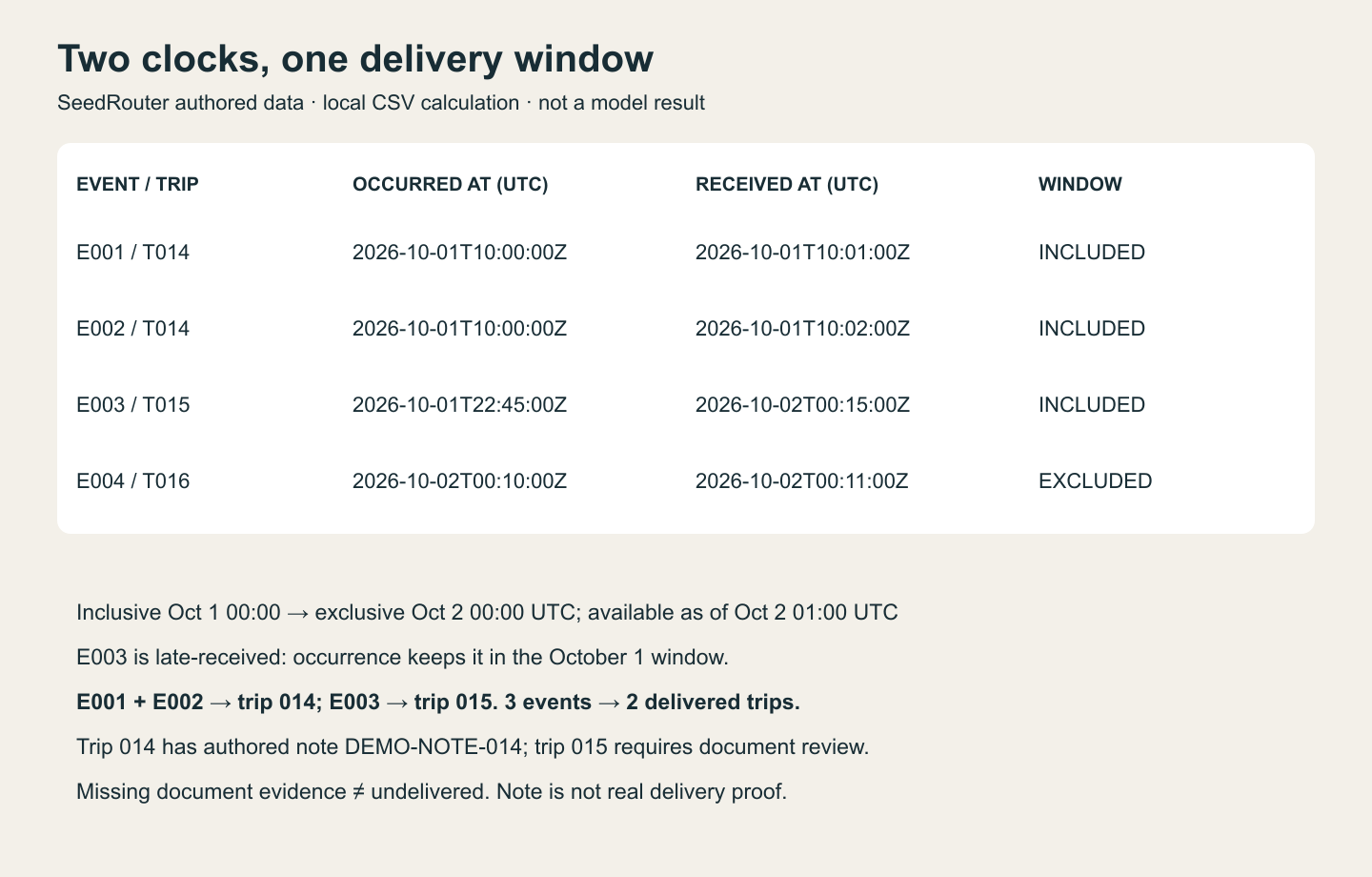
Delivered trips and delivery events can produce different totals. In this logistics AI example, October 1 uses event time in UTC: three delivered events represent two trips. A fourth event belongs to October 2.
- Choose the event date and time zone used by the report.
- Test logistics AI queries on duplicate and late-arriving records.
- Calculate the final result in the data system.
Logistics AI counting example
- DEMO-TRIP-014
- October 1, 10:00 UTC · two events, one trip
- DEMO-TRIP-015
- October 1, 22:45 UTC · one event, no document
- DEMO-TRIP-016
- October 2, 00:10 UTC · outside the window
- October 1 total
- 2 delivered trips; 1 with a matching document
Deterministic logistics AI test fixture with invented records; this arithmetic is not a model benchmark.
Make the report explain its own scope
A useful logistics AI summary distinguishes delivery status from document completeness. DEMO-TRIP-015 counts as delivered in the supplied events but has no matching note. Mark that evidence gap for review; do not change its status to undelivered.
- Attach the query result used for the narrative.
- Keep logistics AI explanations distinct from inferred causes.
- Flag missing evidence instead of inventing a reason for a delay.
Logistics AI reporting handoff
- Period / clock
- October 1, 2026 · event time in UTC
- Data available through
- October 2, 01:00 UTC
- Delivered trips
- 2; duplicate events count once
- Document review
- DEMO-TRIP-015 has no matching delivery note
Illustrative logistics AI report specification. No delivery rate or operational improvement is claimed.
Choose logistics AI by the output and evidence
Test logistics AI on the same representative documents and questions. Judge extraction, query planning and explanation separately so a strong paragraph does not hide an incorrect total.
| Task | Starting point | What must be checked |
|---|---|---|
| Logistics AI document fields | A supported text/vision model and prepared document input | Identifiers, page evidence and missing values. |
| Logistics AI query planning | GPT-6 Sol or Claude Opus 5.5 with a schema | Joins, counting rule, reporting window and allowed access. |
| Logistics AI report drafting | A text model supplied with validated results | Narrative agreement with the figures and stated scope. |
Trace one question from source to report
Start logistics AI with a question an analyst can already answer. That reference result makes it possible to distinguish a useful workflow from a merely convincing explanation.
- 1
Prepare the sources
Give logistics AI the relevant document excerpts, table definitions and metric rules. Keep shipment identifiers and reporting dates visible in the evaluation material.
- 2
Check the intermediate result
Review logistics AI extracted fields or a proposed query before using them. Reconcile the output with source records and compute totals in your data system.
- 3
Explain the checked figures
Pass verified results to logistics AI for a summary. Retain the query, data window and source links with the report so another person can inspect the answer.
Logistics AI questions before implementation
Does SeedRouter provide a logistics AI transport system?
SeedRouter supplies model APIs rather than a transport-management system. Your application connects logistics AI to authorized records and retains the shipment lifecycle, data access, calculations and operational decisions.
Can logistics AI query my fleet database directly?
A model call does not give SeedRouter access to your database. Your application supplies permitted context and can review logistics AI query proposals before execution through a controlled connection with appropriate access.
How do I validate logistics AI totals?
Compare results with a reference calculation over the same source data and reporting window. Test logistics AI workflows for duplicate events, late records and time-zone boundaries, since a syntactically valid query can still count the wrong thing.
Can logistics AI combine documents and telemetry?
Your application can provide relevant document details and data results together. Keep their origins visible in logistics AI answers, and leave absent trip or cost information unresolved rather than asking the model to fill the gap with an estimate.
What if logistics AI must run offline or in a specific region?
Confirm that requirement before choosing a hosted API. This logistics AI page does not claim offline operation or a particular hosting location; deployment constraints may require a different system design.
How should I estimate logistics AI costs?
Use current rates with representative document sizes and questions. Track logistics AI spending per reviewed output, and account separately for document preparation, database processing and analyst review rather than treating them as included model work.
Inspect the records and implementation references
The logistics AI example includes four authored events, their receipt times and one delivery note. The local validator reproduces the two-trip count, retains the late-received event and flags the missing document without changing delivery status. Download the inputs and calculation receipt to inspect each decision.
- Logistics AI operations brief
- Original event records CSV
- Read the sample delivery note
- Run the time-window checks
- Inspect the calculation receipt
- Business data query workflow
- Report automation workflow
- Current prices
Related solutions
- Invoice and document extraction
Extract invoice fields and line items, then validate quantities, totals and source evidence.
- Business data queries
Turn business questions into reviewable queries and explain results calculated by your data systems.
- Monthly reports
Combine deterministic spreadsheet processing with model-assisted classification and written analysis.
Begin with a question your analyst can verify
Choose a document or operational question with a known reference answer. Try logistics AI with that material, inspect the intermediate output and connect only the reviewed result to your report.