
AI filmmaking, one usable shot at a time
Watch the case videoTurn a script into references, keyframes and video takes your editor can work with. Build AI filmmaking around clear shot decisions with SeedRouter’s text, image and video APIs, then keep the approved assets connected.
For filmmakers, animation teams and production developers.
Build AI filmmaking around the scene
AI filmmaking combines written direction, image references and generated video inside a production workflow. SeedRouter supplies model APIs; your production tools handle the asset library, timeline edit and final delivery.
Plan the visible story
Use AI filmmaking to develop a shot breakdown from an approved scene. Give each shot a purpose, a starting state and an ending state so the sequence can communicate the action.
Explore this use caseCarry references between shots
Keep AI filmmaking character and location references available for every relevant shot. A stable reference pack gives the team something concrete to compare when identity, costume or spatial layout drifts.
Explore this use caseChoose takes for the cut
Review AI filmmaking output in sequence. A convincing standalone clip may still fail at the cut because screen direction, an object or the action state no longer matches.
Explore this use case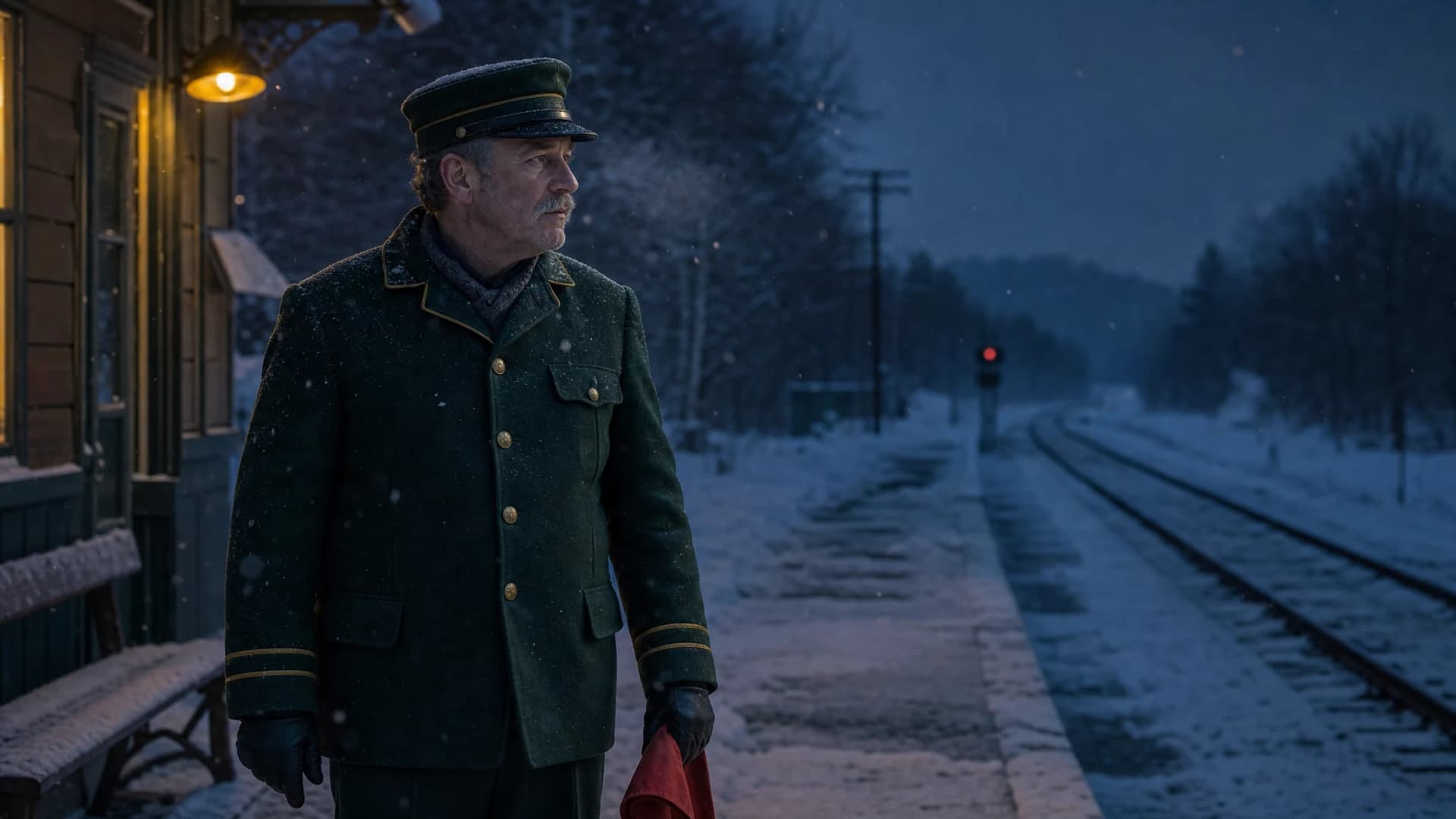
Make the keyframe answer a shot question
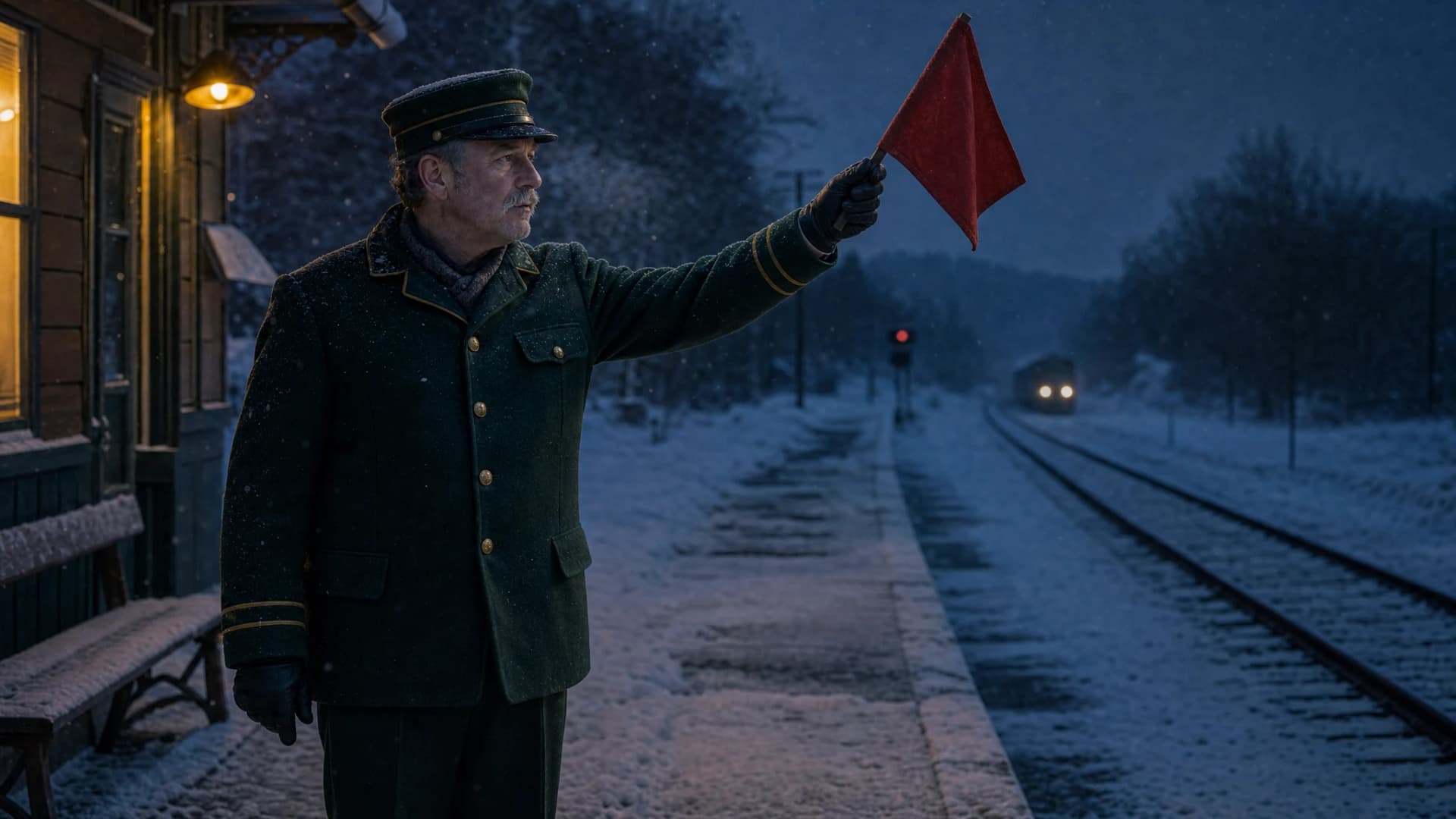
The Last Platform follows a station attendant waiting in snow, gripping a red signal flag and facing distant headlights. AI filmmaking needs those three shot intentions to agree before motion: the same uniform, holding hand, prop and screen direction.
- Keep the station attendant and red flag references with every shot.
- Evaluate AI filmmaking eyelines and lamp direction across the source images.
- Distinguish the planned sequence from an assembled, reviewed film.

Review both sides of every cut
The first AI filmmaking finishing candidates changed the flag’s holding hand. Returning to the original front camera angle keeps the raised flag in the same left hand, with two distant headlights. That repairs the visible starting-state mismatch; the motion and eventual cut still need their own review.
- Check costume and props as well as the face.
- Keep AI filmmaking screen direction consistent through the cut.
- Ask for a new take of the affected shot only when appropriate.
Keep accepted work when a scene changes
Keep each Last Platform shot attached to its source frame and intended story beat. AI filmmaking revisions should identify the affected cut or prop, allowing useful surrounding shots to remain available for the editor.
- Keep the approved source frame separate from generated takes.
- Record AI filmmaking take selection in the shot manifest.
- Budget the revised shot and its continuity check together.
AI filmmaking take manifest
- Scene
- DEMO-LAST-PLATFORM
- Shot 1
- Attendant looks down the snowy track
- Shot 2
- Glove holds the red signal flag; hand must match the cut
- Shot 3
- Raised flag and distant headlights
- Cut review
- Requires generated footage and sound inspection
AI filmmaking source frames establish the proposed scene. They do not certify motion, cut continuity or a completed film.
Choose AI filmmaking models by production stage
A single AI filmmaking model does not need to handle every task. Test the relevant input controls and judge whether the resulting asset serves the scene.
| Stage | Starting point | Review standard |
|---|---|---|
| AI filmmaking planning | Claude Opus 5.5 or GPT-6 Sol | Shot purpose and action states match the approved script. |
| AI filmmaking keyframes | Nano Banana Pro or GPT Image 2 | Character, costume, composition and location references. |
| AI filmmaking takes | Seedance 2.5 or Kling 3.0 | Movement, continuity and usable edit points. |
Take a short scene through the whole process
Evaluate AI filmmaking on a sequence you can actually edit. Keep its scope small enough to inspect every shot and every transition.
- 1
Break down the scene
Give AI filmmaking a short script, character references and a location plan. Identify the visible beat of each shot and the state that must carry into the next.
- 2
Approve frames and takes
Settle AI filmmaking keyframes before expanding motion variations. Save candidates with shot identifiers and record why the editor accepted or rejected each take.
- 3
Review the assembled cut
Watch the AI filmmaking sequence in your editing software. Record continuity corrections and finished-shot cost before deciding how much of the next scene to generate.
AI filmmaking questions for production teams
Does AI filmmaking generate a finished film in one request?
This workflow treats each shot as a deliverable with its own references and review. SeedRouter supplies AI filmmaking model calls; your team assembles the timeline, checks the sequence and completes sound and delivery in production software.
Will AI filmmaking preserve the same character?
Reference images can guide generation, but they do not guarantee identity across shots. Evaluate AI filmmaking results for face, silhouette, costume and movement, and keep approved references available when requesting a correction.
How do I choose an AI filmmaking video model?
Start with the inputs and control that your shot needs, then inspect the model’s documented settings. Compare AI filmmaking candidates from equivalent briefs for useful motion and edit points rather than choosing only from a polished gallery clip.
Can AI filmmaking output include sound?
Audio depends on the selected video model and request. Check that model’s page and the actual generated file; AI filmmaking still needs sound review and mixing for the cut, while standalone music and dubbing APIs remain planned.
How should I budget AI filmmaking revisions?
Use live rates and count every candidate that contributed to the selected shot. Compare AI filmmaking cost per accepted shot, then add review, editing and sound work; a price per generated second is not a complete scene budget.
What is a useful first AI filmmaking test?
Use a short scene with a recurring character and a prop that changes hands or position. AI filmmaking evaluation should include the cuts and rejected takes, so the team sees the revision work behind the final sequence.
Use the scene records and production guides
SeedRouter created these AI filmmaking case images on October 12, 2026 with GPT Image 2 at high quality: three initial images and two targeted corrections. The second correction preserves the holding hand and two headlights. The download records rejected candidates, reference inputs and the changed camera angle; no customer outcome or completed film is claimed.
Related solutions
- Video production
Build a shot-based workflow with clear acceptance criteria, selective revisions and a delivery budget.
- AI comic and series production
Connect scripts, character references and reusable shots for serialized visual storytelling.
- Storyboards and animation keyframes
Translate a shot list and character references into keyframes that can guide animation.
Start with a scene worth finishing
Choose a short script and define the shots you need. Explore AI filmmaking models, prepare the references and judge the first takes in the context of the cut.