
AI for education, starting with the lesson
Watch the case videoDraft explanations, create lesson illustrations and prepare activities from content your teaching team approves. Connect AI for education to your authoring workflow with SeedRouter APIs, keeping the learning objective and factual review in view.
For course teams, educators and learning-product developers.
Where AI for education fits into content preparation
AI for education can assist with drafting instructional text and visual materials. SeedRouter provides model APIs; educators and course authors define the learning objective, check correctness and publish through their existing learning tools.
Draft from an approved source
Use AI for education to turn supplied lesson notes into explanations or practice prompts. Keep the source and intended difficulty alongside each draft so the reviewer can check both meaning and level.
Explore this use caseMake the concept visible
Give AI for education a visual brief with the concept and required relationships. Review the actual objects, labels and proportions before an illustration becomes teaching material.
Explore this use caseConnect the authoring steps
Build AI for education into an application that saves drafts and review decisions. Your course system remains responsible for lesson structure, learner accounts and content access.
Explore this use case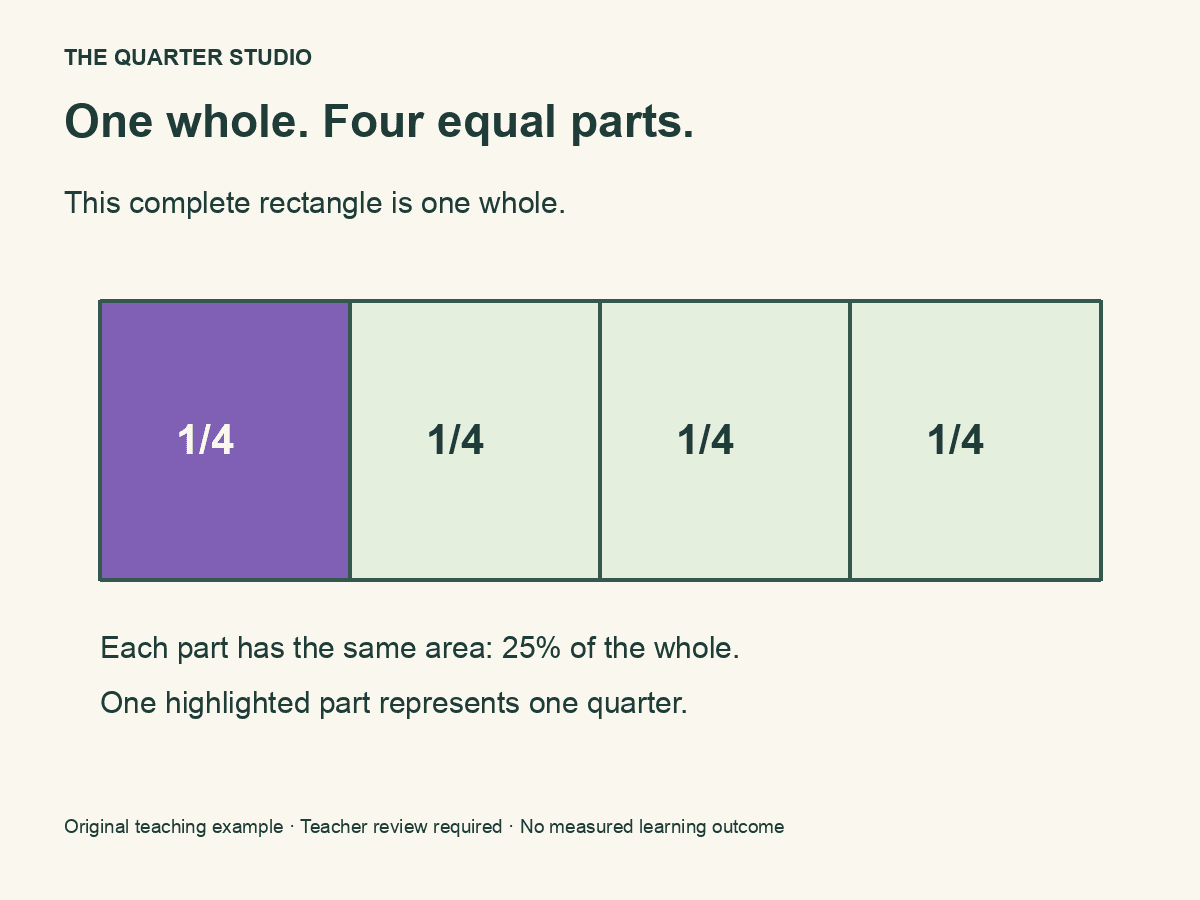
Write the objective before the image prompt
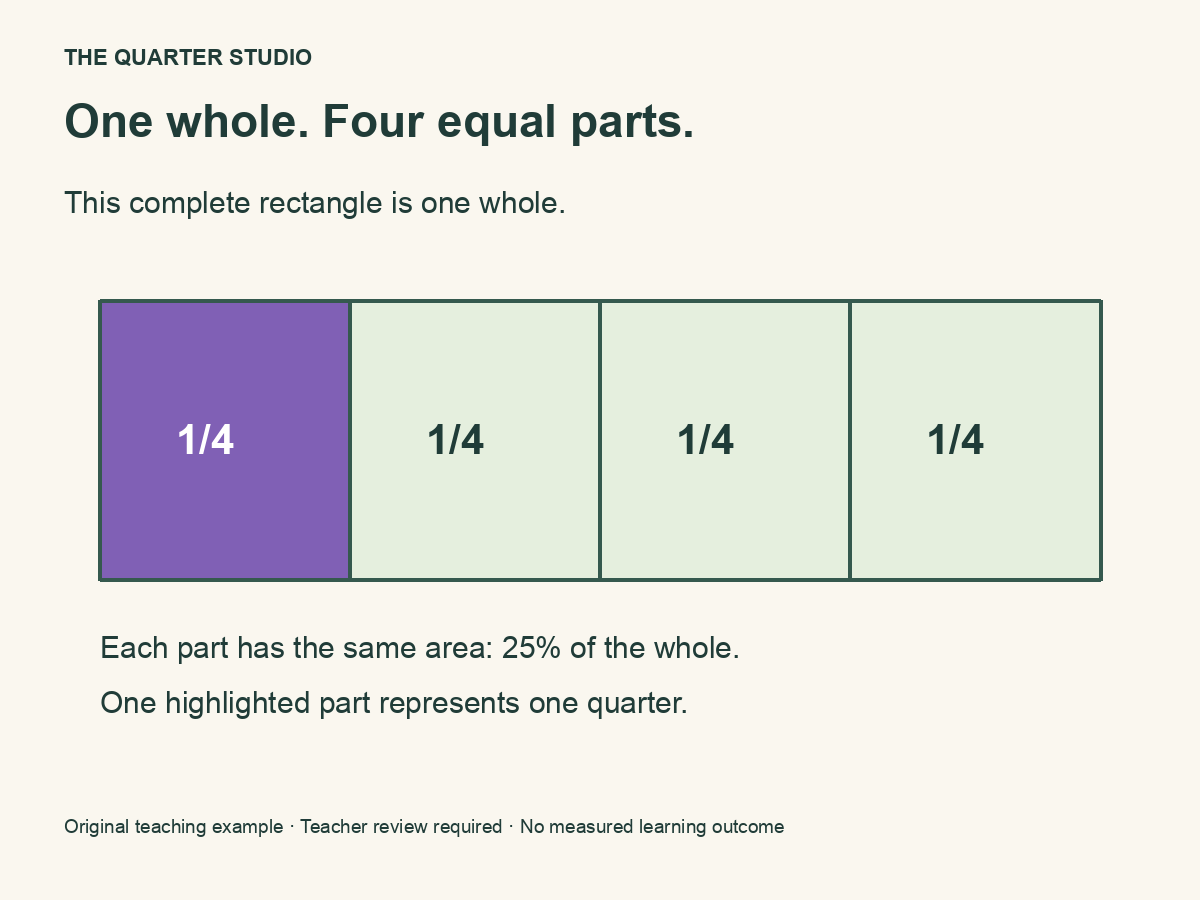
A decorative illustration may not explain the lesson. Use AI for education with an explicit visual requirement, such as four equal regions, so the result can be checked against something more useful than appearance.
- State the relationship the learner needs to notice.
- Check AI for education diagrams for counts and proportions.
- Keep final labels editable in the lesson authoring tool.
Keep the explanation and answer key together
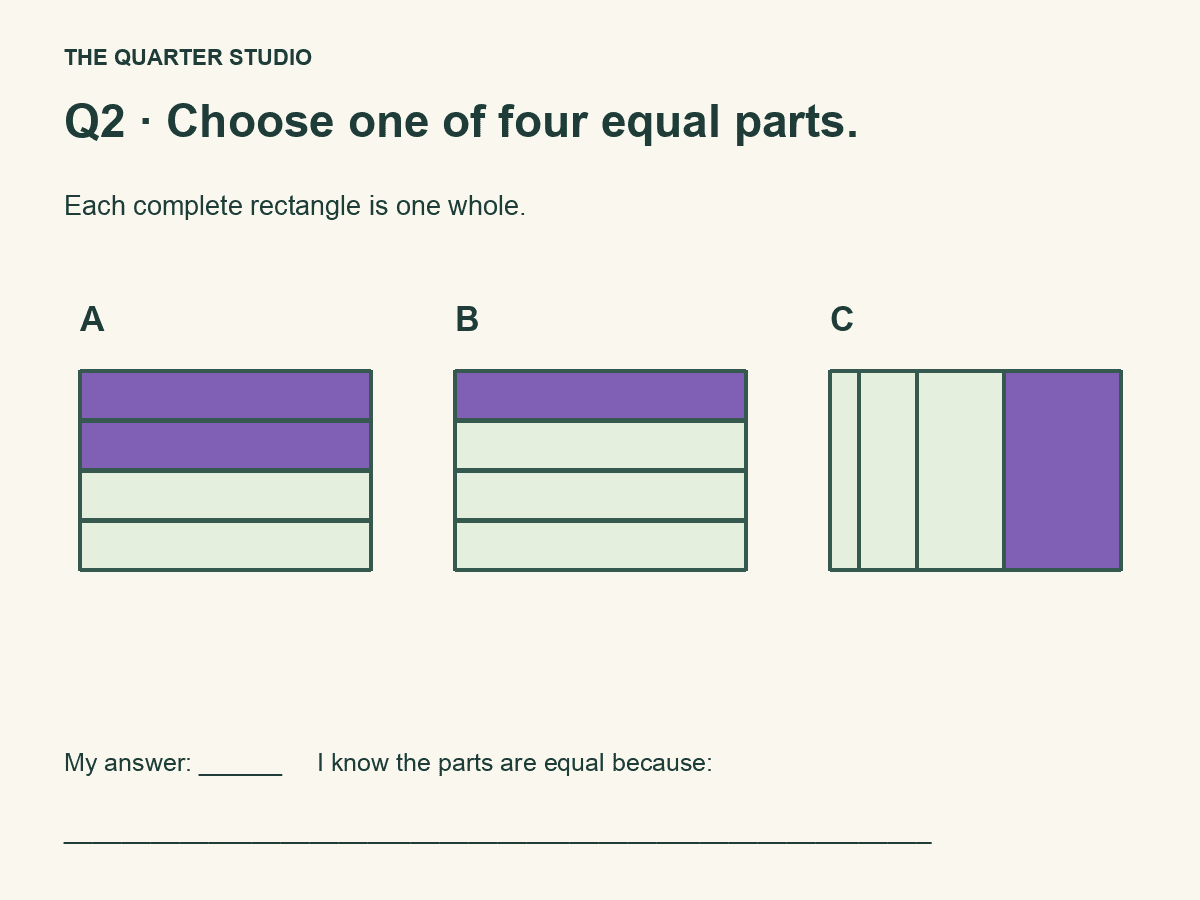
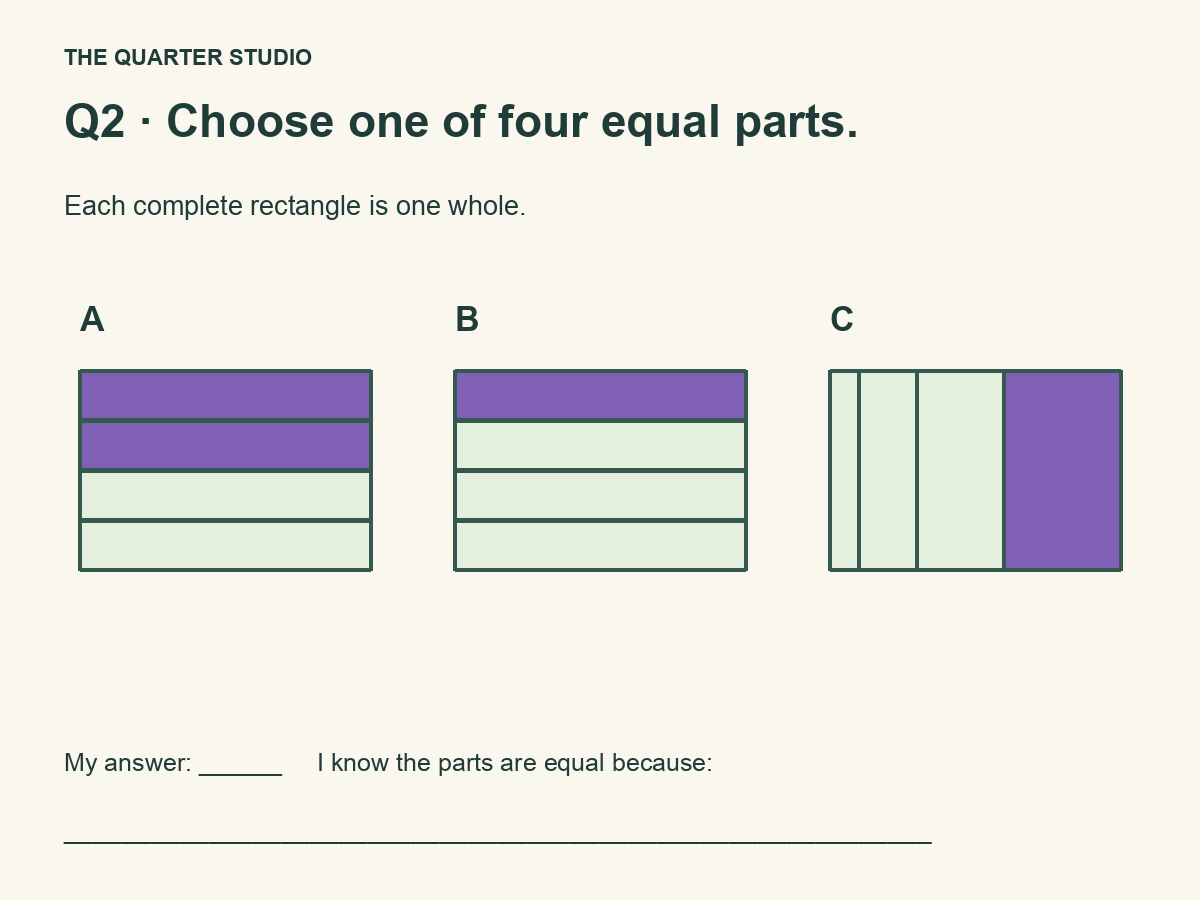
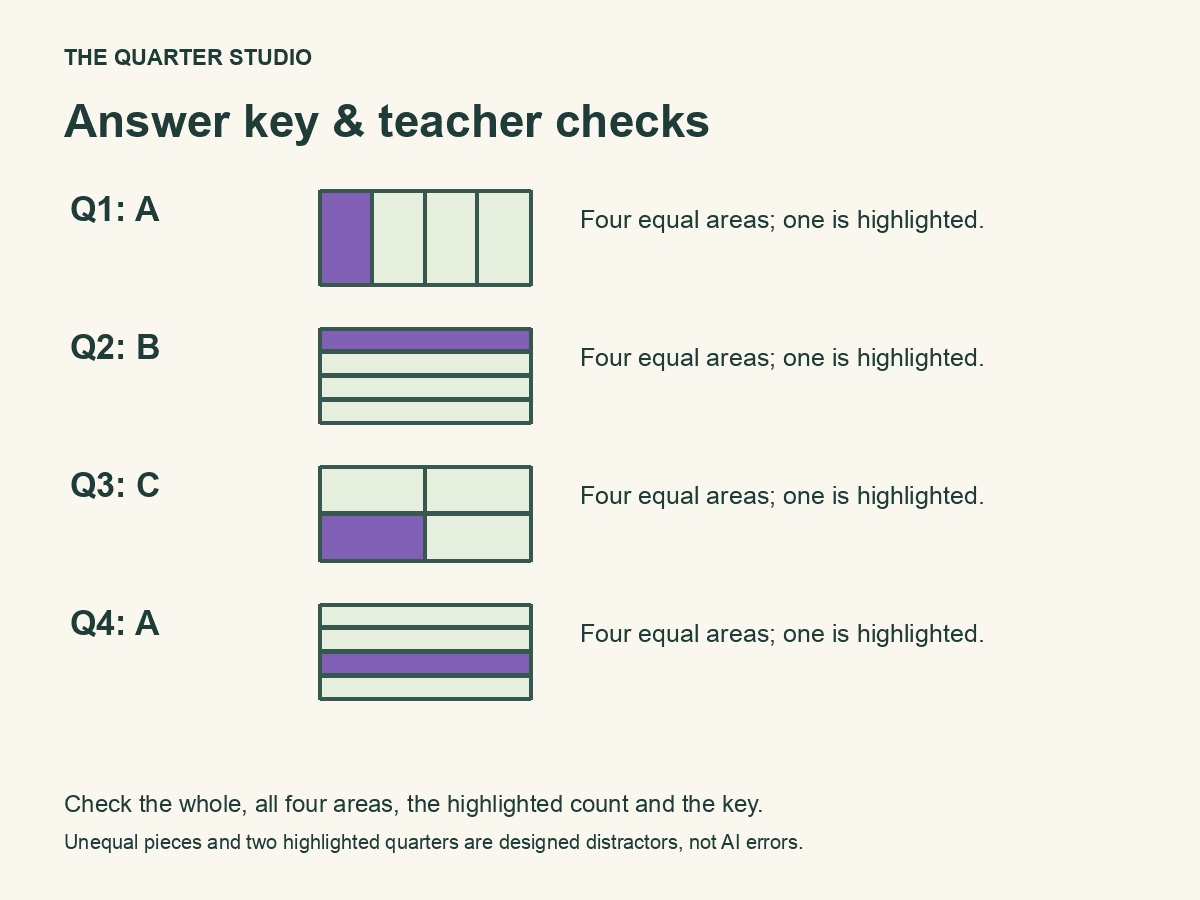
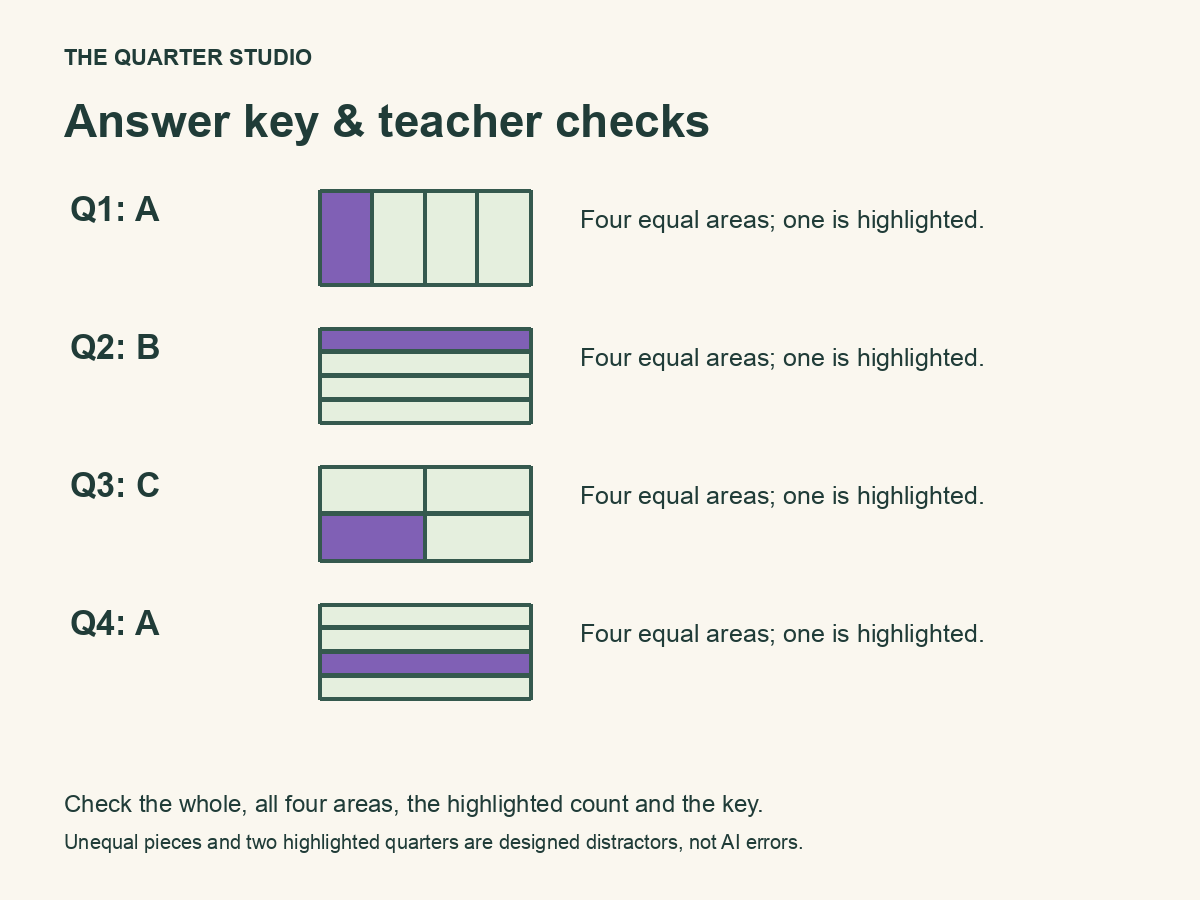
In this AI for education pack, Q1 asks which rectangle shows one quarter; Q2 asks learners to choose one of four equal parts. Q3 repeats the question with squares, and Q4 asks what fraction of the whole is purple. Learners choose an answer and explain why the parts are equal.
- Keep the original learning material with the draft.
- Review AI for education wording for ambiguity and unintended clues.
- Have a subject reviewer approve the answer key.
Prepare language variants for a local reviewer
AI for education can draft a different-language explanation from an approved original. Preserve the intended concept and terminology, then ask a qualified reviewer to check readability and meaning before release.
- Keep names, units and technical terms consistent.
- Inspect AI for education text inside the actual lesson layout.
- Treat future speech playback as a separate capability.
AI for education language handoff
- Source
- Approved explanation and glossary
- Draft
- Target-language text and questions for review
- Check
- Terminology, difficulty and text expansion
- Audio
- Standalone speech APIs are not currently offered
AI for education planning example. No voice, pronunciation or learning-outcome benchmark is implied.
Choose AI for education by the teaching material
Evaluate AI for education against a specific lesson objective. Separate a useful draft from a finished learning resource, and include factual review in the comparison.
| Material | Starting point | Review focus |
|---|---|---|
| AI for education text | GPT-6 Sol or Claude Opus 5.5 | Factual accuracy, level and alignment with the supplied source. |
| AI for education visuals | GPT Image 2 or Nano Banana Pro | Objects, labels, counts and the relationships being taught. |
| AI for education workflow | Your authoring tool with an API connection | Review status, version history and publication permissions. |
Complete one lesson asset before expanding
Start AI for education with a resource a teacher can inspect closely. Keep the review connected to the exact draft and source material.
- 1
Define the lesson need
Give AI for education an objective, an audience and approved source notes. Choose one deliverable, such as an explanation, a worksheet prompt or an illustration.
- 2
Draft and inspect
Generate a small set of AI for education candidates. Compare each with the objective and source, including details inside images rather than only the surrounding text.
- 3
Publish the approved version
Save the accepted AI for education asset in your course system. Retain review notes so later edits can be checked without losing the original teaching requirement.
AI for education questions for content teams
Is SeedRouter an AI for education learning platform?
SeedRouter provides model APIs rather than a learning-management system. You connect AI for education to your own authoring or course application, which manages access, lesson sequencing and publication.
Can AI for education create accurate diagrams?
Image models can produce candidate visuals, but accuracy requires inspection. Review AI for education diagrams for labels, counts and spatial relationships, and use a deterministic drawing tool when an exact construction is required.
Can AI for education write quizzes and answers?
Text models can draft questions from content you supply. Before using AI for education assessment material, have a subject reviewer verify the correct answer, remove ambiguity and confirm that the question tests the intended concept.
Does AI for education include bilingual speech?
Standalone text-to-speech APIs are currently planned, not available here. You can prepare AI for education text and visual workflows now; pronunciation, mixed-language playback and voice reuse need a separate speech integration when that capability exists.
How do I evaluate AI for education costs?
Use current model rates and count revisions as well as the first draft. Assess AI for education spending per approved lesson asset, then include the time a teacher spends checking factual accuracy and adapting the material.
What should stay under the educator’s control?
The learning objective, source material, answer key and final publication belong to the teaching team. AI for education output should not be treated as proof of student understanding or a measured improvement in learning outcomes.
Use the lesson brief and model references
Inspect the complete AI for education activity: a teaching diagram, four practice cards and an answer key. The supplied validator reads the SVG shapes and checks their areas. This verifies the prepared geometry, not learning effectiveness, model accuracy or approval for a particular curriculum.
Start with the next lesson asset
Choose an explanation or illustration your team already needs. Try AI for education with its source material and review criteria, then keep the candidate that helps communicate the lesson clearly.